Participating Frequently
November 25, 2017
Answered

Connect Bridge CC to a hard disk download of CS6

  • November 25, 2017
  • 1 reply
  • 745 views

I recently purchased CS6 from ebay. The disc download does not include Bridge. Since I first learned CS with 3 and then an update to 5, I have always used bridge and find it to be extremely useful. Not having the use of bridge can be crippling from a workflow perspective. I discovered I can download bridge from Adobe CC, but I can't get bridge CC to recognize the CS6 that is currently usable on my computer. Is there a way that they can talk to each other and become useful together the way I was always able to use bridge and CS 3 and 5 together in my earlier installations?
    This topic has been closed for replies.
    Correct answer Barb Binder

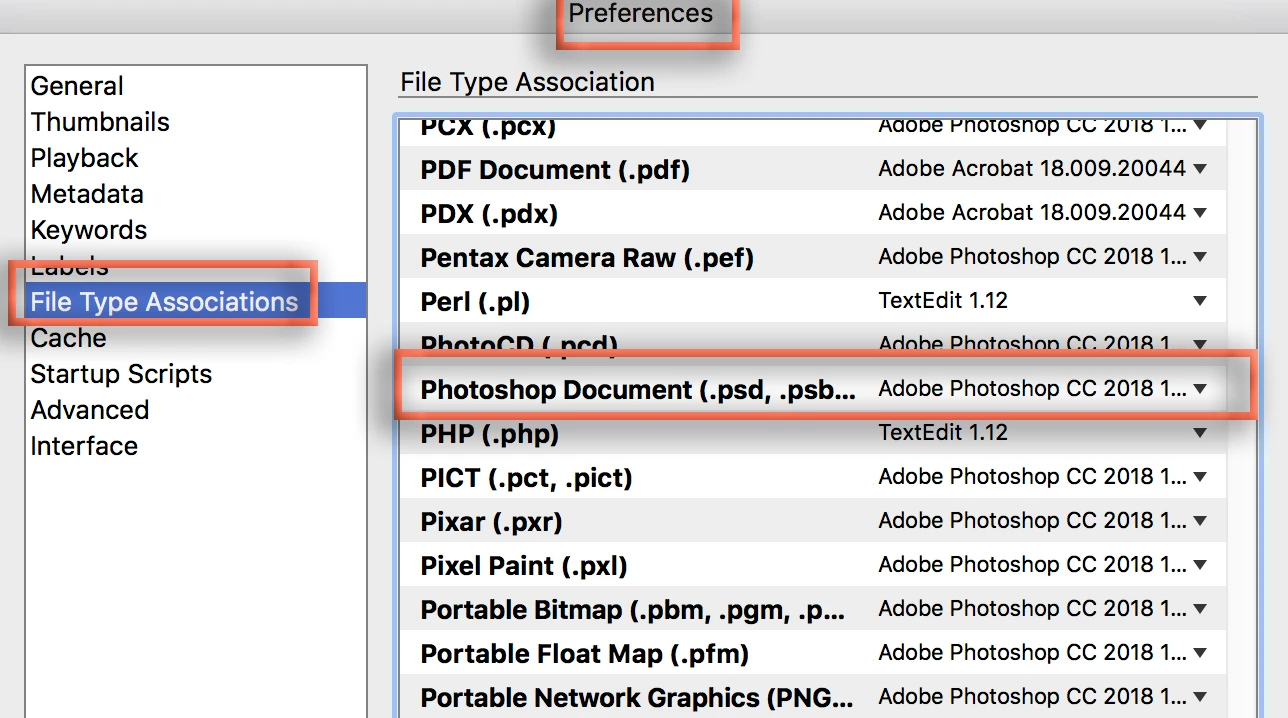
    I'd start by opening Bridge and setting the File Type Associations to your version of Photoshop in Preferences. If that doesn't work, let us know.

    1 reply

    Barb Binder
    Community Expert
    Barb BinderCommunity ExpertCorrect answer
    Community Expert
    November 26, 2017

    I'd start by opening Bridge and setting the File Type Associations to your version of Photoshop in Preferences. If that doesn't work, let us know.

    ~Barb at Rocky Mountain Training
    Participating Frequently
    November 26, 2017

    I found the File Type Associations under preferences, however, it says "none" next to every single file type listed. It brings up a "browse" button if I hover over any of them, and that took me to my computer settings and I was able to insert "Adobe Photoshop CS6" next to "Photoshop Document". I think this may have solved the problem. I can see I have a lot to learn about certain processes (please excuse if I sound ignorant, I am not very computer savvy). Camera Raw does not come up the way I thought it would, but it does come up. I just have to hit the correct buttons.

    Thank you.

    Barb Binder
    Community Expert
    Community Expert
    November 26, 2017

    No apologies necessary—we were all beginners once. It sounds like setting the file association answers your question. If you come up with others that don't pertain to this specific topic, feel free to ask them by starting a new thread.

    ~Barb

    ~Barb at Rocky Mountain Training