Fallen_Nyx
Known Participant
March 17, 2022
Answered

Connecting Adobe Photoshop with Bridge

  • March 17, 2022
  • 1 reply
  • 1152 views

I'm having trouble connecting my adobe photoshop to bridge. I have to choose Tools>Photoshop>Load Files Into Photoshop Layers, but when I do it asks me to update my photoshop and the files don't even open in photoshop as layers....SOS!!!

This topic has been closed for replies.
Correct answer Sameer K

Hi there,


Thanks for reaching out. I’d love to help you figure that out. We are here to help.

Could you please share the version of Adobe Bridge & Photoshop (Help > About Bridge & Help > About Photoshop) and the specific macOS version you are working on? Have you recently updated Adobe Bridge or Photoshop, or the operating system? Has it started to happen after? Have you tried any troubleshooting steps?


Please ensure Photoshop is up to date by following this article: https://helpx.adobe.com/photoshop/kb/uptodate.html


Please ensure Photoshop & Bridge have permissions needed on the Mac by following the steps suggested below:  

  1.  Go to the System Preferences for your Mac, then Security and Privacy, then select the Privacy tab.  
  2. Then select Accessibility from the list to the left. Check if Photoshop & Bridge are added to the list with a checkmark in front of it.  
  3. If Photoshop & Bridge are not a part of the list, please add it by unlocking the window first using the lock at the bottom left, then clicking the + icon & navigating to the Applications folder.  
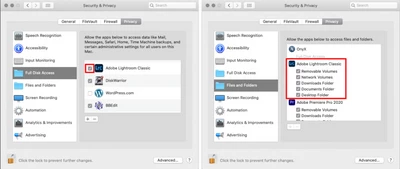
  4. Also, grant permissions to Photoshop & Bridge under Full disk access found in the same list as Accessibility. It should look as shown below for Lightroom Classic. In your case, it has to be identical for Photoshop & Bridge.
  5. Once done, restart the Mac & check if it helps. 

1 reply

Sameer K
Community Manager
Sameer KCommunity ManagerCorrect answer
Community Manager
March 17, 2022

Hi there,


Thanks for reaching out. I’d love to help you figure that out. We are here to help.

Could you please share the version of Adobe Bridge & Photoshop (Help > About Bridge & Help > About Photoshop) and the specific macOS version you are working on? Have you recently updated Adobe Bridge or Photoshop, or the operating system? Has it started to happen after? Have you tried any troubleshooting steps?


Please ensure Photoshop is up to date by following this article: https://helpx.adobe.com/photoshop/kb/uptodate.html


Please ensure Photoshop & Bridge have permissions needed on the Mac by following the steps suggested below:  

  1.  Go to the System Preferences for your Mac, then Security and Privacy, then select the Privacy tab.  
  2. Then select Accessibility from the list to the left. Check if Photoshop & Bridge are added to the list with a checkmark in front of it.  
  3. If Photoshop & Bridge are not a part of the list, please add it by unlocking the window first using the lock at the bottom left, then clicking the + icon & navigating to the Applications folder.  
  4. Also, grant permissions to Photoshop & Bridge under Full disk access found in the same list as Accessibility. It should look as shown below for Lightroom Classic. In your case, it has to be identical for Photoshop & Bridge.
  5. Once done, restart the Mac & check if it helps. 
Fallen_Nyx
Known Participant
April 2, 2022

Thank you for trying to help me, it was only a matter of upgrading the software. Ugh, LOL