
Participant
April 1, 2021
Question

Considering cancelling because its too hard to use - feedback on the tutorials

  • April 1, 2021
  • 4 replies
  • 768 views

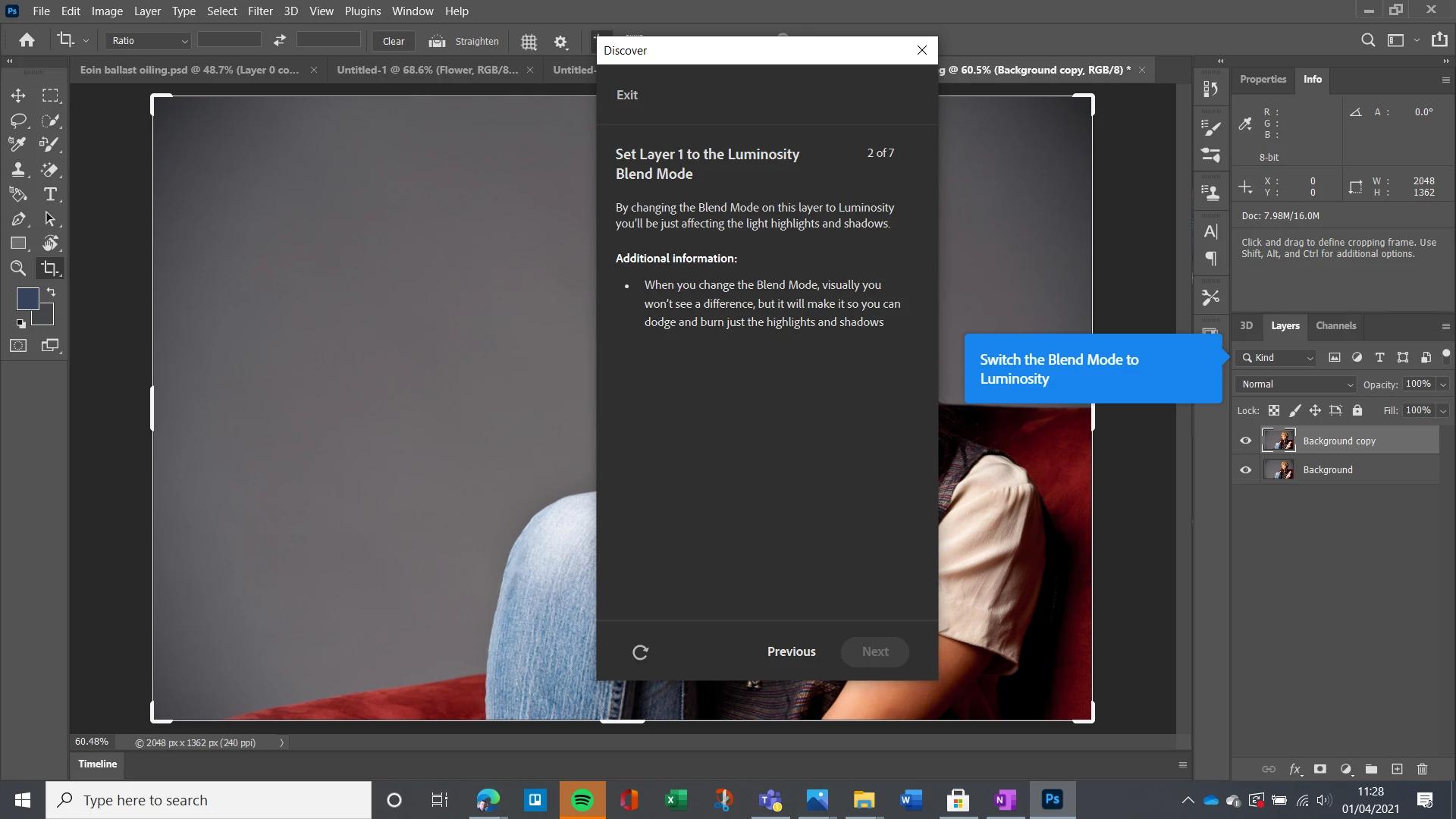
Pointless I'd say trying to get feedback to Adobe directly but they need to know that their tutorials are not helpful for beginners.  I'm trying to figure out how to paint/darken an area and clicked on this tutorial.  (I've done other tutorials and they're equally poor).  As someone needing help, how is the instruction "swith the blend mode to luminousity" helpful?  If I knew how to do that, I would probably know how to darken an area.  (I've worked in IT marketing for more than 20 years and used a multitude of tools, self-taught on all of them but Photoshop has me running round in circles getting nowhere).   There are other tools that are catching up in terms of functionality and are much more user friendly.  Its obviously a great product but if I can't use it and its not intuitive, then I'll just give up. 


This topic has been closed for replies.

4 replies

Derek Cross
Community Expert
Community Expert
April 1, 2021

Welcome to this friendly forum.

As mentioned, Photoshop is a professional tool with a steep learning curve, starting with luminosity blend modes may not be the best starting point.

I suggest you get some training – the Linkedin Learning online video tutorials offer clear step-by-step staged training (and you can get 30-days free access): https://www.linkedin.com/learning/photoshop-2020-essential-training-the-basics?trk=learning-serp_learning_search-card&upsellOrderOrigin=default_guest_learning

And please feel free to return to the forum with specific questions.


(By the way, one way to non-destructively lighten and darken parts of an image is to create a blank layer over the image, fill it with 50% grey, set the blend mode to Overlay and use the Dodge and Burn tools to paint to lighten and darken parts of the image and use opacity to reduce the overall effect. This method is more easily demonstrated with a video!)


Legend
April 1, 2021

You have chosen to work with the top professional tool. Expect to need professional training. It is not designed to be picked up by working with it for a few minutes or days, or learned from a few tutorials. It makes no difference if you are an experienced IT professional either; photo editing is a world of its own.

c.pfaffenbichler
Community Expert
Community Expert
April 1, 2021

It is funny, though, that the arrow of the blue tutorial-field points to the Filter Type-field instead of the Blend Mode-field. So close … 

c.pfaffenbichler
Community Expert
Community Expert
April 1, 2021


This is a user Forum, so you are not really addressing Adobe here, even though some Adobe employees thankfully have been dropping by.

c.pfaffenbichler
Community Expert
Community Expert
April 1, 2021

In the Layers Panel there is a dropdown-menu that in your screenshot contains the word »Normal« – click on that …