
Participant
July 12, 2017
Answered

Content Aware check box does not appear when crop tool selected.

  • July 12, 2017
  • 3 replies
  • 1024 views

Completely new to this forum, hope I'm in the correct place.   Using Photoshop CC Version 14.2.1 x64.  Recent email from you gave details on how to use Content aware when cropping. When I select crop tool the Content Aware check box does not appear in the Options bar. Any ideas please.

A couple of questions.

Am I informed when someone replies.   Can I paste into this box, could not find a way of doing this. How do I track replies. How does the Tag work.

golfertel
    This topic has been closed for replies.
    Correct answer davescm

    Hi and welcome

    Content Aware crop came in with CC2015.5. Is there any reason why you are sticking with CC2014 - we are up to CC2017.1.1 now.

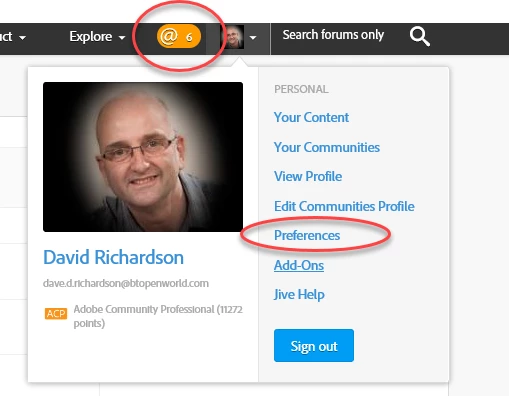
    For the forum - By default any responses will appear at the top of the screen as an orange number - click on it and you will see messages and responses etc

    For emails go to the top right of the page - click the down arrow and choose Preferences. You can set your email settings there

    You can copy and paste straight into the forum box.

    Dave

    3 replies

    Nancy OShea
    Community Expert
    Community Expert
    July 13, 2017

    If you're a Creative Cloud subscriber, you can install multiple versions of the products from your Creative Cloud Desktop App by hitting the Advanced Button & deselect remove previous versions.   In addition, you can install Previous Versions -- see screenshot.  I find it's useful to have more than one version on my system for special situations.   The latest version is CC 2017.

    Nancy O'Shea— Product User & Community Expert
    Participant
    July 14, 2017

    Hi Copy of mail sent to Dave, many thanks for your help.

    I do not know if I should reply by email or go to the forum site. However thanks for your reply. I must admit I thought as a CC subscriber my apps would automatically be updated to the latest version, obviously that was incorrect. Have now updated to the latest 2017 version and "Content Aware" works fine. Many thanks for your help, a good introduction to the forum.

    Terry

    Terry

    Nancy OShea
    Community Expert
    Community Expert
    July 14, 2017

    The email copies you receive are generated by the web forum.   You can turn them off in your PERSONAL  Preferences.   When replying to forum posts, I always use the web site.   Email replies are dicey. 

    Nancy

    Nancy O'Shea— Product User & Community Expert
    davescm
    Community Expert
    Community Expert
    July 12, 2017

    This may also help you

    Getting Started on the Adobe Forums

    Dave

    davescm
    Community Expert
    davescmCommunity ExpertCorrect answer
    Community Expert
    July 12, 2017

    Hi and welcome

    Content Aware crop came in with CC2015.5. Is there any reason why you are sticking with CC2014 - we are up to CC2017.1.1 now.

    For the forum - By default any responses will appear at the top of the screen as an orange number - click on it and you will see messages and responses etc

    For emails go to the top right of the page - click the down arrow and choose Preferences. You can set your email settings there

    You can copy and paste straight into the forum box.

    Dave

    Participant
    July 14, 2017

    Dave I do not know if I should reply by email or go to the forum site. However thanks for your reply. I must admit I thought as a CC subscriber my apps would automatically be updated to the latest version, obviously that was incorrect. Have now updated to the latest 2017 version and "Content Aware" works fine. Many thanks for your help, a good introduction to the forum.

    Terry