

Ignat Miller
Inspiring
June 21, 2017
Answered

Content-Aware feature in Crop Tool - Major problem!

  • June 21, 2017
  • 4 replies
  • 1396 views

I noticed really irrational and undesirable behaviour of Content-Aware feature of Crop Tool.

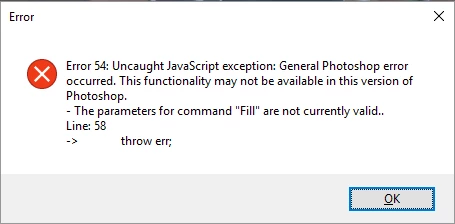
Let's say, I crop an image using Crop Tool and cropped part becomes hidden (because Delete Cropped Pixels is turned off). Then I crop it again so those hidden pixels get back in the visible frame. While in the process of cropping everything looks fine, but when I apply the crop with Content-Aware turned on it will not only fill transparent parts (which obviously need to be filled), but also replace those original image data that is desired to stay intact. I tried to Lock image pixels in Layers panel, and got error 54.

1 (original image)
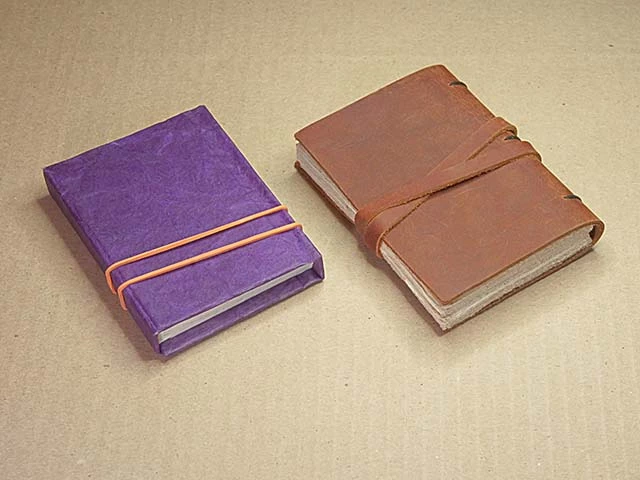
2 (Crop Tool - in the process)
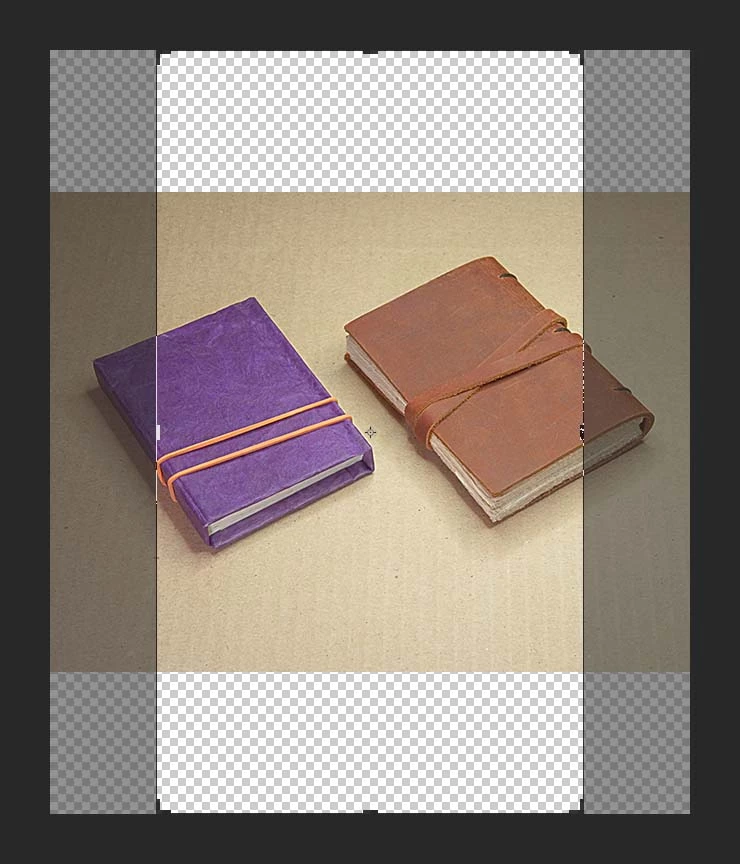
3 (applied Crop Tool with Content-Aware fill)

4 (second time: Crop Tool - in the process #1)
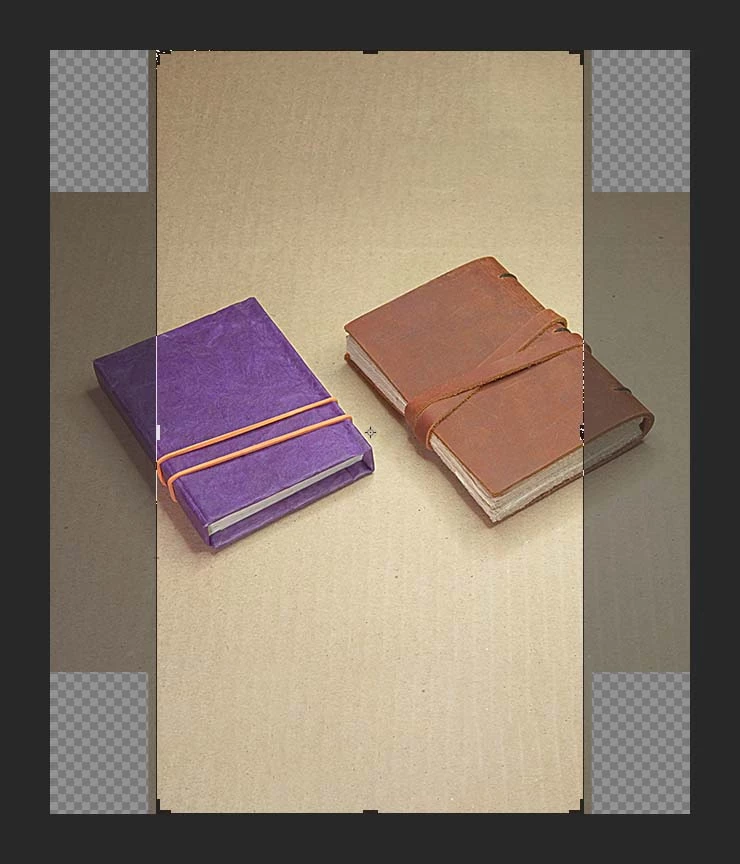
5 (second time: Crop Tool - in the process #2)
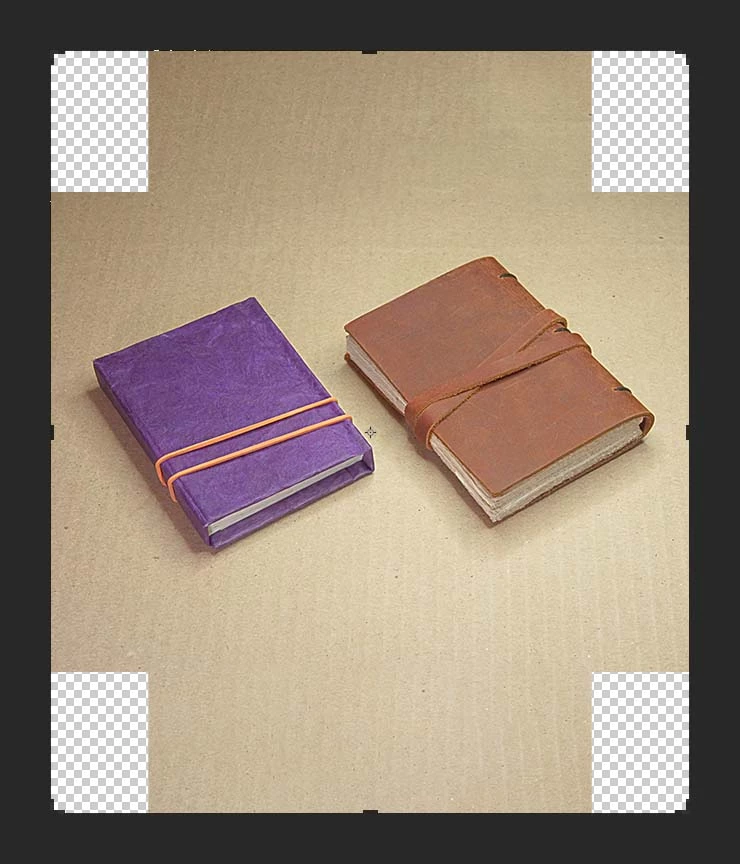
6 (second time: applied Crop Tool with Content-Aware fill)
7 Error message popping up after apply of Crop Tool with Content-Aware fill and Lock image pixels turned on
I really hope that this thing is just a flaw and is not meant to be like that.

This topic has been closed for replies.
Correct answer Ignat Miller

Fastest work around I found:

If you have used Crop Tool with Delete Cropped Pixels turned off and now want to do another crop that reveals those hidden pixels back and also fills transparent areas with Content-Aware fill, do the following:

1) Use Crop Tool as desired, but before applying the crop make sure to uncheck Content-Aware feature.

2) Apply the crop.

3) Select transparent pixels. Go to Select > Load Selection > check Invert and hit OK (alternatively you can Ctrl+Click the layer in Layers panel and then hit Ctrl+Shift+I).

4) Fill selection with Content-Aware fill. Go to Edit > Fill... (or just hit Shift+F5) and in Contents: drop-down menu select Content-Aware, hit OK

It would definitely save some time for users if Crop Tool would fill only missing pixels instead of filling all including already existing.

4 replies

Ignat Miller
Ignat MillerAuthorCorrect answer
Inspiring
June 22, 2017

Fastest work around I found:

If you have used Crop Tool with Delete Cropped Pixels turned off and now want to do another crop that reveals those hidden pixels back and also fills transparent areas with Content-Aware fill, do the following:

1) Use Crop Tool as desired, but before applying the crop make sure to uncheck Content-Aware feature.

2) Apply the crop.

3) Select transparent pixels. Go to Select > Load Selection > check Invert and hit OK (alternatively you can Ctrl+Click the layer in Layers panel and then hit Ctrl+Shift+I).

4) Fill selection with Content-Aware fill. Go to Edit > Fill... (or just hit Shift+F5) and in Contents: drop-down menu select Content-Aware, hit OK

It would definitely save some time for users if Crop Tool would fill only missing pixels instead of filling all including already existing.

davescm
Community Expert
Community Expert
June 22, 2017

The same workaround as in post 9 then...

Dave

Ignat Miller
Inspiring
June 22, 2017

davescm , thank you for your participation. With no doubt you was the first. And with no doubt your workaround is very obvious thing for mature Photoshop users, so I don't pretend to be the first with the solution, I just made a more detailed step-by-step instructions in case some less experienced users will find this thread trying to deal with the issue.

davescm
Community Expert
Community Expert
June 22, 2017

Content aware crop often works well (surprisingly well in some images)  but, as with most complex image processing algorithms, it occasionally throws out an unexpected glitch.

In this case the solution is simple - take a step back in history and expand the crop again without content aware checked . Then select the corner squares and use content aware fill (Shift F5)

A glitch - yes - but easily worked around.

Dave

Ignat Miller
Inspiring
June 22, 2017

c.pfaffenbichler

Looks like you just do posts, instead of helping people.

c.pfaffenbichler
Community Expert
Community Expert
June 22, 2017

You might change your opinion when you have been active on this Forum a while.

c.pfaffenbichler
Community Expert
Community Expert
June 22, 2017

Though I may be doing the Photoshop team a disservice by lumping Content-Aware features together; Content-Aware Scale and Content-Aware Fill might actually involve two very different techniques. (Edit: Both of them impressive in their own ways.)

c.pfaffenbichler
Community Expert
Community Expert
June 22, 2017

Well, I think many of the Content-Aware features are targeted at amateurs and are pretty much useless for professionals, despite the fact that I do consider them impressive programming and image analysis feats.

In any case I can reproduce the issue.

But I think your process is way off of what the feature is intended to achieve.

Just do the Cropping in one go without first cropping so as to hide original image content before revealing it again. 

Ignat Miller
Inspiring
June 22, 2017

Thank you for your reply, but I completely disagree.

Your point of view for me sounds like "computers are for amateurs, real professionals do everything with their own hands". Automatization is the process that helps both amateurs and professionals. In first place Content-Aware feature is here to save valuable time and all professionals are very dependent on time-saving features as basically they change their time for someone's money to get their bread with butter. There are tons of cases where content-aware feature works just fine, or needs just a slight manual post-retouching!

Sorry for my next offensive words, but I think that it's not Content-Aware feature that is "pretty much useless", but your reply and advice to "do the Cropping in one go".

c.pfaffenbichler
Community Expert
Community Expert
June 22, 2017
I think that it's not Content-Aware feature that is "pretty much useless", but your reply and advice to "do the Cropping in one go".

Why exactly do you first have to crop to hide original content and then reveal it again?

In a test going to roughly the final image dimensions in one go with Content-Aware seemed to work fine.

Your point of view for me sounds like "computers are for amateurs, real professionals do everything with their own hands".

It seems you misunderstood my statement, it is not about computers but about a specific set of features within Photoshop at the current time.

I think they are as of yet not sufficiently non-desctructive and the supposed convenience they provide can be offset by image degradation.