Participant
December 9, 2014
Answered

Convert Jpg images into patterns (.pat)

  • December 9, 2014
  • 4 replies
  • 69868 views

Is it possible to Batch convert Jpg images into .pat files? I am familiar with the define pattern function but what I really need is to convert many jpg's.

Thanks

    This topic has been closed for replies.
    Correct answer Nancy OShea

    @Real Abhi 

    No, not the entire image. It’s too big.  

    Patterns are small selections from a larger image. 
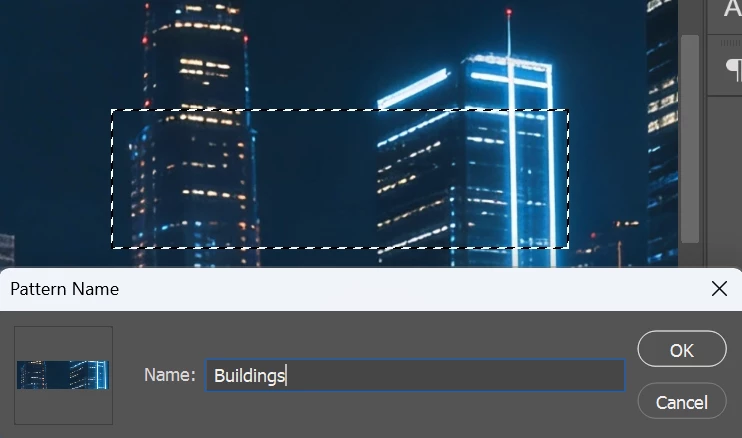
    1. Make a small selection with the Marquee tool.
    2. Edit ⇒ Define Pattern.
    3. Give pattern a name and hit OK.
    1. Open Patterns panel from your Window Menu to find your newly created pattern swatch.

    Drag pattern onto your canvas and adjust to suit.

     

    Hope that helps.


    4 replies

    Real Abhi
    Participant
    March 12, 2026
    Is it possible to convert this Jpg images into .pat files? 


    Nancy OShea
    Community Expert
    Nancy OSheaCommunity ExpertCorrect answer
    Community Expert
    March 13, 2026

    @Real Abhi 

    No, not the entire image. It’s too big.  

    Patterns are small selections from a larger image. 

    1. Make a small selection with the Marquee tool.
    2. Edit ⇒ Define Pattern.
    3. Give pattern a name and hit OK.
    1. Open Patterns panel from your Window Menu to find your newly created pattern swatch.

    Drag pattern onto your canvas and adjust to suit.


    Hope that helps.


    Nancy O'Shea— Product User & Community Expert
    Real Abhi
    Participant
    March 13, 2026

    Hey Thanks

    Participant
    December 16, 2024
    Ativo_1.jpg
    Participant
    July 10, 2024
    wood_floor_diff_4k.jpg
    JJMack
    Community Expert
    Community Expert
    December 9, 2014

    Use edit Define pattern on the image to define a Photoshop pattern. Then use the preset manager to save the pattern as a *.pat file.....

    To batch this you may need to use a Photoshop Script to name the patterns a action define pattern step would have a hard code pattern name. Changing that step to a script could retrieve the document name and set the pattern name the same as the jpeg name.  You could define many patterns that way then use the preset manager select all the defined patterns and save a single *.pat file with that set of patterns.

    JJMack
    Participant
    April 22, 2023

    Thank you, this has been a lifesaver!

    c.pfaffenbichler
    Community Expert
    Community Expert
    April 22, 2023

    JJMack is no longer with us but it is good to see his posts can still help people. 

    https://community.adobe.com/t5/photoshop-ecosystem-discussions/r-i-p-jjmack/m-p/12701028#M617668