
BigBlue22
Participant
June 19, 2017
Answered

Coordinate Data Lost after Editing

  • June 19, 2017
  • 2 replies
  • 922 views

I am using an orthomosaic tiff file that has been stitched together from pictures taken by a drone. Each photo that has been taken has the GPS coordinate information, and this is kept even once the stitching process has been completed. This coordinate information is then used to place the orthomosaic in the correct location in a mapping program, ArcGIS. The stitching software leaves a large amount of excess around the orthomosaic that it produces, and this is problematic for working in ArcGIS. It is easy enough to photoshop out, but whenever I do the coordinate data is somehow lost and the ortho can no longer be placed in ArcGIS in the correct location. Is there some reason the coordinate data is being lost?
    This topic has been closed for replies.
    Correct answer JJMack

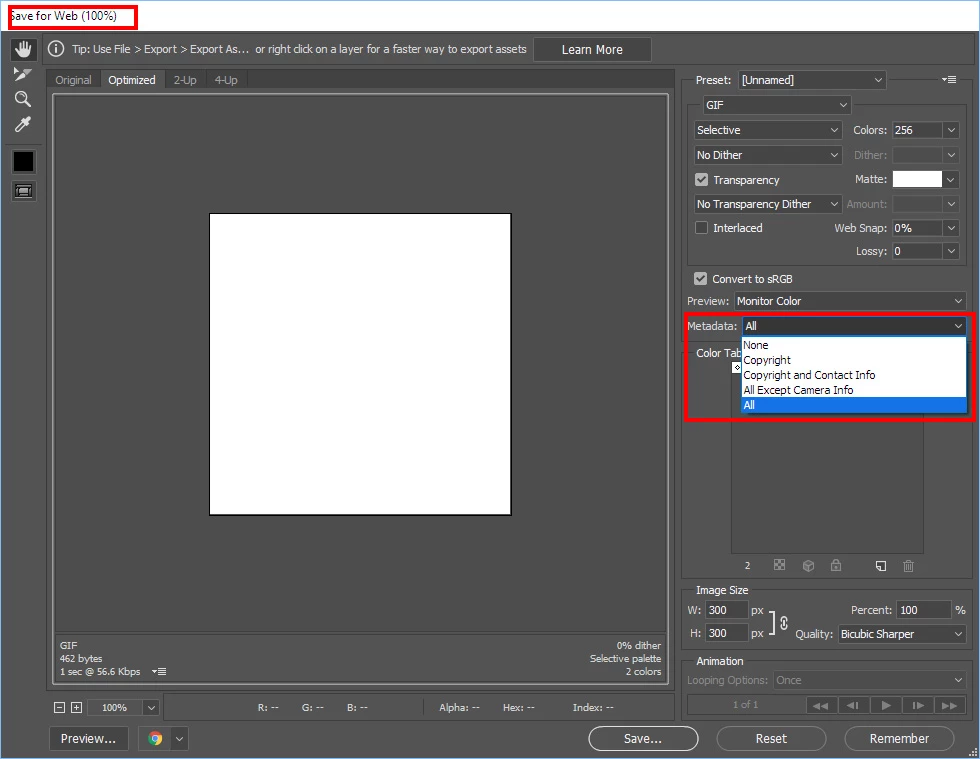
    I would expect that the GPS location would be the location of the Drone the camera not the image's location.  I could be wrong.   If the image is a stitched panorama where in the image would you think the GPS location data be for?  I have no idea of what software you are suing the is stripping your GPS metadata.  If you are using Photoshop Save For Web that will strip metadata by default.  However you can have Save for web save metadata. Or use Save AS.

    2 replies

    akajackweb
    Participant
    September 24, 2019

    If it is an ortho mosaic it is most likly a geotiff. I use listgeo & geotifcp to extract then reinsert the geotiff metadata. PhotoShop strips the geotiff header information (tags).
    https://download.osgeo.org/geotiff/libgeotiff/listgeo-geotifcp-win32-x86-112502.zip
    listgeo inputfile > metadata
    geotifcp -g metadata input output

    JJMack
    Community Expert
    JJMackCommunity ExpertCorrect answer
    Community Expert
    June 19, 2017

    I would expect that the GPS location would be the location of the Drone the camera not the image's location.  I could be wrong.   If the image is a stitched panorama where in the image would you think the GPS location data be for?  I have no idea of what software you are suing the is stripping your GPS metadata.  If you are using Photoshop Save For Web that will strip metadata by default.  However you can have Save for web save metadata. Or use Save AS.

    JJMack