
Copy ACR Masking
Here explained my workflow:
For instance, I have several photos in RAW format (Canon CR3) taken in same scene. I open the first photo in Photoshop. The Camera RAW 16.4 wakes up. I do some general overall adjustments. Then, I do AI masking to locate the persons on the photo for specific adjustments, and finally apply the supplied Presets of Adaptive : Sky (Blue Drama) to tune the clouds. I notice that an ACR and an XMP file are created to save these masking positions and adjustments.
I do not want to repeat these steps to the rest photos. So, I copy the ACR and XMP files and renamed them to match with the rest photos.
When open the next photo, I once saw on the Camera RAW panel that I need to do AI update. After the AI update, I was able to see the photo was correctly masked and the adjustments correctly applied.
However, when I repeat the same steps to next photos, Camera RAW does not prompt me for AI update. These photos are masked accordingly to the pixel positions of the persons, and the sky line, of the original photo. I find it nowhere on the menu or panel or context menu to call for masking update.
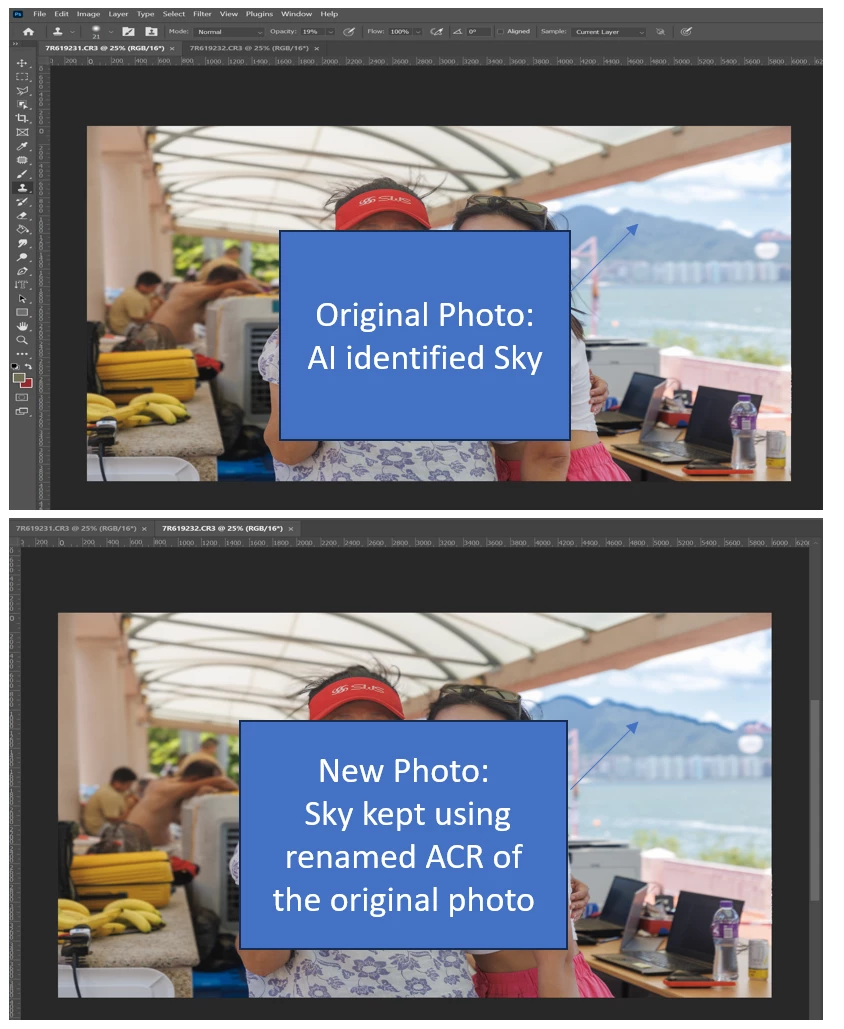
So, I would like to know the proper procedures for me to apply AI masking and Camera RAW setting across a series of photos in Photoshop. I do not want to repeat all the settings on every photos I open in a series.
(I know Lightroom Classic allow copying and pasting masks across photos with AI re-analsyzing changed positions, but LRC has other limitations, e.g. do not allow rotating the frame beyond boundary with content awareness fill.)
 AdChoices