georgep2812592
Participant
October 6, 2018
Answered

Copy Spot Healing tool to multiple images.

  • October 6, 2018
  • 1 reply
  • 2855 views

Hi all,

Long story short my camera had a sensor error last night so there now a thin bright white line appearing across all images (ive added a before / after photo so you can see). Luckily the Spot Healing tool in Photoshop removes this without jeopardising or cloning the image which is great. However... I have a shoot tonight that required me to take well over 400 photos, is there anyway I can copy this action across all images? The white line is in the same areas across all images.

I'm a bit of a photoshop novice and ive tested on Lightroom.. it does no way near the same job.

BEFORE SPOT HEALING...

AFTER SPOT HEALING:

This topic has been closed for replies.
Correct answer Stephen Marsh

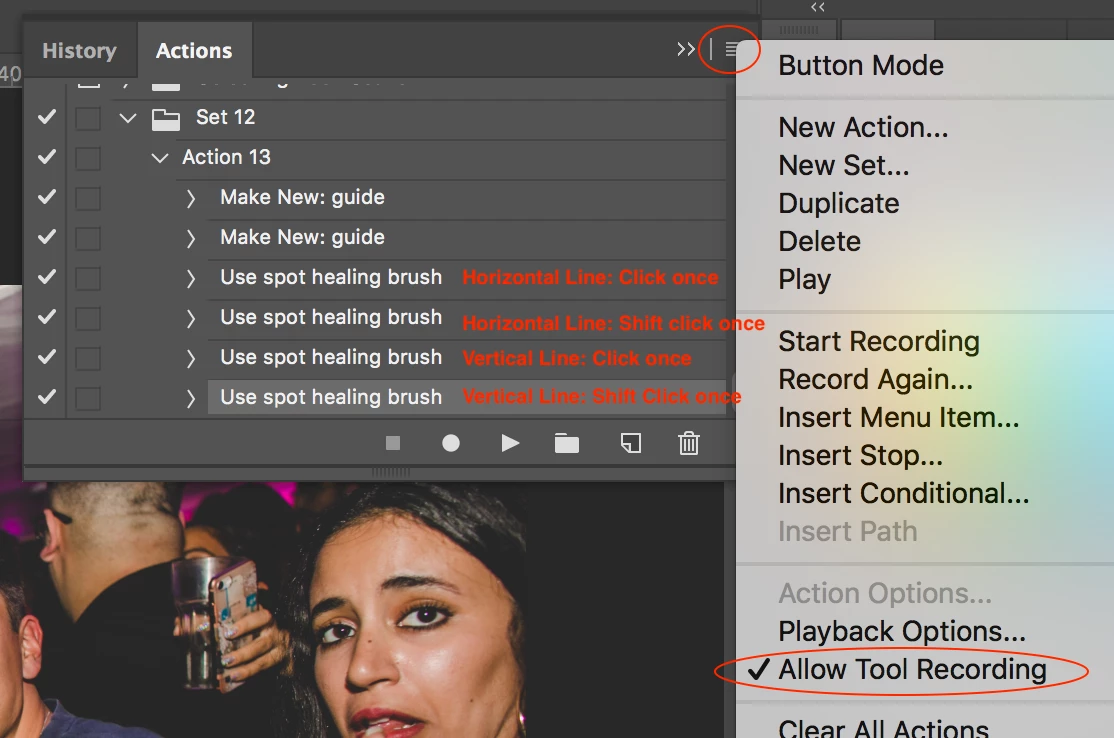
Yes, it is possible to record the spot healing brush, this is what I tested on your photo:

I used guides on the centre of each of the horizontal and vertical sensor error lines. I then used caps lock on the spot healing tool to make it easier to position on the guides. The first click sets the start position (i.e. left hand side). Then go to the end position and then a second shift click (i.e. right hand side).

I tested this using batch processing.

There are other approaches, you could create a selection channel action or file, load the selection and use content aware fill via a batch process.

1 reply

Stephen Marsh
Community Expert
Stephen MarshCommunity ExpertCorrect answer
Community Expert
October 7, 2018

Yes, it is possible to record the spot healing brush, this is what I tested on your photo:

I used guides on the centre of each of the horizontal and vertical sensor error lines. I then used caps lock on the spot healing tool to make it easier to position on the guides. The first click sets the start position (i.e. left hand side). Then go to the end position and then a second shift click (i.e. right hand side).

I tested this using batch processing.

There are other approaches, you could create a selection channel action or file, load the selection and use content aware fill via a batch process.