
Inspiring
October 28, 2017
Resuelto

"Could not save Preferences" in Photoshop CC 2018

  • October 28, 2017
  • 5 respuestas
  • 2702 visualizaciones

Working on a Mac (10.12.6) and using Photoshop CC 2018.

When I close Photoshop after hours of editing I get this pop-up:
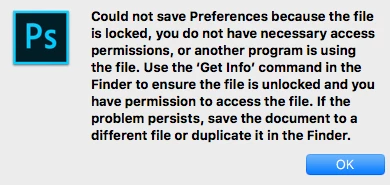
I have no idea what file this is referring to, but I have full and complete read and write access to all photos and folders so am confused.

I would like to get rid of this but not sure how to identify where the problem is.

Suggestions? Thanks in advance.
    Este tema ha sido cerrado para respuestas.
    Mejor respuesta de D Fosse

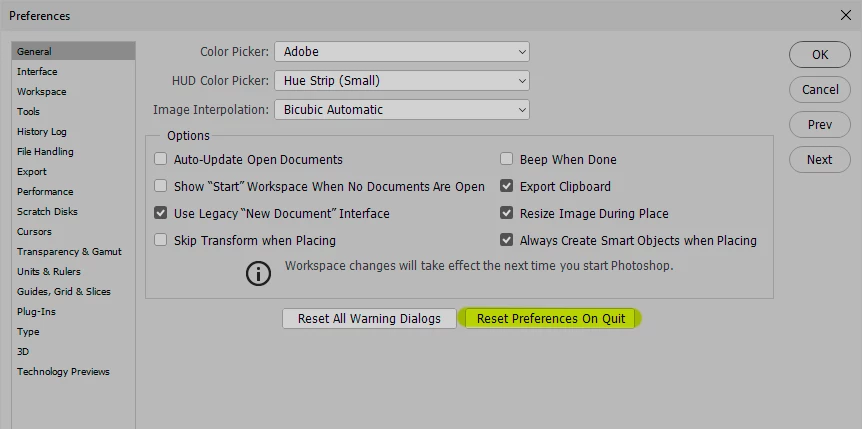
    Try to reset preferences. This will delete the file, so that it can get freshly rebuilt on next launch.

    This is a Windows screenshot, but it should look the same on Mac:

    5 respuestas

    JJMack
    Community Expert
    Community Expert
    November 15, 2017

    I use Windows you need to read up on your Mac OSX and its File system permissions it not a Photoshop thing

    JJMack
    sadieerinphoto
    Participant
    November 14, 2017

    This is the fun message I'm getting. I've gone through every preference folder I can find and it's still being a jerk.

    Using PSCC 18 on Mac High Sierra.

    JJMack
    Community Expert
    Community Expert
    November 15, 2017

    The message states your User ID does not have file system access to wirte to its Photoshop User ID preferences folder.  You  need to fix  your Mac User ID Files systems permissions to allow your user ID to write to that folder.

    JJMack
    riskypotato
    Known Participant
    November 15, 2017

    Goes without saying. Can you provide some instructions please? No problem with permissions until CC2018.

    riskypotato
    Known Participant
    November 9, 2017

    Having the same problem. All permissions are open. Tried everything said here: Reset prefs on Quit; trashed the prefs file from my user folder. Still getting this same damn message. Same OS as the original poster - 10.12.6.

    D Fosse
    Community Expert
    Community Expert
    October 28, 2017

    This refers to the Preferences file, Adobe Photoshop Prefs.psp. This file is rewritten on every exit, preserving your settings to the next launch.

    The prefs file lives under your user account (not program files), so this is where you need to check your permissions.

    Inspiring
    October 28, 2017

    Thank you. I checked that and permissions are as they should be. I am hoping to figure out how to locate the file that seems to be creating the issue and go from there... but so far no luck.

    Catherine

    Apologies for any typos.

    D Fosse
    Community Expert
    D FosseCommunity ExpertRespuesta
    Community Expert
    October 28, 2017

    Try to reset preferences. This will delete the file, so that it can get freshly rebuilt on next launch.

    This is a Windows screenshot, but it should look the same on Mac:

    JJMack
    Community Expert
    Community Expert
    October 28, 2017

    Read up on your Mac OSX and its file system and file security and permissions

    JJMack
    Inspiring
    October 28, 2017

    This is the first and only time this has ever happened and I have been using PS on Macs for many years. Is there a way to identify this one file that seems to be creating the problem?

    Catherine

    Apologies for any typos.