
Inspiring
February 21, 2020
Answered

Could we have panning the canvas in not-fullscreen mode?

  • February 21, 2020
  • 1 reply
  • 1219 views

Currently, we can only pan the canvas in fullscreen modes if the canvas fits the display completely. But this is not always desirable when using Cintiq.


First of all, fullscreen mode has some problems. Fullscreen on Windows suppresses notifications. Also, Fullscreen doesn't always show up correctly while streaming.


That leaves me with non-fullscreen, but I can't pan the canvas in non-fullscreen mode if it fits the display completely. In those cases the canvas gets centered on the screen and locked there. This is problematic when using Cintiq, because I can't position the canvas so that it's in the ideal position for my drawing hand.


Thank you.
This topic has been closed for replies.
Correct answer Jeff Arola

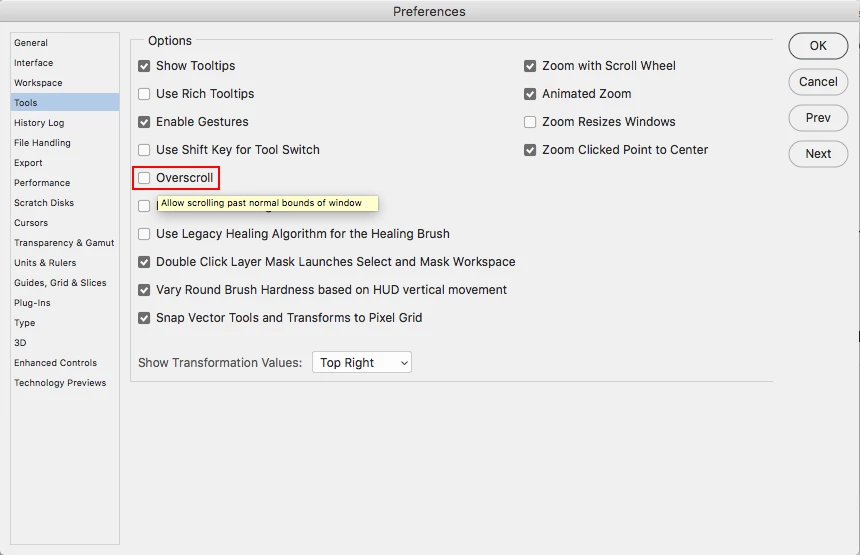
In photoshop go to Edit>Preferences>Tools and check Overscroll.


Then you should be able to move your image in Normal screen mode, even though it's fitted to the screen.


1 reply

Jeff Arola
Community Expert
Jeff ArolaCommunity ExpertCorrect answer
Community Expert
February 21, 2020

In photoshop go to Edit>Preferences>Tools and check Overscroll.


Then you should be able to move your image in Normal screen mode, even though it's fitted to the screen.


IanuariusAuthor
Inspiring
February 21, 2020

Excellent, that is just what I wanted. 15 years of Photoshop and still learning new things. Thank you Jeff_Arola!