LuffytaroOfficial
Known Participant
April 2, 2021
Answered

CR2 to JPG Enlargement Without Losing Quality

  • April 2, 2021
  • 2 replies
  • 2798 views

I've been examining methods to make a CR2 file I have into a large JPG file. The CR2 file dimensions that I can see are approximately 5k x 3k pixels, but I would like it to be saved as a JPG file that is much larger like 10k pixels x 10k pixels because I want to use it for large format printing. I don't want to increase the resolution either. Is there any way I can achieve this? 

This topic has been closed for replies.
Correct answer D Fosse

Just to be clear:


You don't need more pixels just because it's printed large! That's a very common misunderstanding.


Any good quality file from a current camera will work for anything, whether magazine spread or roadside billboard.


5000 x 3000 pixels is not a huge file, but it should still be more than enough for most practical purposes. It's vastly more important that the image is of good technical quality - sharply in focus, no motion blur or camera shake, and optimally sharpened for the intended use.


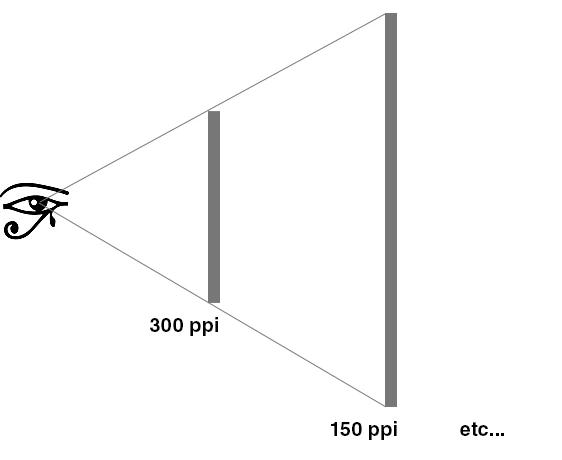
The bigger the print, the farther away it will be seen from. The eye wants to take in the whole image, so you step back. You can't help it. So the effective, optical resolution stays the same:


Don't upsample jpegs. Ever. The compression artifacts look horrible when upsampled, no matter the method.


Yes, super resolution is probably the best of any available method, in the rare cases where it's justified. But it's not magic. It doesn't improve anything, it just cuts the losses to a minimum.

2 replies

D Fosse
Community Expert
D FosseCommunity ExpertCorrect answer
Community Expert
April 2, 2021

Just to be clear:


You don't need more pixels just because it's printed large! That's a very common misunderstanding.


Any good quality file from a current camera will work for anything, whether magazine spread or roadside billboard.


5000 x 3000 pixels is not a huge file, but it should still be more than enough for most practical purposes. It's vastly more important that the image is of good technical quality - sharply in focus, no motion blur or camera shake, and optimally sharpened for the intended use.


The bigger the print, the farther away it will be seen from. The eye wants to take in the whole image, so you step back. You can't help it. So the effective, optical resolution stays the same:


Don't upsample jpegs. Ever. The compression artifacts look horrible when upsampled, no matter the method.


Yes, super resolution is probably the best of any available method, in the rare cases where it's justified. But it's not magic. It doesn't improve anything, it just cuts the losses to a minimum.

LuffytaroOfficial
Known Participant
April 9, 2021

Yeah I understand that, and I wouldn't ever try to upscale jpegs. I haven't dealt much with Raw files before so I didn't know if there was something extra I could get from Raw images such as a larger size or resolution or something, without using the super resolution feature. But since the CR2 image I am dealing with seems to be pretty high quality already I guess there should be much issue putting it on a large print. Thanks for your insightful comment! 

Trevor.Dennis
Community Expert
Community Expert
April 2, 2021

There is a very new feature built into Photoshop called Enhance.  Open the RAW file in Camera Raw, and right click and choose Enhance.  When the Dialog window opens, chose Super Resolution.  This doubles the pixel size and is probably the best tool of this kind available in any app.


You can use it with JPGs as well, but you have to open them in ACR.

LuffytaroOfficial
Known Participant
April 9, 2021

Thanks for telling about that feature, it's pretty cool and it really does do a good job at enlarging my image.