
Participant
July 31, 2017
Answered

Create new menu has changed, any way to revert it back?

  • July 31, 2017
  • 1 reply
  • 455 views

Hey, so originally when i clicked on "Create New" it brought up a menu that looked like new-document-photoshop-cc-2017.jpg THIS

But now when I do it the menu looks like This
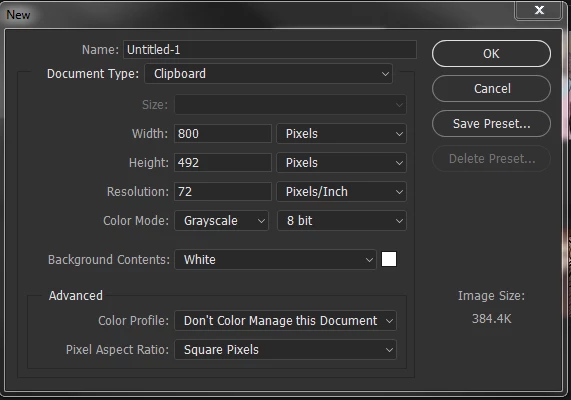
It also makes the sizing VERY weird!!! When I set it to my normal 6"x6" its way too small and I have to use a very very small brush when drawing, but with the menu i had before 6"x6" was fine. Its super super supppeerrr annoying, its been this way about an hour and I dont know how to fix it so I can go back to my easy menu I had before. any help?

This topic has been closed for replies.
Correct answer davescm

Your second screenshot is the legacy New Document interface.

To go back to the first, go to Preferences > General and uncheck "Use Legacy "New Document" Interface"

Dave

1 reply

davescm
Community Expert
davescmCommunity ExpertCorrect answer
Community Expert
July 31, 2017

Your second screenshot is the legacy New Document interface.

To go back to the first, go to Preferences > General and uncheck "Use Legacy "New Document" Interface"

Dave

Participant
July 31, 2017

Thank you!!!!! this worked out!!!! You're amazing!!!!

davescm
Community Expert
Community Expert
July 31, 2017

You're welcome

Dave