timetoplay_50945476
Participating Frequently
February 12, 2018
Answered

create this effect ( whites lines )

  • February 12, 2018
  • 2 replies
  • 309 views

Hello i'm searching to recreate this kind of effect we can see all around the picture ( the whites lines )

anyone have advices ?

thanks


This topic has been closed for replies.
Correct answer davescm

I can think of a couple of ways;

1. Just draw the individual shapes with the pen tool and fill with a gradient

or

2. Use the polygon shape tool.

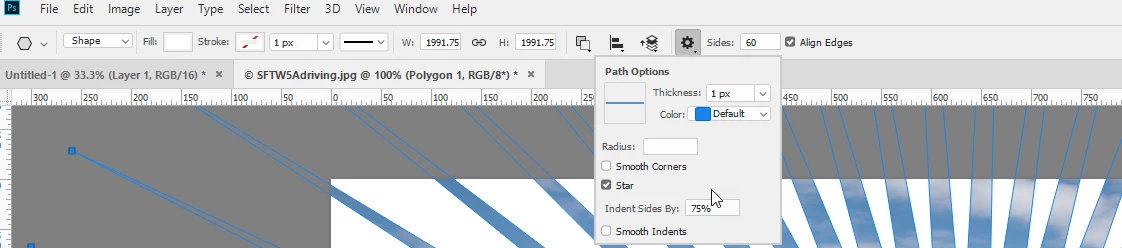
Here I've set it to star in the options bar with 60 sides and an indent of 75%
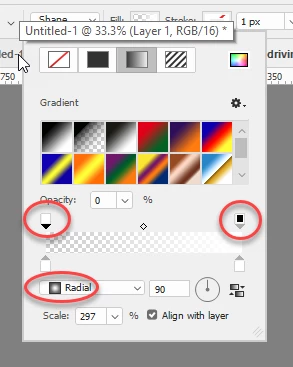
I also set subtract front shape to invert it and set the fill to a gradient varying the opacity
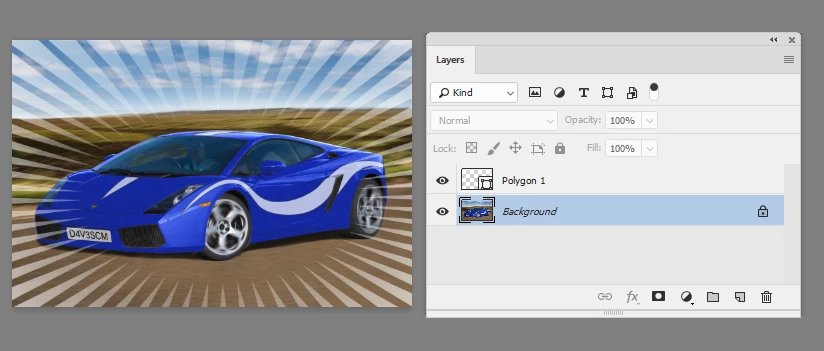
Finally I used transform path to make the shape oval rather than round
Dave

2 replies

Trevor.Dennis
Community Expert
Community Expert
February 12, 2018

Polar Coordinates would do it.  Make a square document bigger than your work document

Make a single spike on a new layer

Copy it a bunch of times, and use the Move > Align tools in the Options bar to spread across the page.

Merge those layers into one

Filter > Distort > Polar Coordinates (rectangular to polar) Note that the spikes become fatter after this process, so start with nice thin spikes

davescm
Community Expert
davescmCommunity ExpertCorrect answer
Community Expert
February 12, 2018

I can think of a couple of ways;

1. Just draw the individual shapes with the pen tool and fill with a gradient

or

2. Use the polygon shape tool.

Here I've set it to star in the options bar with 60 sides and an indent of 75%

I also set subtract front shape to invert it and set the fill to a gradient varying the opacity

Finally I used transform path to make the shape oval rather than round

Dave