
Question
Creating an A4 Canvas in Photoshop
- Within in the Photoshop application locate and select, Create new. This will be to the left of the screen
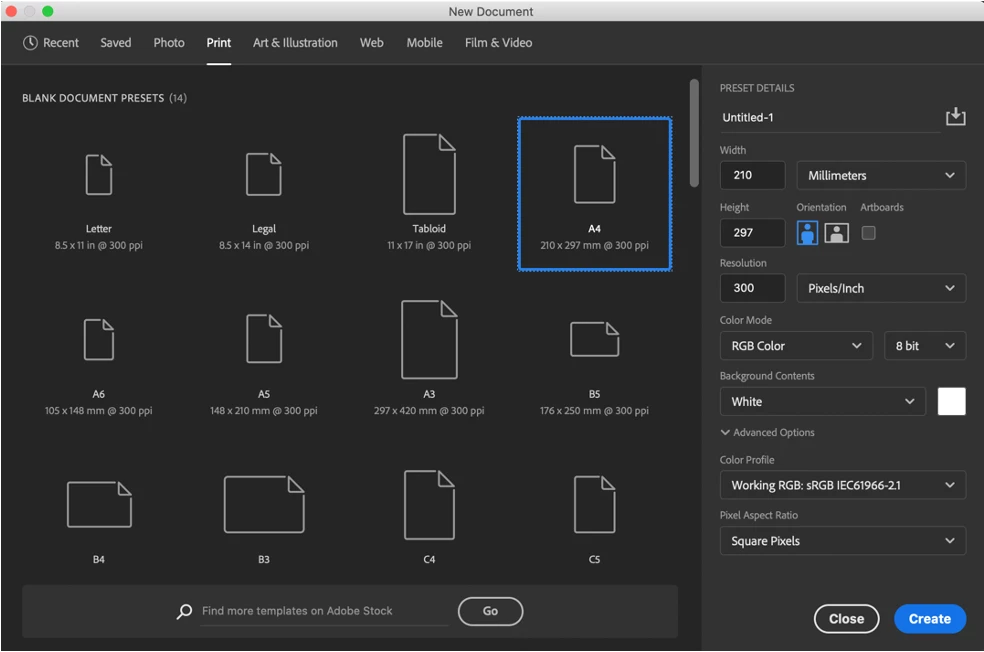
- A new dialog box will appear called, New Document. This is where you are able to create a new document. You can customise your own document or choose from a rang of pre-sets
- Inside this dialog box locate and select, Print. You will now see a range of document pre-sets created for Print. The pre-sets are labelled by their size for example, A3, A4 and A5.
- Locate and select the A4 pre-set Click the pre-set once. If you have double-clicked the pre-set, a new document window will open. You can adjust the settings in the new document window.
- Re-name the pre-set
- Select an orientation
- Select a background colour
- Select Create when finished
 AdChoices