Participant
December 2, 2019
Answered

Creating an adjustment layer

  • December 2, 2019
  • 2 replies
  • 1873 views

Creating an adjustment layer, then selecting an adjustment (i.e. Vibrance) does not bring up the command screen to actually execute the command (Photoshop 2000). Same lack of result for any of the adjustments.

This topic has been closed for replies.
Correct answer melissapiccone

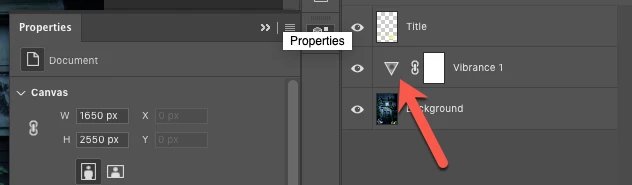
double click on the icon - if you don't have an icon, double click whatever is there instead - and are you really using a 20 old version of PS? Pretty sure we didn't have adjustment layers back then...
 

2 replies

melissapiccone
Community Expert
Community Expert
December 2, 2019

If you don't see the properties panel, click on the adjustment layer icon in the layers panel - it will pop it open.

Melissa Piccone | Adobe Trainer | Online Courses Author | Fine Artist
JV0001Author
Participant
December 2, 2019

Hi Melissa,

I see no "adjustment layer icon" in the layers panel.

melissapiccone
Community Expert
melissapicconeCommunity ExpertCorrect answer
Community Expert
December 2, 2019

double click on the icon - if you don't have an icon, double click whatever is there instead - and are you really using a 20 old version of PS? Pretty sure we didn't have adjustment layers back then...


Melissa Piccone | Adobe Trainer | Online Courses Author | Fine Artist
jane-e
Community Expert
Community Expert
December 2, 2019

Hi


When you create an Adjustment layer, the Properties panel should open — possibly it is out of sight. Try looking for it in the Window menu or reset your current workspace to see that works.


Jane

JV0001Author
Participant
December 2, 2019

Hi Jane,

Thanks for your speedy response.

It all works fine if I have “Properties” and “Adjustments” windows open before I create a new Adjustments layer from the bottom of the Layers panel (next to “Layer Style” and “Layer Mask”).

It used to be, before PS 2000, that selecting an adjustment after creating a new Adjustments layer in this manner opened the Properties panel automatically (without having that panel opened on the desktop ahead of this sequence).

If I am not missing something, I vote for the previous method; much easier and takes up less “permanent” desktop space; in the earlier version, the Properties and Adjustments windows disappeared after the command was completed.

jane-e
Community Expert
Community Expert
December 2, 2019

It’s working for me in Photoshop 2020 and appears to be working for Melissa. Can you switch to your Essential Workspace, then Reset it, and try again? If it doesn’t work you may have to Reset Preferences after backing up Actions, etc.


To make Melissa and me happy, can you check your version number? The first CS came out in 2003 and the one before that was PS7. There never was a PS 2000, I don’t think.

Win: Help menu > About

Mac: Application menu > About


~ Jane