
Known Participant
July 6, 2017
Answered

Creating crop marks and fold lines in PS

  • July 6, 2017
  • 2 replies
  • 2244 views

OK OK so I know this isn't standard practice BUT I don't understand why photoshop can't do it.

I have a wedding album that I have designed in 14x10in format. After I've finished I increase the canvas size by 20mm (yes i just flipped from in to mm)  and created guides, new layer, marqueed the appropriate selection in the corners and edit>stroke @ 1pt to make crop marks on the centre of those guides. It looks ok and accurate.

My album finisher has requested that I also have fold lines in the middle of the double page spread so that they can score accurately and not guess where I have made the centre line and balanced photos on either side.

When I create a centre guide and then using the single row marquee at 1pt the line is always slightly on the left. I have over come this by using the marquee box and selecting half of the image with a stroke of 1.5pt. My question is, is there a way to get this on the middle of that guide? Even at a weight of 2pt
    This topic has been closed for replies.
    Correct answer Nancy OShea

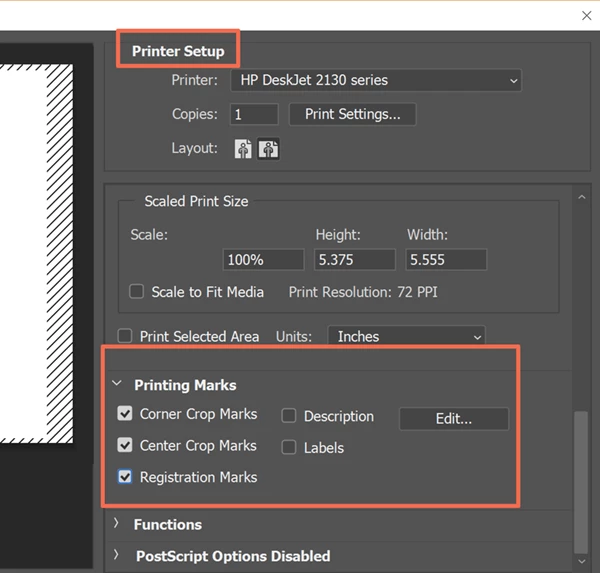
    You will find Crop Marks in the Printer Setup.   File > Print....  See screenshot.

    2 replies

    davescm
    Community Expert
    Community Expert
    July 6, 2017

    Hi

    try this

    a. Draw your vertical line.

    b. Zoom in and adjust the point size in the options bar so you have an even number of pixels (Photoshop really draws in pixels and if you want it centered it needs to be able to put the same number on each side). Or even quicker - just specify the line width in pixels.

    c. Then click in the options bar on Align - Horizontal Centers   - with Align to canvas clicked

    Dave

    Nancy OShea
    Community Expert
    Nancy OSheaCommunity ExpertCorrect answer
    Community Expert
    July 6, 2017

    You will find Crop Marks in the Printer Setup.   File > Print....  See screenshot.

    Nancy O'Shea— Product User & Community Expert