surfotw10
Participant
September 19, 2012
Answered

Creating numbered/bulletted text in Photoshop.

  • September 19, 2012
  • 2 replies
  • 79151 views

Hello I was wondering if it is posible to create numbered/bulleted text in photoshop, with indentation as it is done in MS Word.

I tried the paragraph palette but I cannot do indentation per single line:

I wanted to do something like this:

Just something like the text that appears to the left of the image of that house. The image displayed shows the various components of a water distribution system for a single home which collects rain water and deposits it in a storage tank. The only text that I have written in photoshop is the title and the web address.

This is for some course notes but I wanted to replace the original scanned text (which is in dark blue) for some photoshop text in black colour. But I want the text with the same indent format. Can this be done in Photoshop?

Could anyone please help?

Thank you for reading my inquiry.
This topic has been closed for replies.
Correct answer kendallplant

Photoshop can't automatically generate a numbered list. As stalion_two mentioned, you're probably better off using a word processor.

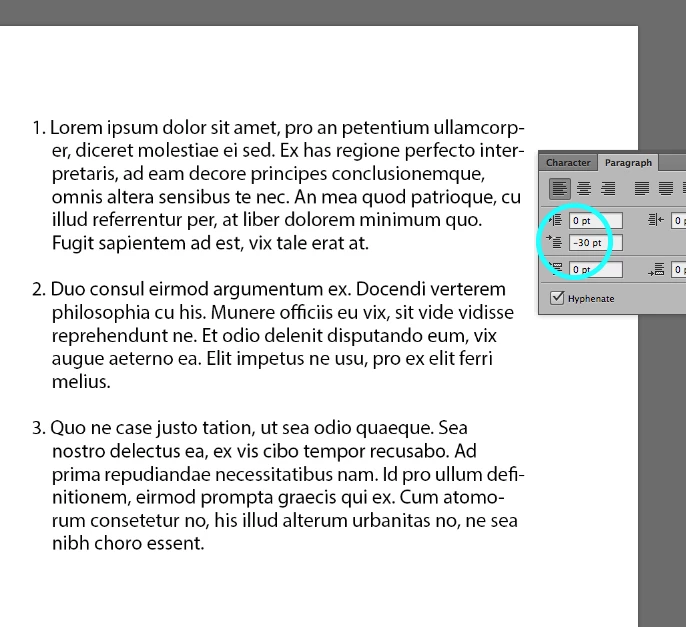
Try entering a negative value for the first line indentation as shown below. You may have to adjust this number according to which font size/type/weight you're using. You can see that it replicated the indentation in the screenshot you provided.

2 replies

kendallplant
Adobe Employee
Adobe Employee
September 19, 2012

I'm not sure if this is the kind of effect you're looking for, but you could try this indentation trick: http://www.ianhoar.com/2008/04/12/photoshop-tip-3-bullets-in-photoshop/

station_two
Inspiring
September 19, 2012

Of course you can use a pair of pliers to drive a nail, but it's the wrong tool for the job.

Photoshop is not a page layout application nor a word processor.  In this case Photoshop is the wrong tool for the job. 

surfotw10
surfotw10Author
Participant
September 19, 2012

Oops  the image did not upload properly.

Here is my message again:

I was wondering if it is posible to create numbered/bulleted text in photoshop, with indentation as it is done in MS Word.

I tried the paragraph palette but I cannot do indentation per single line:

I wanted to do something like this:

Just something like the text that appears to the left of the image of that house. The image displayed shows the various components of a water distribution system for a single home which collects rain water and deposits it in a storage tank. The only text that I have written in photoshop is the title and the web address.

This is for some course notes but I wanted to replace the original scanned text (which is in dark blue) for some photoshop text in black colour. But I want the text with the same indent format. Can this be done in Photoshop?

Could anyone please help?

Thank you for reading my inquiry.

kendallplant
Adobe Employee
kendallplantCorrect answer
Adobe Employee
September 19, 2012

Photoshop can't automatically generate a numbered list. As stalion_two mentioned, you're probably better off using a word processor.

Try entering a negative value for the first line indentation as shown below. You may have to adjust this number according to which font size/type/weight you're using. You can see that it replicated the indentation in the screenshot you provided.