Participant
March 3, 2022
Answered

Crop goes automatically to an active selection

  • March 3, 2022
  • 1 reply
  • 1353 views

Why does the crop tool automatically go to my selection if I have one on. I have never ever wanted that "suggested crop" and find it to be very conterproductive and add unecessary steps. I was able to turn it off if I have a path selected so far but not yet for an active selection. I kind of get upset having to spend so much time turning  off all types of conter productive "default" new options each time I  replace a computers.
This topic has been closed for replies.
Correct answer Sameer K

Hi there,

Thanks for reaching out. We are sorry for the trouble with Crop in Photoshop. We are here to help.

Crop selection has been the way for the Crop tool to function for some time. These steps can disable it:

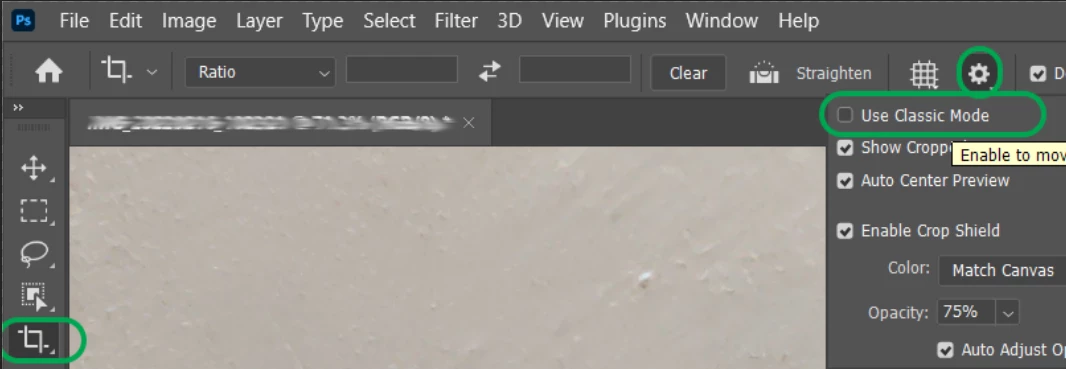
  • Select the Crop tool (C), and on the tool menu, click on the 'Settings' or gear icon
  • Enable 'Use Classic Mode' as shown below

This will disable the Crop to selection behavior of the Crop tool.


We hope this helps,

Regards,

Sameer K


1 reply

Sameer K
Community Manager
Sameer KCommunity ManagerCorrect answer
Community Manager
March 3, 2022

Hi there,

Thanks for reaching out. We are sorry for the trouble with Crop in Photoshop. We are here to help.

Crop selection has been the way for the Crop tool to function for some time. These steps can disable it:

  • Select the Crop tool (C), and on the tool menu, click on the 'Settings' or gear icon
  • Enable 'Use Classic Mode' as shown below

This will disable the Crop to selection behavior of the Crop tool.


We hope this helps,

Regards,

Sameer K


Participant
March 3, 2022

Yep, that did it. Thanks!