Known Participant
March 20, 2019
Question

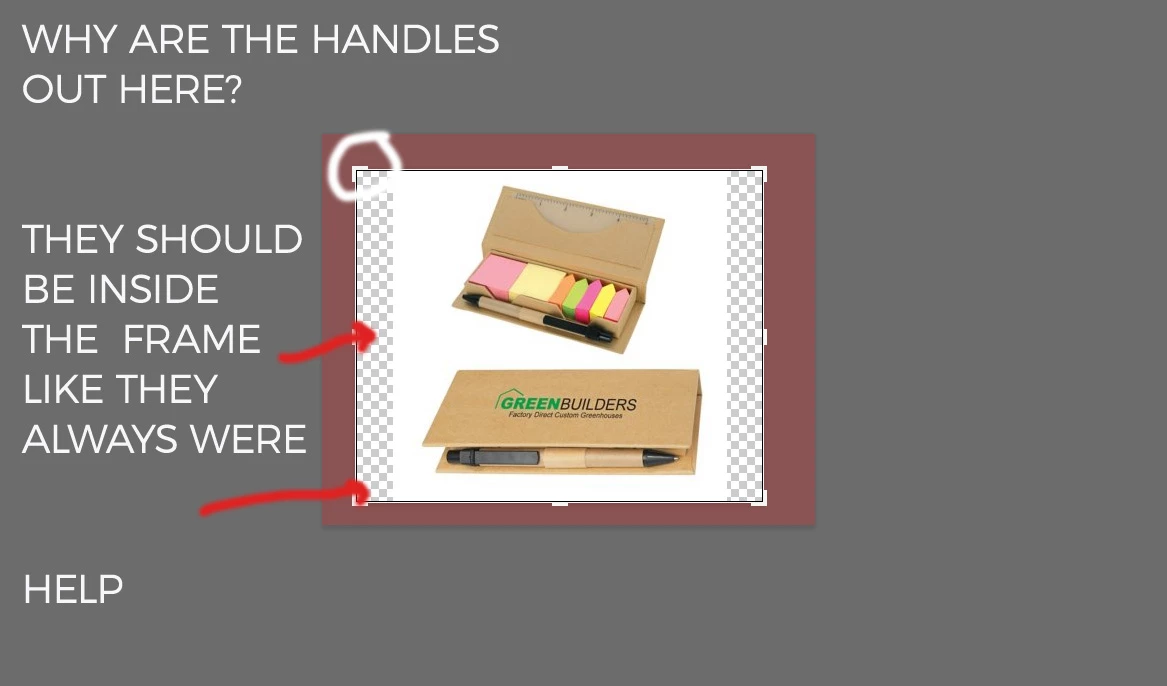
crop handles on outside of crop area....i want them on the inside....like they always were

  • March 20, 2019
  • 4 replies
  • 1885 views

google searched this, no answers....thought it would be an easy preference fix

i want my crop handles on the INSIDE of the frame...not the outside. see attached.

i recently had to RESET all my tools and this was one of the myriad of problems that happened. mental note....NEVER reset tools....ever.

thanks for any help.
This topic has been closed for replies.

4 replies

Kevin Stohlmeyer
Community Expert
Community Expert
March 21, 2019

Try taking a screen shot of your view menu with the Crop tool active.

Extras should be checked.

Known Participant
March 21, 2019

here's some more screen shots....i tried all of the 'overlay' options [always, auto, never] and no change....and i did click OUT of the crop and back into it just to be very certain

Kevin Stohlmeyer
Community Expert
Community Expert
March 21, 2019

Take another screenshot where you move the crop inward towards the image on the white area.

The tool appears correct from this but the crop seems like its outside the image.

Nancy OShea
Community Expert
Community Expert
March 20, 2019

t looks to me like your crop handles have been dragged beyond your image size.

What is your Crop preset?

Nancy O'Shea— Product User & Community Expert
Known Participant
March 20, 2019

is this what you're asking about?

Known Participant
March 20, 2019

i have tried the Classic mode, too. it was worse. made the handles disappear altogether.

Kevin Stohlmeyer
Community Expert
Community Expert
March 20, 2019

Kevin Stohlmeyer
Community Expert
Community Expert
March 20, 2019

Have you tried dragging out your crop tool to see if it appears?

Known Participant
March 20, 2019

not sure what that means.....thanks anyway....i KNEW resetting my tools was a huge mistake but i did it anyway.....UGH   

Kevin Stohlmeyer
Community Expert
Community Expert
March 20, 2019

Click the Gear Icon in your options bar to turn on "Use Classic Mode".

Known Participant
March 20, 2019

thanks so much.

sadly, that did not work for me. i did try it earlier and it did nothing  ....except turn off any indication whatsoever that my Crop is currently active. see attached. this is what i see in Classic mode.