
Known Participant
July 27, 2019
Question

Crop tool gone crazy

  • July 27, 2019
  • 2 replies
  • 810 views

Someone used my computer and changed crop tool to Ratio

Now the crop tool puts constraints on images though I hit Clear.

I moved it on Original Ratio but still seems as though there are constraints

I want to adjust the crop myself but can't remember what it was. Is that Original Ratio which means no constraints?

  Also, I crop the picture and it makes me want to use PSD all the time and can't get it to remember Jpg which I always use.

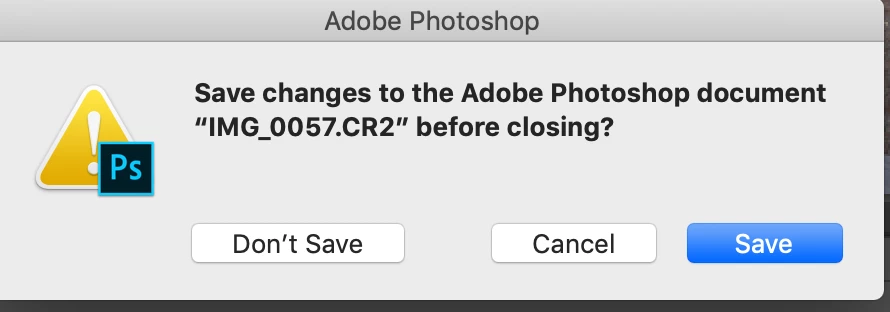
I then close the picture out and it ask if I want to save it which I just did. Before this all happened it just closed when I wanted it to.

Screen shot shows what it asks when I want to close picture after saving

So I want to have no constraints. Can you please help me.

Thank you, Penni
This topic has been closed for replies.

2 replies

c.pfaffenbichler
Community Expert
Community Expert
July 29, 2019
I crop the picture and it makes me want to use PSD all the time and can't get it to remember Jpg which I always use.

If there is the slightest chance that the image may have to be edited in the future you may want to consider not using a lossy compression.

When you save an image in a format that does not support at least on of the image’s properties (be that bit depth, layers, channels, …) »As a Copy« will become checked in the Save-dialog.

If you want to avoid that you could create an Action that includes necessary steps (flatten, 8bit, …) to make sure the file can be saved as jpg itself and not just »As a Copy«.

And if Bojan Živković’s advice should not have resolved the issue could you please post a screenshot with the pertinent Panels (Layers, Channels, Options Bar, …) visible?

Bojan Živković11378569
Community Expert
Community Expert
July 27, 2019

If you clear settings in the Options bar you should be able to drag handles without constrained proportions either with Ratio or W x H x Resolution.

When using the Crop tool do you have Delete Cropped Pixels in the Options bar checked? If not Photoshop will convert Background layer to normal when cropping and that will force it to offer PSD as saving option because you have layer-s instead of Background layer only.