janetm62681729
Known Participant
January 30, 2022
Question

crop tool problem

  • January 30, 2022
  • 3 replies
  • 947 views

mac os big sur 11.6.1

23.1.1 PS


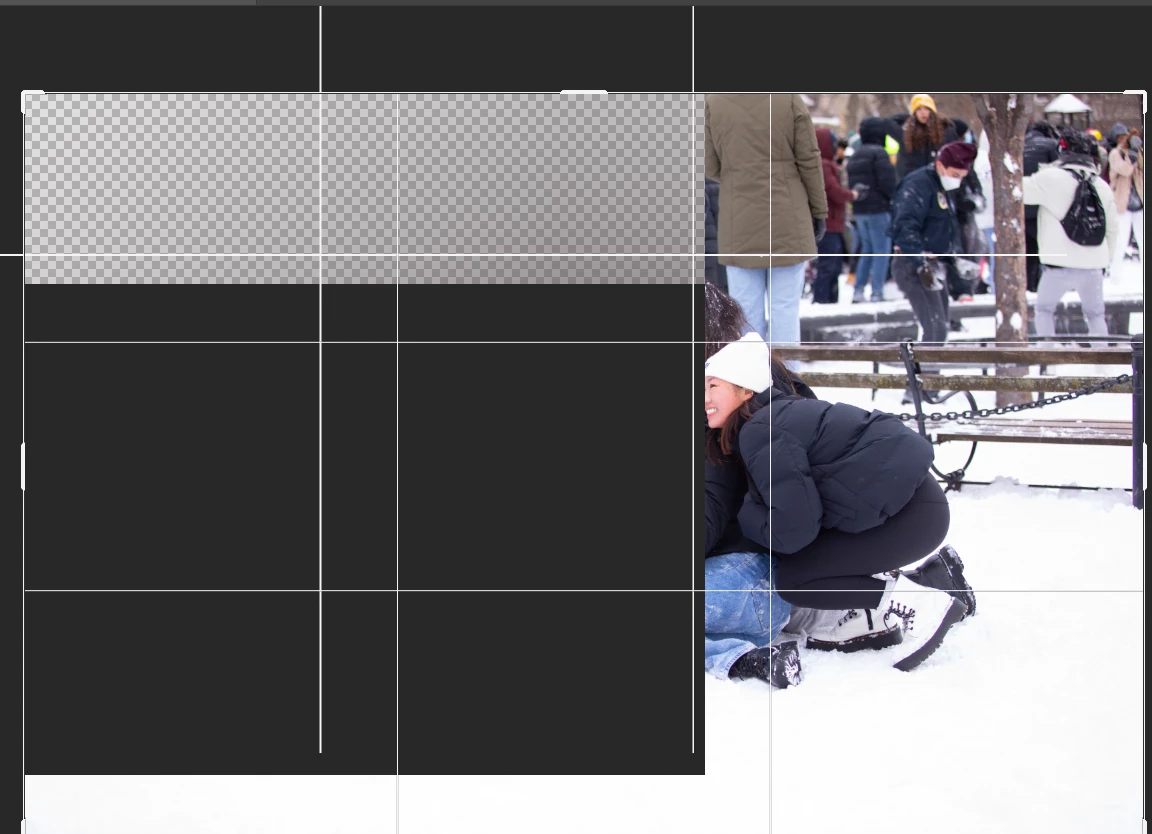
so problem with crop tool just started. i am using a normal preset which works fine but i also see all these lines on the screen.. i've restarted .. any thoughts? thanks

This topic has been closed for replies.

3 replies

Legend
January 31, 2022

Are you complaining about the grid inside the Crop bounds? Or the grid on the document bounds?


To turn off on the document, go to View > Show > Grid to uncheck Grid.

janetm62681729
Known Participant
January 31, 2022

not "complaining", reporting and checking.


Yes I did Uncheck, maybe something is corrupt

TheDigitalDog
Inspiring
January 31, 2022

So you have all the options for the guides to be off and you still see it?

Try disabling GPU in the preferences (Preformance tab). Any better?

Author “Color Management for Photographers" & "Photoshop CC Color Management/pluralsight"
janetm62681729
Known Participant
January 31, 2022

hi thanks for the response.. i cannot seem to turn it off.. i unchecked the overlay but continues to show..??

TheDigitalDog
Inspiring
January 30, 2022

Check this dropdown:

Author “Color Management for Photographers" & "Photoshop CC Color Management/pluralsight"