ametista society
Known Participant
January 12, 2019
Answered

cs3 - where are the properties?

  • January 12, 2019
  • 4 replies
  • 2646 views

I draw a rectangle (transparent) and need round the corners.

I must change the properties. Where are they?

    This topic has been closed for replies.
    Correct answer Semaphoric

    Yes, just checked CS4. once you made a Rounded Rectangle, you can't change the properties.

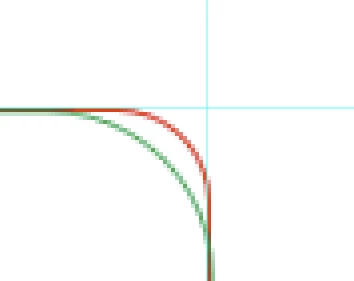
    But you can fake it. I took a rounded rectangle path, stroked it with a brush, and then scaled the path up proportionately. I then selected each of the four sides in turn with the Direct Selection tool, and dragged them in to where the original was. Then added a different colored stroke:
        

    I'd much rather use CC.

    4 replies

    ametista society
    Known Participant
    January 13, 2019

    thank, my friends    

    davescm
    Community Expert
    Community Expert
    January 12, 2019

    Hi

    You need to use the rounded rectangle tool and choose the rounding in advance. The ability to edit the rounding afterwards in properties came with Photoshop CC (live shapes) so is not available in CS3.

    Dave

    JJMack
    Community Expert
    Community Expert
    January 12, 2019

    It look like you gave the rectangle tool active not the rounded rectangle tool active.  There should be a radius setting in the Tool Option bar for the rounded rectangle tool.  The oldest version I have install these days is CS6. The tool can do Pixel paths and shapes.

    JJMack
    jane-e
    Community Expert
    Community Expert
    January 12, 2019

    Hi Vitor,

    I am struggling to remember CS3, but as I recall, you need to draw a rounded rectangle (circled below) and there will be something in the options bar that will let you choose how round you want the corners to be before you draw it.

    ”Properties“ came out in later versions of Photoshop.

    Semaphoric
    Community Expert
    SemaphoricCommunity ExpertCorrect answer
    Community Expert
    January 12, 2019

    Yes, just checked CS4. once you made a Rounded Rectangle, you can't change the properties.

    But you can fake it. I took a rounded rectangle path, stroked it with a brush, and then scaled the path up proportionately. I then selected each of the four sides in turn with the Direct Selection tool, and dragged them in to where the original was. Then added a different colored stroke:


    I'd much rather use CC.
