joe_cavalry
Participant
July 21, 2018
Question

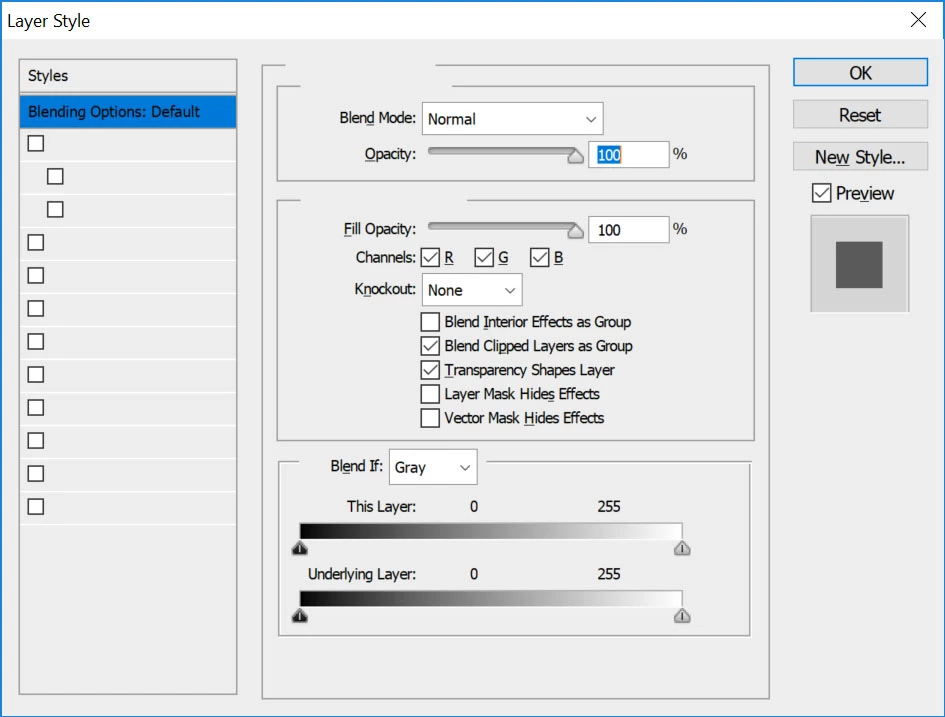
CS6 - Blending Option Panel - check box text missing (see attached image)

  • July 21, 2018
  • 4 replies
  • 375 views

    This topic has been closed for replies.

    4 replies

    Participant
    January 27, 2020

    I have this same issue. Were you able to figure it out?


    I reset all preferences (as indicated in other answers) to no avail. 😞

    ??

    MarekMularczyk
    Community Expert
    Community Expert
    July 28, 2018

    Try resetting Photoshop preferences - when starting Photoshop hold Ctrl+Alt+Shift and you'll be prompted to reset preferences.

    Adobe Community ExpertAdobe Certified Professional
    c.pfaffenbichler
    Community Expert
    Community Expert
    July 28, 2018

    What have you done for trouble-shooting so far?

    Restoring Preferences after making sure all customized presets like Actions, Patterns, Brushes etc. have been saved might be a good starting point:

    https://helpx.adobe.com/photoshop/kb/basic-trouble-shooting-steps.html

    SteveG_AudioMasters_
    Community Expert
    Community Expert
    July 21, 2018

    This is the Audition forum - we don't know anything about blending option panels! If you can tell me which software you're using (Photoshop or Illustrator, I'd guess), I'll move this post to the appropriate forum.