
philip14206
Known Participant
September 22, 2019
Frage

cs6 lighting filter [EDIT — Lighting filter in CS6 3D]

  • September 22, 2019
  • 3 Antworten
  • 701 Ansichten

hi everyone.

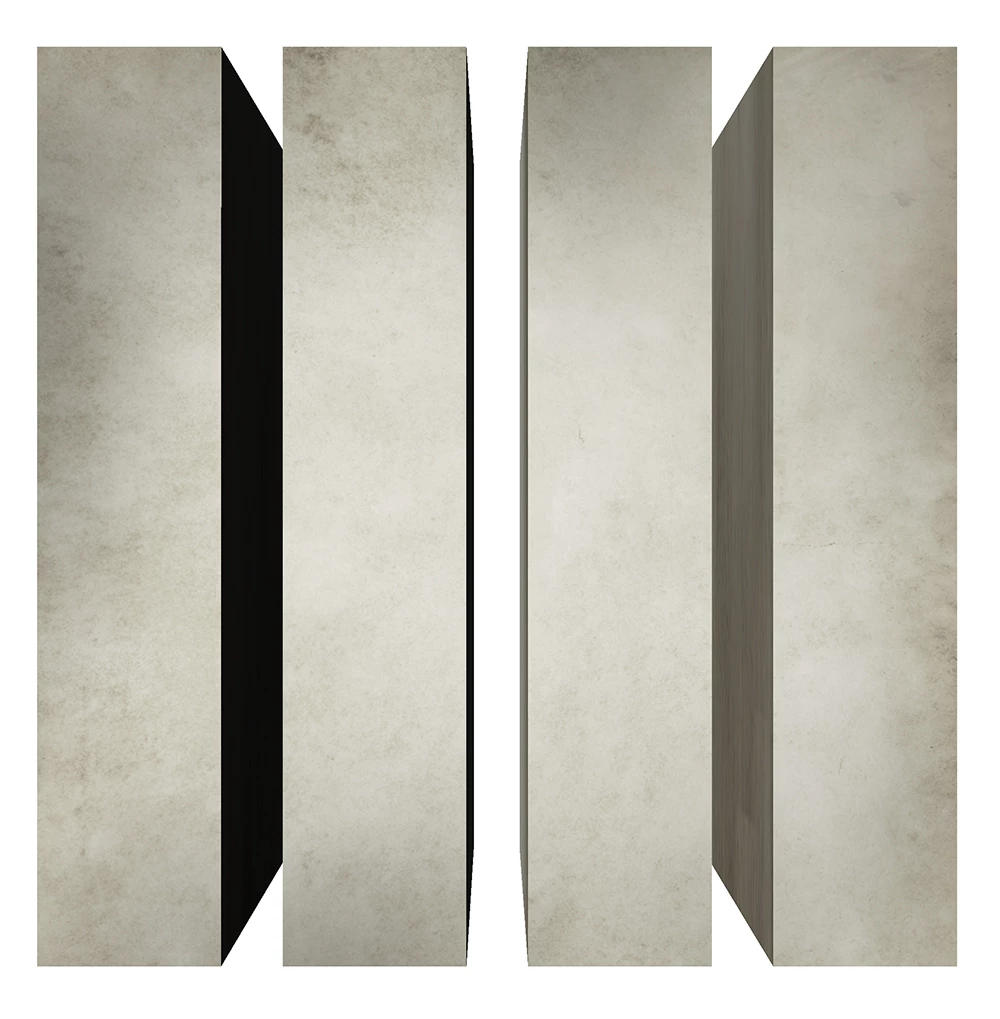
i have been trying to balance the light for this image. as you can see the inside column on the left is darker than the right. i cant get the two inside columns to have the exact same light. i move the light to the left the right is darker move the light to the right the left is darker. i have used all 3 light presets but without any luck. thanks.
Dieses Thema wurde für Antworten geschlossen.

3 Antworten

davescm
Community Expert
Community Expert
September 22, 2019

Hi

In 3D do what you would do in real life i.e add an extra light. Try two infinite lights, one to each side and both with even intensities. You might also need to adjust the shine property if you have glare on the front surface ( or reduce the IBL light in environment)

If you don't like the shadows on the side sufaces you can turn off the Catch shadows/cast shadows in the object properties

Dave


Dave
(Trevor tagging another person does not work in this forum. I just happened on this thread when looking through the posts)

philip14206
Known Participant
September 22, 2019
thank you so much dave. i think this is what im looking for. really appreciated. thank you for you advice and help dave.
Trevor.Dennis
Community Expert
Community Expert
September 22, 2019

OK Philip.  I was way off the mark if you were talking about 3D.  I have edited your subject line to show people it is a 3D issue, and added a link to our Dave who is one of our 3D experts.  With the old forum that would generate a notification email to let Dave know he had been mentioned.  I have not tried it with the new forum so far, so fingers crossed.

philip14206
Known Participant
September 22, 2019
very much appreciated trevor also apologies for not stating it was created in 3d. thank you for your time and help. cheers.
Trevor.Dennis
Community Expert
Community Expert
September 22, 2019

With objects so graphic as that, I'd personally build them again, but you asked about Lighting Effects (I think)

To have any idea what is going on we'd need to know what the original image looked like, and how you set up the filter.

BTW  Did you make the layer(s) a Smart Object?  That would be highly advisable in a situation like this, so you could keep going in and tweaking the filter.


I can't remember if LE is different today from CS6, but AFAICS you can centralise the effect, and its focus.  Did yours look like this?

I would have started from scratch though, and made the four rectangles and made them a Smart Object

Then add Filter > Texture > Grain Remember it is a SO so you can double click the effect to tweak it, and so as many times as you like

I'd have finished with Adobe Paper Texture Pro because it is free and excellent.  It creates a new layer, so it is still non-destructive


Note I have the texture set to Overlay. Multiply would be darker and more intense.

Note also that I cliped the tyexture layer to the grey rectangle layers or the texture would have filled the document window.

I probably haven't answered your LE question, so can you give us some more info about what the issue is?  Thanks


philip14206
Known Participant
September 22, 2019
thank you so much for your reply trevor. appreciated. i created from the 3d application in cs6. i was happy with the final result except the light in 3d. i rasterized it to a 2d layer hoping that the lighting filter would be different in 2d but their both the same. in 3d i added the texture.