
Participating Frequently
December 6, 2018
Answered

Ctrl+1 can't be used for 100% zoom after changes to color channel shortcuts.

  • December 6, 2018
  • 2 replies
  • 2738 views

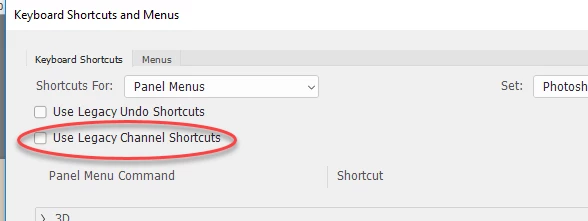
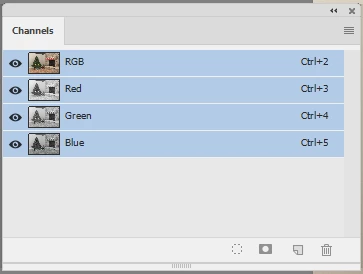
In Photoshop 20.0.1 (Windows) or maybe before, the default shortcuts for isolating color channels were changed by default to use the keys Ctrl + 1, 2, and 3. This change collides with and overrides the default shortcut for 100% zoom. Maybe I missed it, but I can't find in the keyboard shortcuts editor where to change the color channel bindings.
This topic has been closed for replies.
Correct answer davescm

Hi

It looks like you have the legacy channel switching shortcuts set.

Uncheck this:

To get this :

Dave

2 replies

Semaphoric
Community Expert
Community Expert
December 7, 2018

I confess that it's only be recently that I've gotten to using Control+1, rather than Alt+Control+0 (which still works).

davescm
Community Expert
davescmCommunity ExpertCorrect answer
Community Expert
December 7, 2018

Hi

It looks like you have the legacy channel switching shortcuts set.

Uncheck this:

To get this :

Dave

Participating Frequently
December 7, 2018

That was what I missed precisely. Thank you.