

Trevor.Dennis
Community Expert
Community Expert
April 12, 2024
Question

Ctrl Alt C Canvas Size Shortcut Not Working (Both Versions)

  • April 12, 2024
  • 2 replies
  • 1803 views

I have been nibbling away at this problem for weeks now.

Ctrl Alt C shortcut does nothing.

This is the same with full release and beta versions.

It's the same regardless of workspace.

The shortcuts menu shows the shortcut is there where it should be.


As it is affecting both versions, and I have had to reset Preferences at least once since this started, it sounds like the shortcut is being trapped by another app.  So I have turned off Lazy Nezumi Pro, and Green Shot.  

I have looked through this list of apps that use the same shortcut and I have none of them running.

https://defkey.com/what-means/ctrl-alt-c


I don't have Nvidia Experience running.


These are what show in the Windows taskbar pop-up and are top left to right:

Messenger

Wacom Center

Alarm Clock

Defender

Windows Explorer

Nvidia settings

Display Pilot

Logitech G Hub

Logi Tune (what's that?)

iCue (I have a Corsair keyboard)

3D Connexion Space Mouse

MS Edge (which I never use)

Outlook notification (you have mail — Ding!)

Chrome (my defualt browser)

CC Desktop app

Eject media

Windows Security

Bluetooth

Onedrive
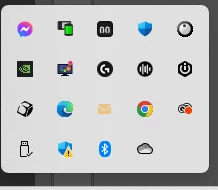
I suppose I could go through those one by one and exit them.


There's nothing in the Task Manager background processes list that shouts out at me.


This is annoying but I am using the Crop tool to add canvas, and I made an action that Adds 100 pixels all round.  If I need an exact amount added, I drag a big chunk with the Ctrop tool, and stroke a layer that filled the frame by the required amount.  But I would like to fix this if I can, so does anyone have any thoughts what could be trapping the shortcut?


Windows 11

This topic has been closed for replies.

2 replies

Vicki DeVico
Participating Frequently
June 24, 2024

Did you ever find the answer to this problem? In the newest update (Not sure about immediately past ones), when I use Ctrl+Alt+C, I get a window for "Create Clip". I don't even know what that is!!! I an open the Canvas Size through the menu, but I've been a shortcut user for almost 20 years and this is SUPER annoying!!!


I hope they fix this problem. (Oh, I'm also using Windows 11.)

rome8
Participant
August 4, 2024

I realized teh "Create Clip" comes from Zoom. I was logged into zoom which I never am. I logged out of it and then tried the canvas size shortcut and it worked. Not sure if you have zoom but this fixed it for me. 

Vicki DeVico
Participating Frequently
August 5, 2024

OMG...Thank you SO much, rome8! I never realized that another application being open could affect the behavior of Photoshop...but it's obvious it does. I tried it, got the "Create Clip" window. Then I logged out of Zoom and tried again. It worked!!! Thank you so much for this. I use this shortcut often so this is a time saver (and life saver) for me.

Bojan Živković11378569
Community Expert
Community Expert
April 12, 2024

There are no issues with my Windows 11 machine, stable version 25.5.1; however, your version is unknown to us.

Trevor.Dennis
Community Expert
Community Expert
April 12, 2024

It doesn't feel like a Windows thing Bojan, but I am running 11 Pro 22631


I don't think it's a Photoshop thing because it's the same in all workspaces including the default Essentuals which I have reset. It'll be a background process that is intercepting the shortcut, but I can't think which one.