

Participant
October 25, 2018
Answered

Ctrl z hot key stops working

  • October 25, 2018
  • 5 replies
  • 11721 views

So i just installed photoshop, and when i use ctrl + shift or ctrl + alt, the ctrl z hot key stops working.I tried all of the instructions on adobe help but none of them worked out, please give me some help.

    This topic has been closed for replies.
    Correct answer

    Hi

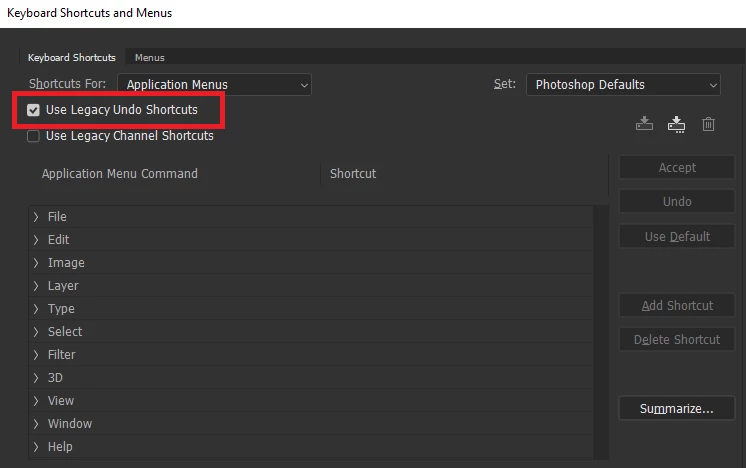
    If it's Photoshop CC2019 the shortcut keys for undo has changed, see here

    New and enhanced features | Latest release of Photoshop CC

    This bit

    New multiple undo mode

    You can change back to the legacy shortcuts
    5 replies

    anujas30064094
    Participant
    May 6, 2019

    Thanks

    macpawel
    Participating Frequently
    October 25, 2018

    Shortcut CTRL+Shift - is used by Windows to change Keyboard settings.

    Be sure you have right keyboard layout choosen

    Correct answer
    October 25, 2018

    Hi

    If it's Photoshop CC2019 the shortcut keys for undo has changed, see here

    New and enhanced features | Latest release of Photoshop CC

    This bit

    New multiple undo mode

    You can change back to the legacy shortcuts

    Participant
    October 25, 2018

    Thank you very much!

    Em Qui, 25 de out de 2018 11:54, melissapiccone <forums_noreply@adobe.com>

    escreveu:

    Ctrl z hot key stops working

    melissapiccone

    <https://forums.adobe.com/people/melissapiccone?et=watches.email.outcome>

    marked Ged Traynor

    <https://forums.adobe.com/people/Ged+Traynor?et=watches.email.outcome>'s

    reply on Ctrl z hot key stops working

    <https://forums.adobe.com/thread/2552324?et=watches.email.outcome> as

    helpful. View the full reply

    <https://forums.adobe.com/message/10705007?et=watches.email.outcome#10705007>

    Ussnorway7605025
    Legend
    October 25, 2018

    the short cut keys only work if Photoshop is the active software and not doing somethink else;

    senario 1 = you clicked outside Photoshop like on chrome for example

    senario 2 = you have a dual screen and Photoshop is showing you a popup box on the other screen which you have to say 'ok' to?

    if its not one of those then can you please post a screenshot?

    Participant
    October 25, 2018

    Hi, i used the legacy undo shortcuts and it started working.

    Chuck Uebele
    Community Expert
    Community Expert
    October 25, 2018

    What do you mean by when you use ctrl + shift etc? What are you using those modifiers with?