
Participant
June 15, 2017
Answered

Cumulative Layer Gif in Photoshop CC 2017

  • June 15, 2017
  • 1 reply
  • 2456 views

Hi Everyone,

I'm attempting to make a gif in photoshop that shows all the layers together by the end. So, when the next frame of the gif appears, the previous one is still visible until the next rotation. How to I accomplish this? Do I have to make a gif with cumulative layers? If so, how do I do that?

Thanks!
    This topic has been closed for replies.
    Correct answer quirky_Glow157F

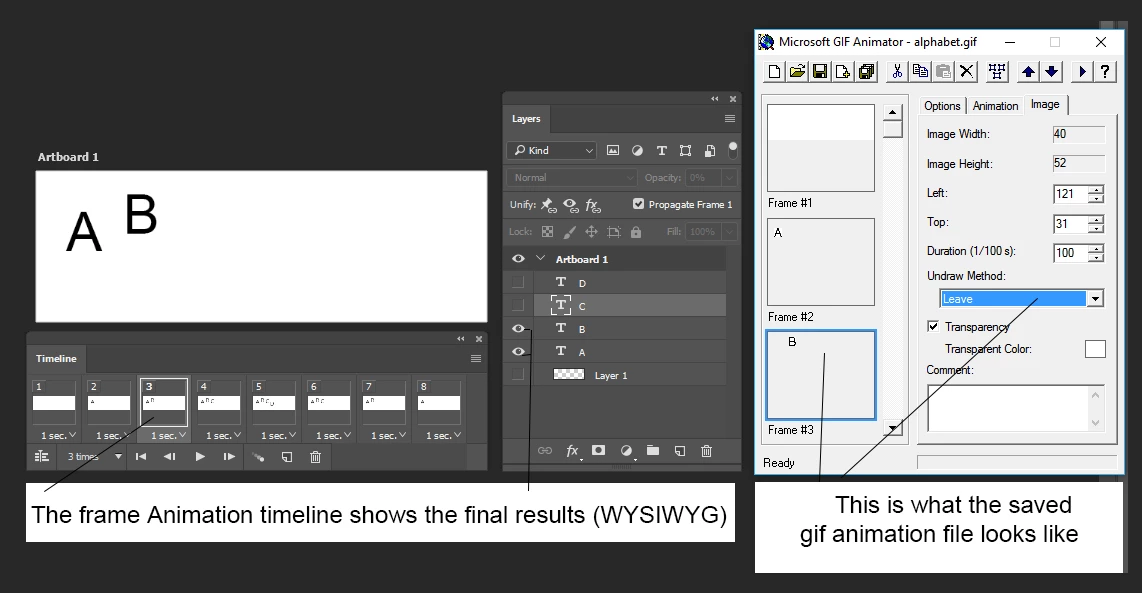
    Photoshop looks after the frame undraw methods (leave, remove...) automatically when it saves the frame animation sequence in gif format.

    As Nancy mentioned, use the layers eye icon to set up each frame as it should be seen, then let Photoshop look after the details.

    A J

    1 reply

    Nancy OShea
    Community Expert
    Community Expert
    June 15, 2017

    So you want to create an animated GIF.  See this link for tutorial.

    How to Make an Animated GIF in Photoshop [Tutorial]

    Nancy

    Nancy O'Shea— Product User & Community Expert
    thebellzAuthor
    Participant
    June 15, 2017

    Hi Nancy,

    Thanks, but this isnt really what I'm looking for. I know how to make a gif, I just need to know how to keep the frames from disappearing after it transitions to the next frame, if that's possible

    Nancy OShea
    Community Expert
    Community Expert
    June 15, 2017

    Read the tutorial all the way through.  Layers are part of the project.  You can turn layer visibility on or off by clicking the EYE icon in your layers panel.

    Nancy O'Shea— Product User & Community Expert