Participating Frequently
December 4, 2017
Answered

Curves

  • December 4, 2017
  • 3 replies
  • 1308 views

Curves, why do I have 255/255 in one image and only 100% in another?

    This topic has been closed for replies.
    Correct answer Terri Stevens

    It always helps to explain what you are talking about when asking questions here as we are not mind readers and your question doesn't make much sense. However I will have a guess and suggest the 'curves display options' are set differently in the images
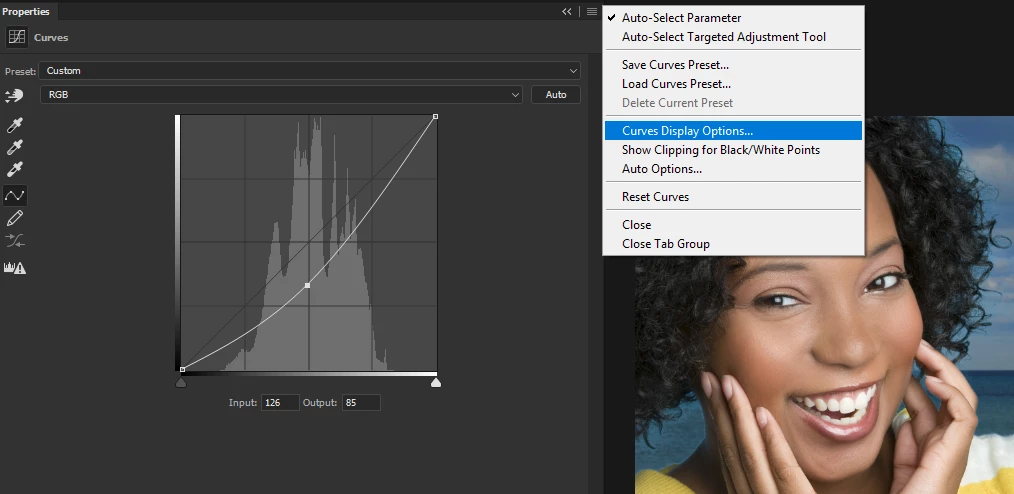
    There are two options for display, one uses tonal range values(0-255) and the other percentages(0-100). The default is tonal range-referred to as 'light' unless you design for print
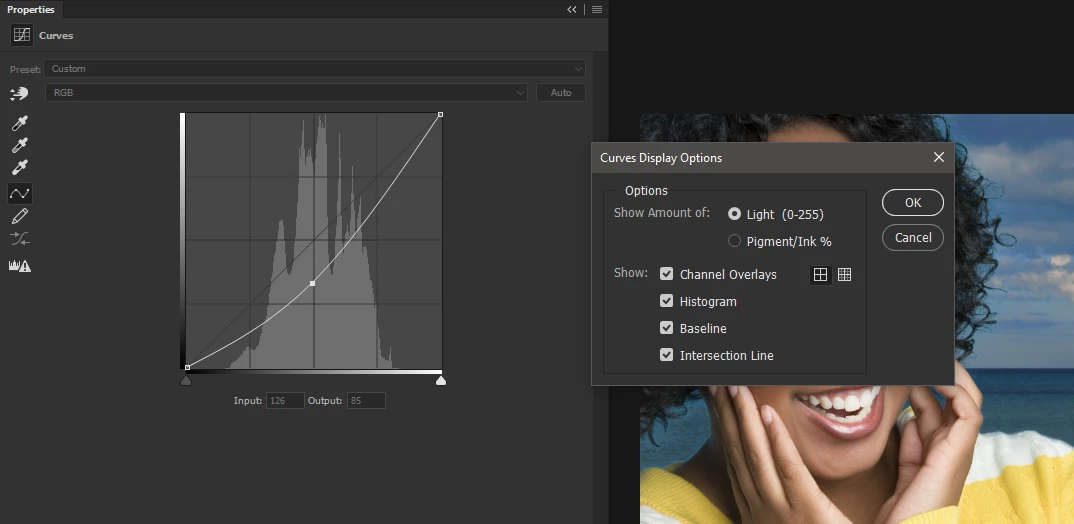
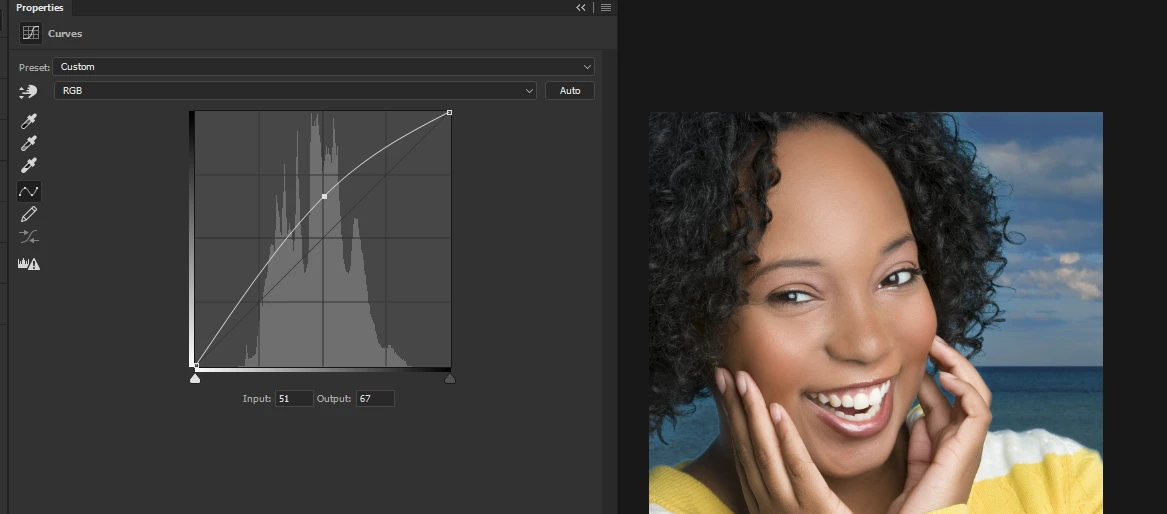
    The other is 'pigment/ink' . The curves look entirely different as shown between the two views shown here and yet the end result is exactly the same
    3 replies

    Barb Binder
    Community Expert
    Community Expert
    December 4, 2017

    RHoward68504:

    You are participating in a discussion on one of the Adobe Community Forums. You are interacting with community volunteers who have expertise in these applications and who take time out of their workdays to help others with their questions. We were all new users once, and we know these applications are complicated. But we do not work for Adobe and we are not paid. We are always happy to help our fellow users but when someone is rude or abusive to us, we are just as happy to go help someone else.

    ~Barb

    ~Barb at Rocky Mountain Training
    Participating Frequently
    December 4, 2017

    I have been very plain in my request. I don't know how else to ask you for

    the steps from the time CS6 starts to get to your screen shots.

    postrophix
    Participating Frequently
    December 4, 2017

    Hi

    You need to Open an image to see these tools. See Barb posting.

    Pierre

    Barb Binder
    Community Expert
    Community Expert
    December 4, 2017

    Curves reside in two locations.

    1. Image > Adjustments > Curves and
    2. Layer > New Adjustment Layer > Curves.

    Terri was showing you the second location, so I'm guessing you are in the first one.

    ~Barb at Rocky Mountain Training
    Participating Frequently
    December 4, 2017

    Supervisor

    Request to have your supervisor. I asked a simple question. You responded

    twice with an incomplete answer. When I asked how to get to the screens

    you showed me, you say I have an attitude. Lets have your supervisor make

    that decision.

    Barb Binder
    Community Expert
    Community Expert
    December 4, 2017

    Hi RHoward68504.

    You addressed that to me, and I answered your question by providing both locations for the Curve controls along with a screen shot.

    What am I missing here?

    ~Barb

    ~Barb at Rocky Mountain Training
    Terri Stevens
    Terri StevensCorrect answer
    Legend
    December 4, 2017

    It always helps to explain what you are talking about when asking questions here as we are not mind readers and your question doesn't make much sense. However I will have a guess and suggest the 'curves display options' are set differently in the images

    There are two options for display, one uses tonal range values(0-255) and the other percentages(0-100). The default is tonal range-referred to as 'light' unless you design for print

    The other is 'pigment/ink' . The curves look entirely different as shown between the two views shown here and yet the end result is exactly the same

    Participating Frequently
    December 4, 2017

    You failed to show how to get to these screens.

    So where do I go to get Curves Display Options?

    On Mon, Dec 4, 2017 at 12:01 PM, Terri Stevens <forums_noreply@adobe.com>

    Terri Stevens
    Legend
    December 4, 2017

    Hard to believe you couldn't work that out for yourself, but I've marked the icon below.