

hcbphoto
Known Participant
October 21, 2023
Answered

Custom actions not appearing

  • October 21, 2023
  • 3 replies
  • 1721 views

Hello,

I'm running Windows 10.  I'm using Photoshop 2024.

I was working on an image in Photoshop and wanted to apply an action I created.  I went to my Actions tab and none of my custom actions are being displayed.

I searched the folder on my hard drive that stores the actions and they appear.

I attached a screenshot of my hard drive directory containing all my actions.  I also included a screen shot within Photoshop of the actions that are available.

Any ideas?

Thank you in advance.
This topic has been closed for replies.
Correct answer D Fosse

Good thing you saved them out, that's what you should do.


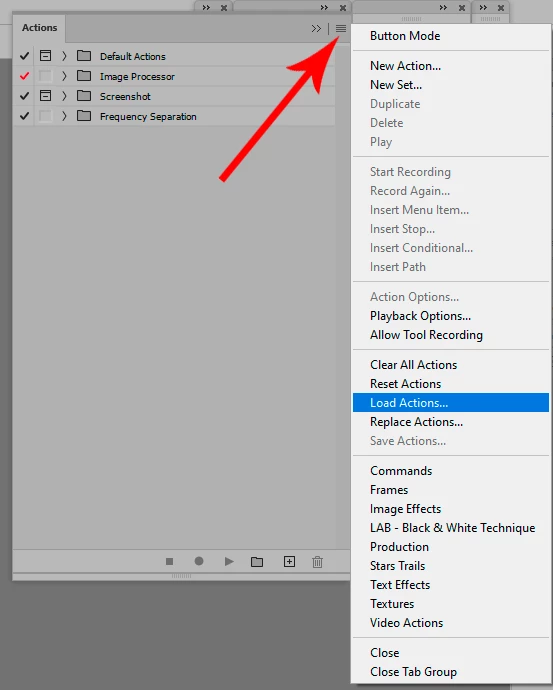
Load them into the panel here:


By default actions are just stored in your Preferences in your user account, and will get lost if you have to reset preferences. They are also version specific and do not migrate in a version update.


By saving them out they can easily be reloaded. You don't need to save them in the default path, you can save them permanently wherever you want, e.g. for reuse in a new version.

3 replies

Participant
January 3, 2024

D. Fosse gives an answer that most users already know. The question is: why must each and every customer who uses custom actions with each update invest time in something stupid like this and that since 25 years or so. Not to mention what happens if you change hardware and forget to copy the actions and have to write them again. This is very customer-unfriendly. What he describes the customer should do is something a decent programmer can make the program do automatically in about ten minutes. Adobe should get their act together. Since more than 20 years you don't have to do things like that in decently written software programs.    

Volvo Cars St Leonard
Participant
October 25, 2023

The same issue here. i oppended PS oneday and all my actions were gone, no where to be seen in any files on my computer. NOWHERE. Adobe just erased all my actions and i cannot bring them back. Ive tried every method to try to locate them and restore previous versions of PS but NO LUCK !. Please someone HELP !!!

D Fosse
Community Expert
Community Expert
October 25, 2023

Turn off automatic updates in the CC desktop app. You'll still get update notifications, but you choose when to run them.


Next time you update Photoshop to a new version, uncheck "remove old versions". Keep the old version around until you know everything works properly.


Save out actions! They are version specific and do not automatically migrate. If you save them out, they can easily be reloaded.

D Fosse
Community Expert
D FosseCommunity ExpertCorrect answer
Community Expert
October 21, 2023

Good thing you saved them out, that's what you should do.


Load them into the panel here:


By default actions are just stored in your Preferences in your user account, and will get lost if you have to reset preferences. They are also version specific and do not migrate in a version update.


By saving them out they can easily be reloaded. You don't need to save them in the default path, you can save them permanently wherever you want, e.g. for reuse in a new version.

hcbphoto
hcbphotoAuthor
Known Participant
October 21, 2023

Thank you so much!  Great help.