Inspiring
November 13, 2018
Answered

Custom blending rule: threshold

  • November 13, 2018
  • 2 replies
  • 521 views

First the TL;DR. I want to create a custom blending rule so that I compare the brightness of two layers and compute an output value of white or black depending on which one is greater. Is there a way to do this?

For those interested in what I'm going for, I have in mind this idea::

First, imagine a linear gradient, from black to white (moving left to right). Call this layer L1.

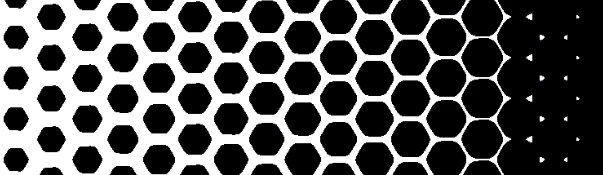
Then imagine a honeycomb of black hexagons -- BUT, there is a lot of white space between the hexagons which have a thick white stroke separating them. Call this layer L2.

Now, **blur** L2 a little so that the dark centers of the hexagons bleed into the white stroke and the white stroke becomes a little gray. So now it looks like fuzzy hexagons. Call this layer L3.

Now I wan to blend L1 and L3 as follows: the resulting layer R1 will have a black pixel wherever L3 (the fuzzy hexagon) is darker than L1 (the gradient).  Otherwise it will have a white pixel.

Imagine the final result: on the right, it will all black, because every part of the fuzzy hexagons will be darker than the white on the right side of the gradient L1.

As you move to the left, only the darkest core of the fuzzy hexagons will be darker than L1, so you'll start to see, on R1, separated hexagons.

As you move all the way to the left the hexagons become smaller and more separated.

    This topic has been closed for replies.
    Correct answer Semaphoric

    Set the blurred layer to Hard Mix:


    This technique is often used for making halftones.

    2 replies

    Semaphoric
    Community Expert
    SemaphoricCommunity ExpertCorrect answer
    Community Expert
    November 13, 2018

    Set the blurred layer to Hard Mix:


    This technique is often used for making halftones.

    davescm
    Community Expert
    Community Expert
    November 14, 2018

    Hi

    If you use Hard Mix you will need to reverse the gradient to that shown in your description

    With hard mix the channels are added and if the result is greater than 255 then it is set to 255 if it is less then it is set to 0.

    So at the white end of the gradient (right in this case) it turns white. You wanted it to turn black.

    Eaxmple

    Gradient :

    Blurred grid :

    Using Hard Mix  - the result does not match your requirent to have the black at the right of the document where the gradient is white:

    Using Divide and Threshold and Invert (as per my previous post): - Meets the requirement:

    Inverting the gradient then using hard mix - also meets the requirement:

    Dave

    davescm
    Community Expert
    Community Expert
    November 13, 2018

    Hi

    I think you can achieve the effect you describe by

    1. Setting L2 (Hexagon layer) to Divide

    2. Adding a threshold adjustment layer with the threshold set to 255

    3. Adding an invert adjustment layer

    Dave