
Custom brush sets all load with group folders - is that normal?
I'm loading brush sets I've either purchased or made. I have them organized into .abr sets. When I bring them into Photoshop CC 2018 for the first time, they load just as a set, no group folder.
But if I edit them and move brush presets between folders or combine them into bigger sets and then want to save them as a new set under I different name, I have been going to the preset manager and saying "Save Set" and giving it a name
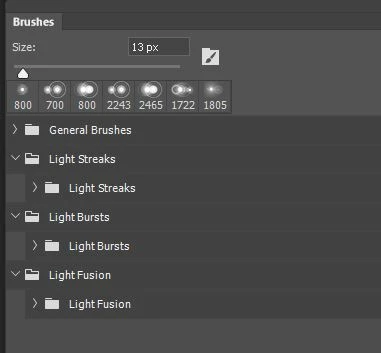
Any set I have loaded and touch and renamed and I unload from the panel and reload, comes back into the panel with a GROUP folder on top, and the .abr file is in a subfolder. I want them to load just as a set (like the default brushes) not with every set having a group folder name.
I've tried to save, export, import, everything I can think of, but every time I unload it and reload it... it automatically has a group folder on top...
Is this the default? A preference I can turn off? Is there some other way to save my changes so the .abr stays just an .abr brush set without a group folder attached?
Thanks
 AdChoices