
Participant
October 29, 2021
Question

Customising 'Export Layers to Files' Naming

  • October 29, 2021
  • 2 replies
  • 2649 views

Hey!


I'm currently in the process of trying to alter the file naming when using Export Layers to Files feature to better suit my needs. I have been able to remove the 0000 number sequences from the file naming process and wondered if I could take it further by adding more information.


Right now, it shows DOCUMENT NAME_LAYER NAME. Ideally, I would like the ability to include a little more information from the following example:
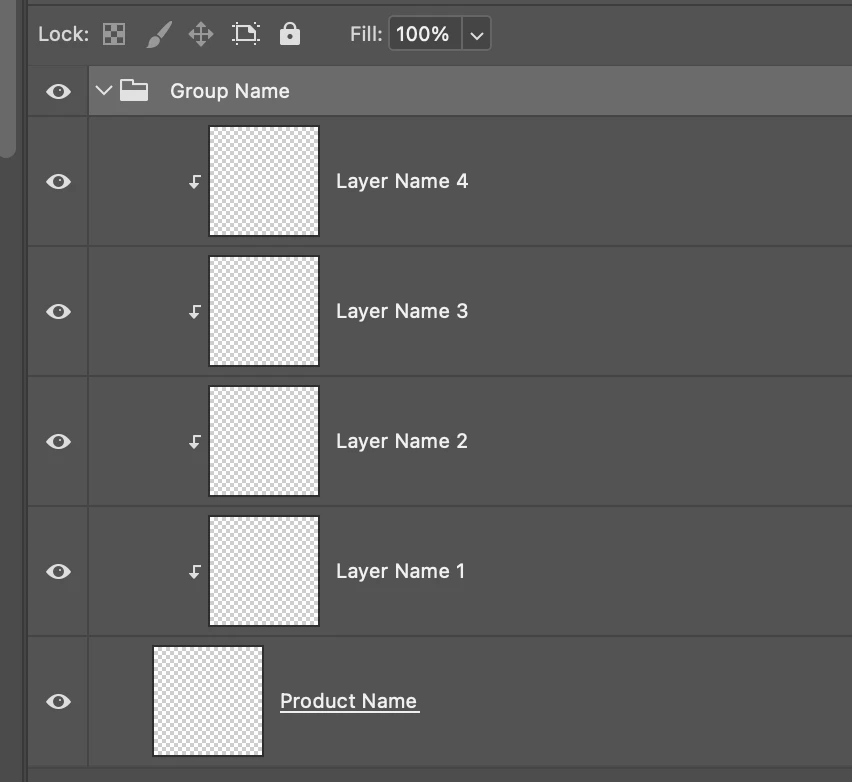


Ultimately, the saved files would show PRODUCT NAME_LAYER NAME. Or perhaps GROUP NAME_LAYER NAME if that's at all possible.


I am unable to simply rename the document as the product name due to that changing with different groups.


Thanks in advance!

2 replies

Stephen Marsh
Community Expert
Community Expert
October 31, 2021

@Dominic Mann 


Will your layer panel always have the same basic structure that will be used for the file naming?


1. The uppermost layer/set will always be used for the Group name?

2. Regardless of the quantity of layers contained in the upper set/group, the very next layer being the bottom layer will be the name used for the Product name?


So essentially, there are only two sources for the required layer names, the upper group and the very bottom layer?


Participant
October 31, 2021

Hi, Stephen. Yes to both of those! 

Stephen Marsh
Community Expert
Community Expert
November 3, 2021

Does the following code snippet work as expected to create the desired name? I.E. is the pop-up alert dialog showing the correct name?


//////////////
// Select front layer
app.activeDocument.activeLayer = app.activeDocument.layers[0];
// Group Name
var groupName = app.activeDocument.activeLayer.name;
// Select back layer
var backLayer = app.activeDocument.layers.length - 1;
var selectLayer = app.activeDocument.layers[backLayer];
app.activeDocument.activeLayer = selectLayer;
// Product Name
var productName = app.activeDocument.activeLayer.name;
// Combined name
var nameCombo = groupName + '_' + productName;
alert(nameCombo);
//////////////


JJMack
Community Expert
Community Expert
October 29, 2021

Are you modifying  Adobe script "Export Layers To Files.jsx" file naming code?

JJMack
Participant
October 29, 2021

I have done, yes. I followed the linked guide, above, for removing the 0000 sequences that appeared in the file names.


I'm not well-versed with code though, but I'm guessing there would be a way to further modify that same file to include other information, such as group names and so on. Would that be correct?


JJMack
Community Expert
Community Expert
October 29, 2021

I would agree that where name are built. You need the set the additional name components in there.

JJMack