
Dax-Cross
Participant
March 19, 2019
Answered

Customising workspace (several questions)...

  • March 19, 2019
  • 2 replies
  • 545 views

I'm trying to customise my workspace to make all dialogs/tools/etc as compact as possible while still having access to everything i find useful, and running into a few issues. I've tried to find answers to these questions elsewhere, but no matter how i configure it I can't get it quite perfect. Is there any way I can do any of the following? I'll try and use correct vocabulary to avoid confusion but sorry in advance if I mess up!

In standard screen mode:

- disable un-docking of the window I'm working on. I'm aware I can disable re-docking it once it's floating, but what about the opposite? I misclick frustratingly frequently and un-dock windows while painting at the top of an image.

- hide the tab bar that shows open windows entirely (this thing:)

In standard screen mode with a maximised window: have docked tabs/toolbar visible, rather than hidden behind the open window.

In 'full screen mode with menu bar': re-enable the scroll bar while keeping everything else as is.

in any screen mode:

- dock other tabs above or below the toolbar within the same column (as in image below)
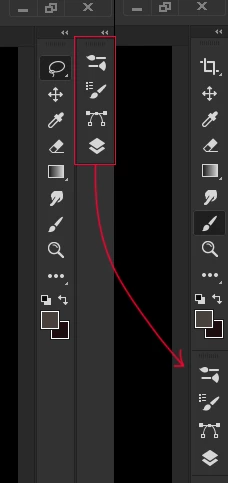
- Hide the close buttons that appear in the top right corner of floating tabs (this would solve just about everything!)

- In general anything I can do that I haven't mentioned here to get as close to this ideal interface as possible:
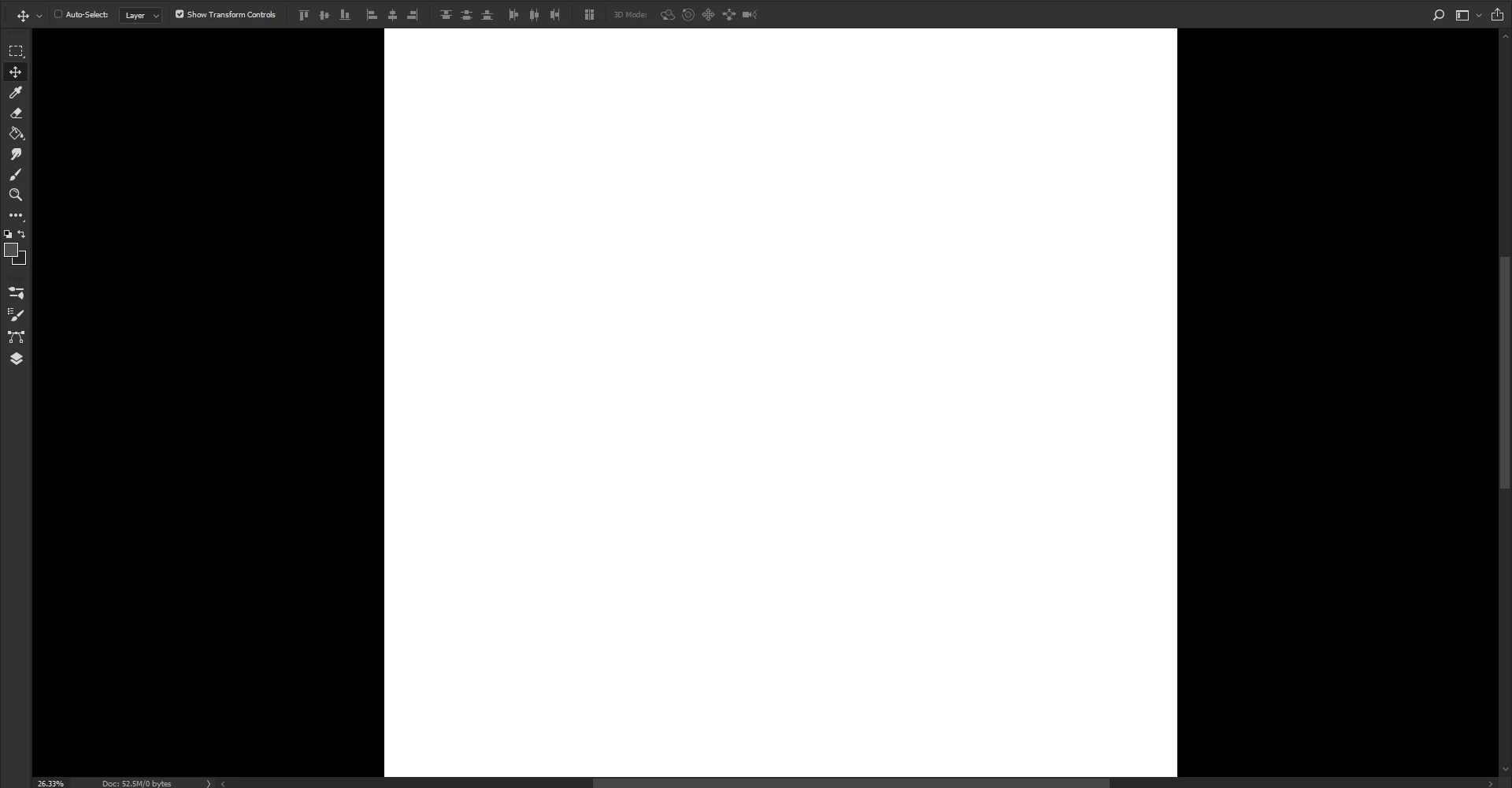
Please note total fullscreen mode doesn't work for me, I'm frequently without keyboard shortcuts and mapped stylus buttons are pretty precious.

Thank you very much to anyone taking the time to read this/assist!

This topic has been closed for replies.
Correct answer D Fosse

AFAIK there's no way to prevent undocking windows and "lock" them to tabs. Keep in mind that floating windows is the original, native behavior of Photoshop. That's how it "always was".

The toolbar is also hard-coded to full column height.

Not what you want to hear, I know - but you should probably make a feature request on the feedback forum.

Photoshop Family Customer Community

2 replies

jane-e
Community Expert
Community Expert
March 19, 2019

Sophie-Cross  wrote

  In general anything I can do that I haven't mentioned here to get as close to this ideal interface as possible:

Hi Sophie,

There is nothing in PS right now that will do everything you are asking, but there is one thing that will get you close to your screenshot.

Press Tab to hide all your panels or press Shift + Tab to hide only the right side panels. Then hover over the very edge of the PS window (right or left) to bring them back temporarily when you need them. This gets easier and faster with practice!

These shortcuts are toggles.

~Jane

Dax-Cross
Dax-CrossAuthor
Participant
March 31, 2019

Hi - Recently started using a new machine and attempted to utilise this. Do you know if there is a way to have tab switch between total full screen mode and standard screen mode - windowed? It seems I can only use it to flick between both modes with no scrollbar, or both modes where the docked window can be accidentally dragged out of dock, both a dealbreaker. I've looked everywhere in the keyboard shortcuts and can't seem to find this listed anywhere to see if it can be changed.

Thanks for your time

Ooh, never mind, found a workaround! leaving it here on the offchance of either a perfect solution or someone as fussy as me seeing this in the future. Mapping that stylus button to F instead of tab means I just have to press it twice and I get the result I'm after. Agreeable!

jane-e
Community Expert
Community Expert
March 31, 2019

Hi Sophie,

Yes, "F" is the shortcut to change Screen Modes. This is not the same as the Tab or Shift+Tab feature, so choose whichever works best for you!

Jane

D Fosse
Community Expert
D FosseCommunity ExpertCorrect answer
Community Expert
March 19, 2019

AFAIK there's no way to prevent undocking windows and "lock" them to tabs. Keep in mind that floating windows is the original, native behavior of Photoshop. That's how it "always was".

The toolbar is also hard-coded to full column height.

Not what you want to hear, I know - but you should probably make a feature request on the feedback forum.

Photoshop Family Customer Community