
not in your wildest dream
Participant
September 28, 2018
Question

Customize and save Export As options

  • September 28, 2018
  • 4 replies
  • 383 views

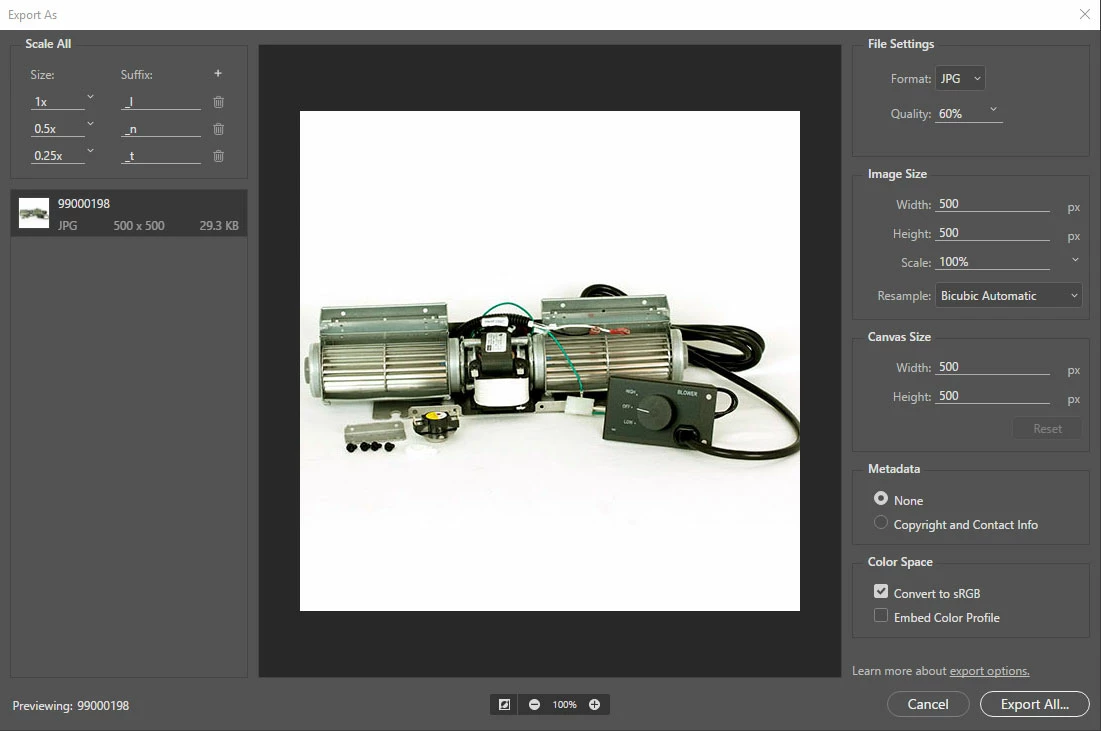
One of my tasks at work is adding and updating images for our store. Each product has a large, normal and thumbnail sized image. Our standard sizes are 500 x 500 px, 250 x 250 px and 125 x 125 px with corresponding suffixes. What I'm looking for is a way to set the Export as dialog to these defaults and suffixes and have them pull up as the default setting every time. The export as feature is handy but I spend a lot of time reconfiguring it every time for each export. I could fly through adding new images if I could save these setting but I see no ability to do this in the preferences other than setting the export format and quality. Is there a preferences file I can manually edit for this or is there some hidden ability to save these setting I don't know about?
    This topic has been closed for replies.

    4 replies

    Randy Hufford
    Community Expert
    Community Expert
    September 29, 2018

    also found this using a droplet in photoshop

    not in your wildest dream
    Participant
    October 1, 2018

    I will try these suggestions to see what can be accomplished. Thanks for your help.

    Im really surprised Adobe and the Photoshop team stopped short allowing for customization and saving within the Export as dialog box or in the setting. This would have added some much need automation and power to a good but seemingly very limited feature.

    Thanks again

    Randy Hufford
    Community Expert
    Community Expert
    September 29, 2018
    Community Expert
    September 29, 2018

    I'd also advise looking at an Action. See below for a guide on this:

    Create actions in Adobe Photoshop

    Randy Hufford
    Community Expert
    Community Expert
    September 29, 2018

    I think you need to write a script or maybe a action?