Participant
February 25, 2021
Question

Customizing Brush Panel in Photoshop 2020

  • February 25, 2021
  • 2 replies
  • 188 views

Hey guys, is there a way to get rid of Size slider in Brush panel and Brush Settings icon?

I use it as a horizontal panel and it takes to much space vertically because of it. 
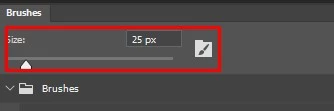
Thanks! 

This topic has been closed for replies.

2 replies

Mohammad.Harb
Community Expert
Community Expert
February 25, 2021

Hide the panel and use the shortcuts right and left square brackets  [  ]

Participant
February 26, 2021

It appears  I didn't describe my case well.


I need that brush panel to switch brushes constanly as it is part of the workflow. From round hard edge to soft edge to textured and so on. Every brush has specific properties, it's not about the brush size, so using shortcuts is not an option as well as using right click to change brush. Best way is to have separate panel constantly on screen. It should be like Custom Brush Panel for Photoshop you can find it on Gumroad. 


I could use Tool Presets Panel but it doesn't look as good as Brush Panel, doesn't have groups and tip shape preview also it locks me to speciefic tool Brush, Smudge, etc. 


Problem with Brush Panel is that it takes to much space vertically and the best way to cut unnecessary UI.  


Participant
February 25, 2021

Same question for bottom slider that changes size of bush preview.