BeanBoy76
Participant
August 15, 2022
Question

Cutout subject and removing hair fringe
  • August 15, 2022
  • 3 replies
  • 522 views


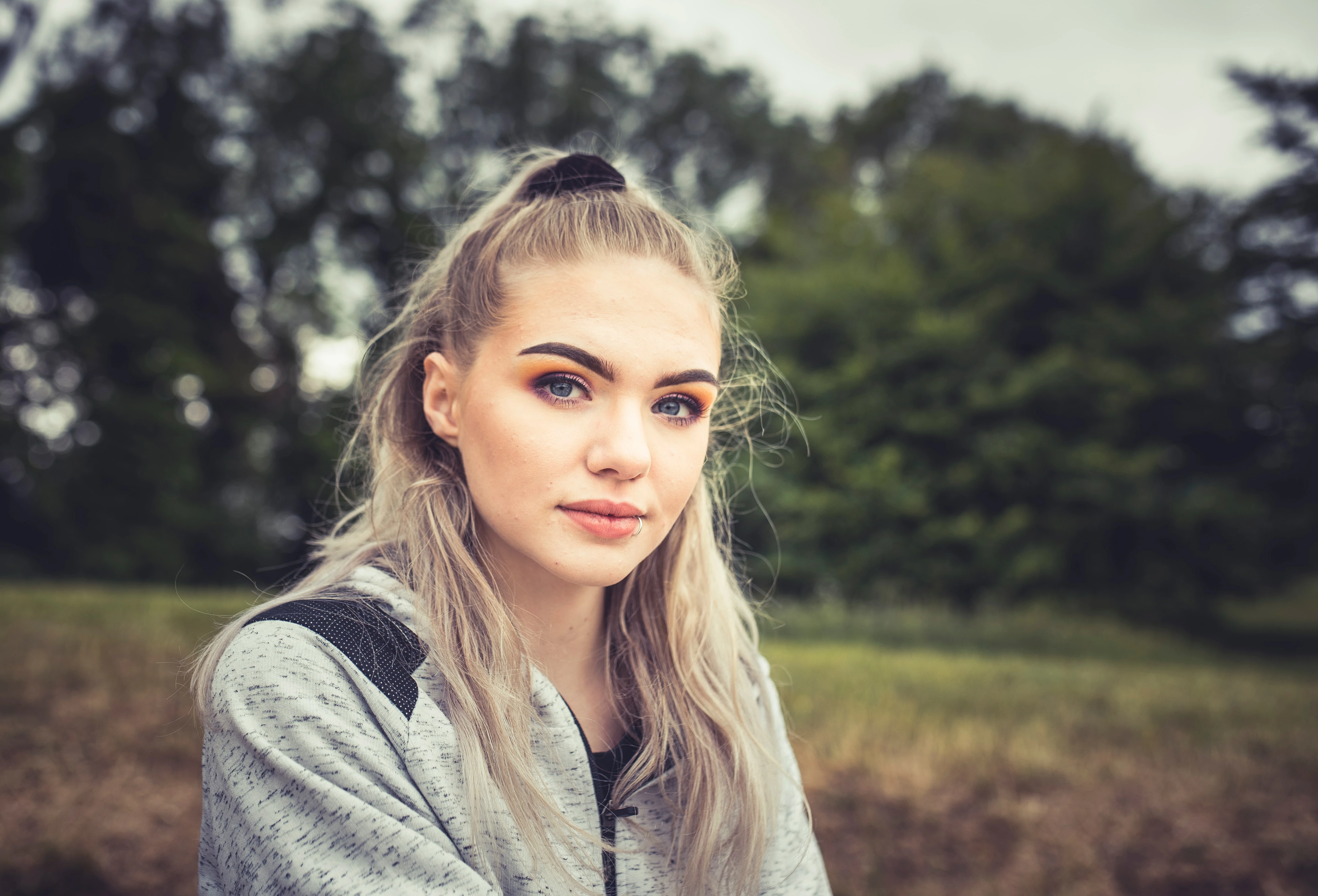
Hi, I am trying to cutout the subject from this image and remove hair fringing. In some areas above

the subject's head, the hair is faded and is fringing with the background. I tried select and mask and painting the hair back on the layer mask after refining it but the hair fringe comes back. Specifically the flyaway hair above the subject's head is what I am having the most trouble with. I also tried a clipping mask and clone stamp tool with no success. 


Is there anyway I could cutout the subject and hair perfectly without using the hair brush technique?

This topic has been closed for replies.

3 replies

didiermazier
Community Expert
Community Expert
August 15, 2022

You may already know them  but here are a few hints for a better cutout

Once the suject selected with that tool, you can edit the result clicking on Select and Mask. 

You can try to check Hard edges just in case

Then you can refine edges and over all you can activate Refine Hair that will give better results

And also you can ask to decontaminate contours for the output

But there is no miracle function since every picture is specific.

The pros prefer working with channels for a precise masking and at the end they add a painting on the remaining hairs based on the color mode and locked transparent pixels.

here is an exemple (from a fellow instructor) of a similar picture

and the alpha channel used for masking

The work on the alpha channel was using painting only on light parts/dark parts. A  painting in color mode will be required on the fine hairs to remove blue tint at the end.

And finally you can test : https://www.cutout.pro/fr/remove-background to see if the AI will do better

😉

Earth Oliver
Legend
August 15, 2022
quote

Is there anyway I could cutout the subject and hair perfectly without using the hair brush technique?


No.

 
Trevor.Dennis
Community Expert
Community Expert
August 15, 2022

Did you take the photograph?  I'm guess that was something 200mm and F2.8 which has left the hair at the back of her head OOF.  So with the soft hair and unhelpful background a perfect selection is going to be near impossible.  What sort of background will you be using? Darker backgrounds might work for you, but a white background is going to show up some problem areas.


If it was me I'dd make a hard edge selection, probably with the pen tool.  Then draw back in the flyaway hair.  I like the Aaron Blaize hair brushes, but if you don't mind spending the time, try a fully hard brush with size jitter set to Fade, with a fade value of 2500 (with spacing set to the default 25%).


Dave Cross told us a story at MAX in 2016.  Apparently Scott Kelby had marvelled at the quality of a selection Dave had made of a similar subject to yours, but Dave fessed up that he had hand painted the flyaway hhair back in.