Participant
April 3, 2023
Answered

Dateien können nicht mehr bearbeitet werden, Bildschirm flackert schwarz-weiß

  • April 3, 2023
  • 1 reply
  • 2806 views

Seit dem letzten Update (Version 24.3.0.376) kann ich keine Bilder mehr bearbeiten. Wenn ich eine Datei öffne, flackert der Bearbeitungsbildschirm schwarz-weiß. Es ist wie bei einem Stroboskop.

Photoshop läuft bei mir mit Windows 10 Home Version 21H2 auf einem Acer Aspire V17 Nitro mit Intel(R) Core(TM) i7-4720HQ CPU @ 2.60GHz und 64-Bit-Betriebssystem. (Falls das hilfreich ist...)

Eine Deinstallation und erneute Installation nutzt nichts.

Danke für Hilfe!
This topic has been closed for replies.
Correct answer Ged_Traynor

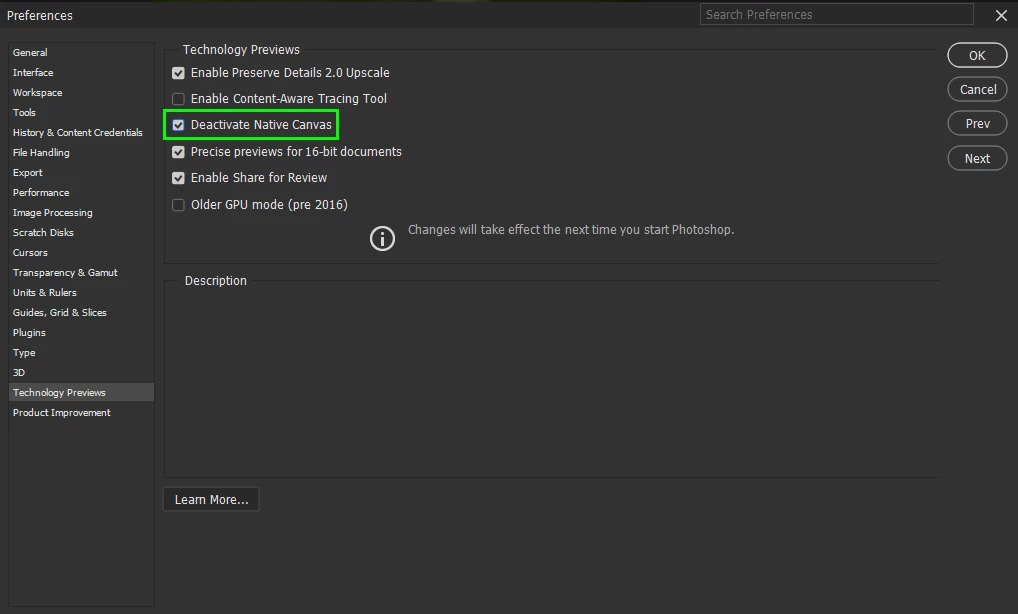
@Tina29215949o8w0 go to Edit > Preferences > Technology Previews and enable this option, then restart Photoshop

1 reply

Ged_Traynor
Community Expert
Ged_TraynorCommunity ExpertCorrect answer
Community Expert
April 3, 2023

@Tina29215949o8w0 go to Edit > Preferences > Technology Previews and enable this option, then restart Photoshop

Participant
April 3, 2023

@Ged_Traynor Solved, thank you!

Problem gelöst, vielen Dank!

Ged_Traynor
Community Expert
Community Expert
April 3, 2023

@Tina29215949o8w0 you're welcome