
November 19, 2019
Answered

Deactivate the little info that hovers when using Marquee/Move/Crop tool in Photoshop?

  • November 19, 2019
  • 4 replies
  • 521 views

I think it's connected to the info panel, cause I didn't, or rarely used it before and now it's here. It's really not useful to me and just kind of annoys me.
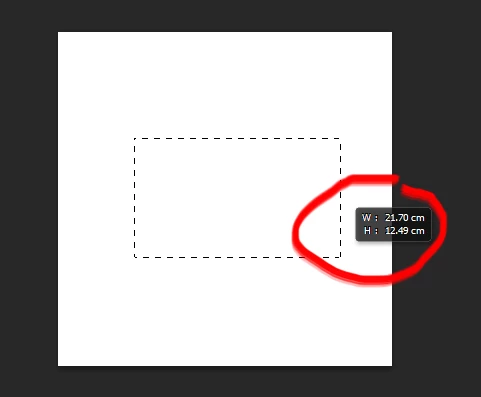
 

Itried resetting the preferences, but no cigar. Any help is appreciated.


{Thread renamed by moderator}
This topic has been closed for replies.
Correct answer Chuck Uebele

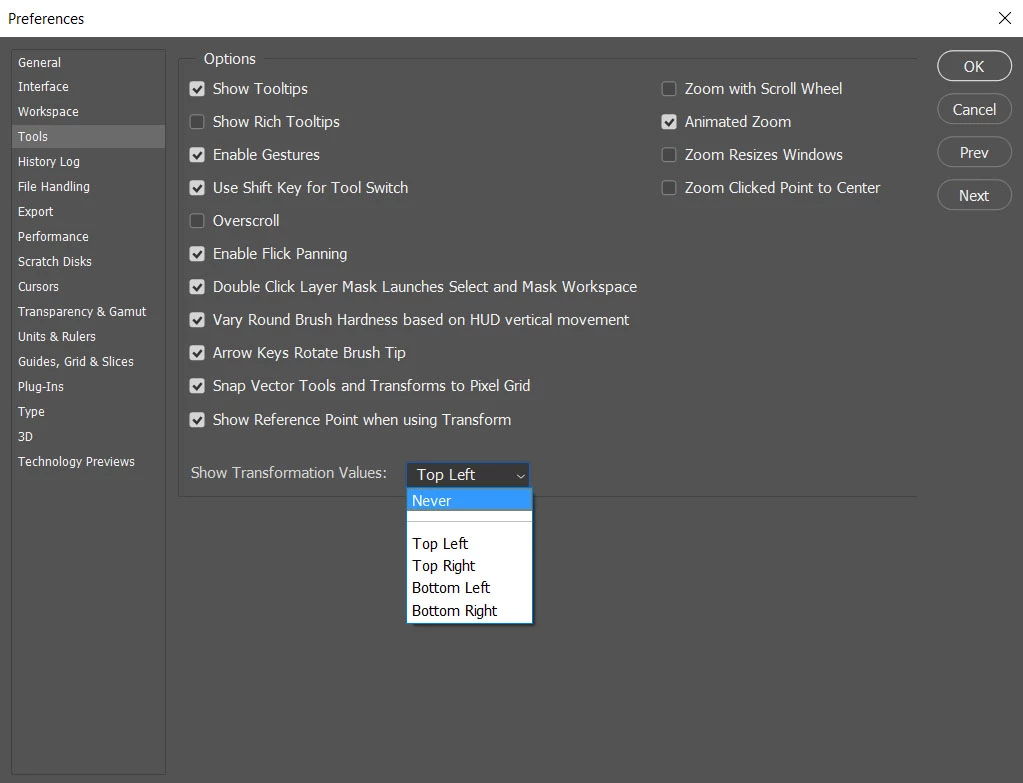
You can turn it off, but it turns it off for all the tools:

4 replies

gener7
Community Expert
Community Expert
November 19, 2019

Good point, Chuck. I need to remember that.

Chuck Uebele
Community Expert
Chuck UebeleCommunity ExpertCorrect answer
Community Expert
November 19, 2019

You can turn it off, but it turns it off for all the tools:

Sahil.Chawla
Adobe Employee
Adobe Employee
November 19, 2019

Hi there,

Welcome to the Adobe Community!


Yes, you can turn off the info by going into Photoshop's Preferences > Tools and change Show Transformation Values to Never.


Regards,
Sahil

November 19, 2019

Thanks guys. You're amazing. And fast.

gener7
Community Expert
Community Expert
November 19, 2019

This is called a "Heads Up Display" for those who need to check the size while drawing out a marquee without having to take the focus off their work to check the Info panel.  If you don't need or want it go into Photoshop Preferences > Tools and set it to "Never".