
Define Brush Preset Creates an non-centred (out of alignment) Brush
I started with an Illustrator file of mandala-esque shapes. The files were then saved as .pngs. (Around 2-3 layers per a single shape(some dotted lines, some straight lines)) What I would like to do is to have brushes of each individual layer of the shape but each time I attempt this and test the layers by clicking the same central spot or even looking at the brush preview (pressing caps lock) it is clear that the brushes are not aligned to the centre. At first I thought it might of been because their anchors weren't central prior to defining the brush preset but that didn't affect it at all.
As a backup I thought about making a brush from the whole shape and not from layers but that won't work if the centre of the shape isn't the centre point of the brush.
Any help assisting with fixing this problem would be greatly appreciated.
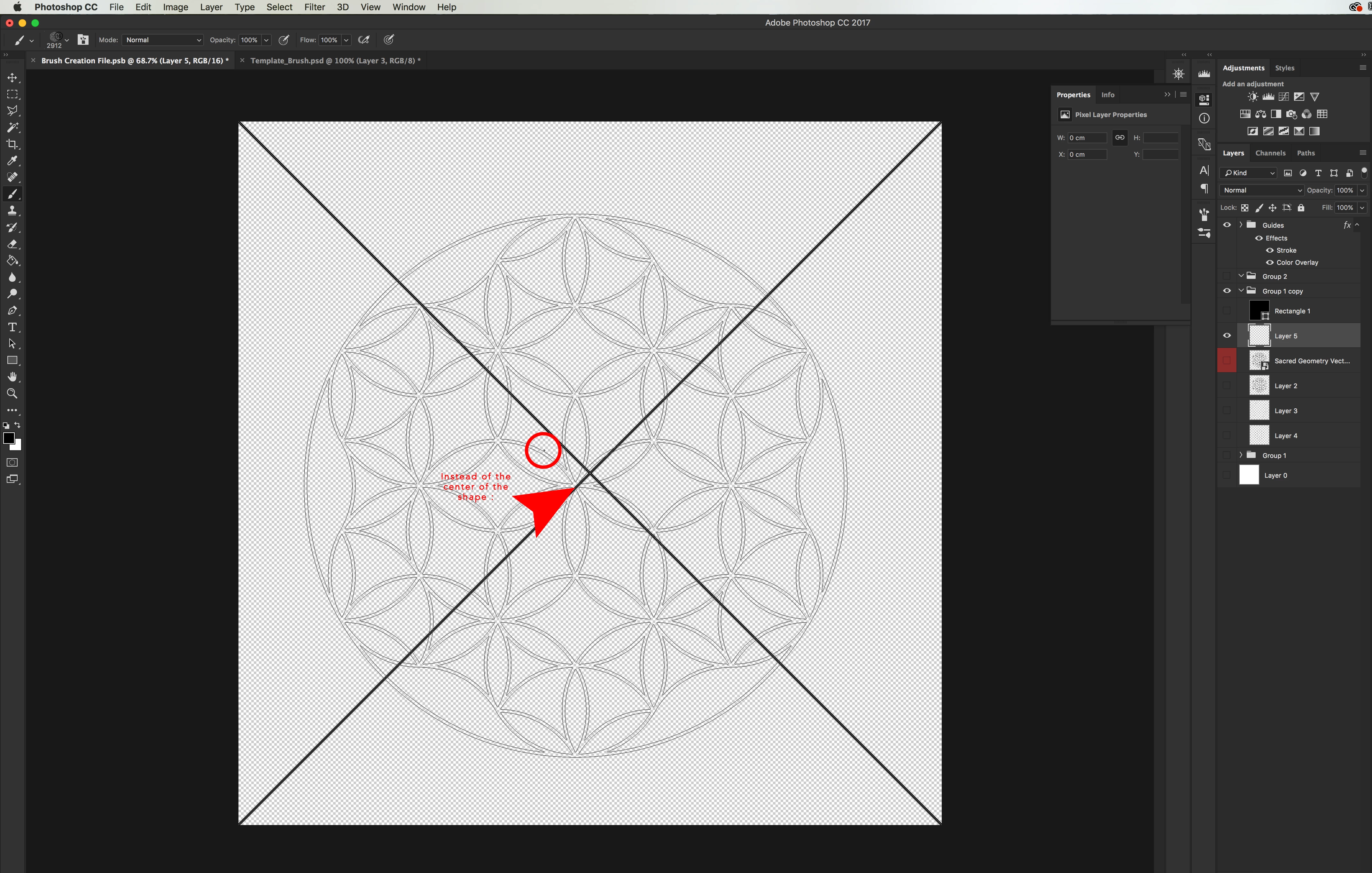
The image shows the brush preview before applying it to the canvas and as you can see, the centre point is not the centre of the brush.
The anchor point was central prior to defining the brush preset so I'm not sure why the alignment isn't correct.
 AdChoices