


Defining Printer presets and Fit to page
Hi all,
I'm working on a script generator to ease the printing of pictures from a PHP web gallery available during weddings (FYI, this is an open source web application with Symfony 3.2, doc will arrive soon, only in French for the moment: https://github.com/stephanfo/AWG).
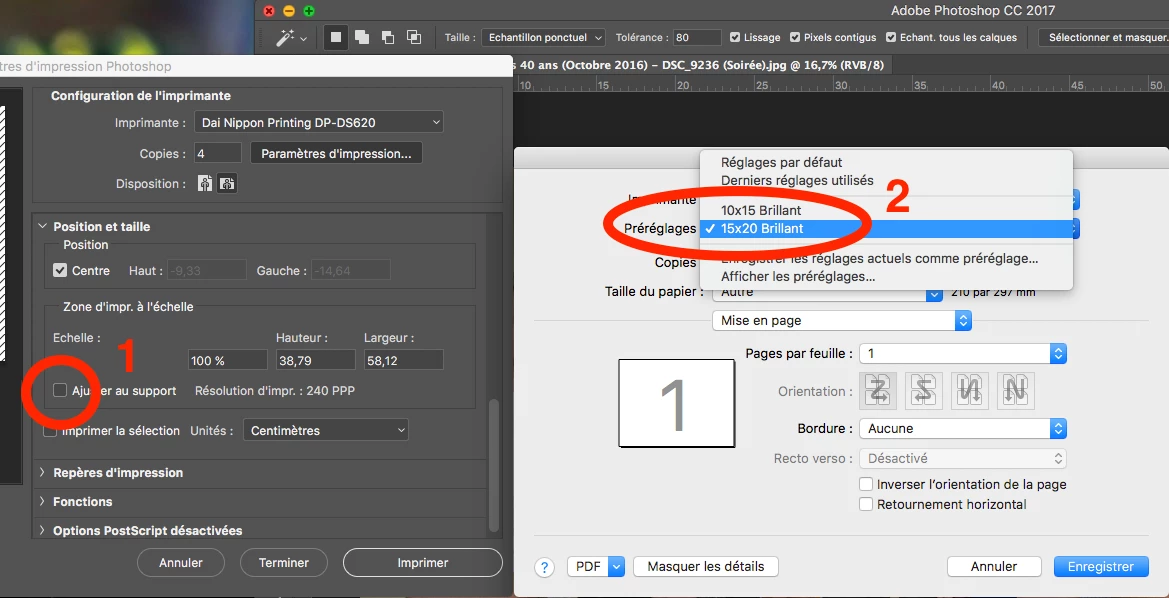
After a selection, I would like to generate a JSX file for a batch printing (copies, different sizes). I can open the picture, select the printer, but I do not know how to select the "fit to page" in PS and "Printer Preset", before to print.
This is my current code, for a single picture:
var docPath1 = '~/Desktop/todo.png';
var doc1 = app.open(File(docPath1));
var ps = doc1.printSettings;
ps.activePrinter = "Dai Nippon Printing DP-DS620";
ps.copies = 2;
// Here I would like:
// - 1 Select "fit to page" PS option
// - 2 Select the printer preset with the good paper size (defined from printers configuration before)
// 2 options after
// executeAction( charIDToTypeID('Prnt'), undefined, DialogModes.ALL ); // To check before to print
// doc1.print(); // To print directly
I would like to set the presets like in the screenshot below:
Can you please help me ? I went through the JSX doc, but nothing relevant came to me.
Thank you,
Stef.
 AdChoices