mauricior6328708
Inspiring
February 12, 2017
Answered

Defining the stroke size by slider

  • February 12, 2017
  • 1 reply
  • 2551 views

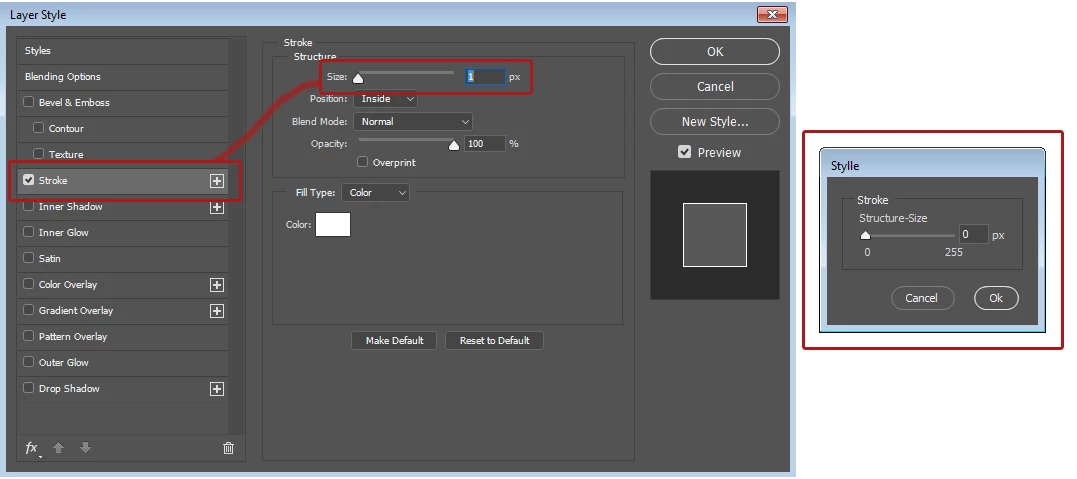
How to make this slider work to control the stroke size in a small dialog box.

I find here that script that controls the opacity of the layer. I made a basic modification, but I do not know how to make it work by controlling stylles. Thanks in advance!

var d= new Window('dialog','Stylle');

          d.grpOpacity = d.add('panel', undefined,'Stroke'); 

          d.grpOpacity.orientation = 'column'; 

          d.grpOpacity.alignChildren = ['fill','top']; 

          d.grpOpacity.grpSlider = d.grpOpacity.add('group'); 

          d.grpOpacity.grpSlider.spacing = 0; 

          d.grpOpacity.grpSlider.orientation = 'column'; 

          d.grpOpacity.grpSlider.st1 =  d.grpOpacity.grpSlider.add('statictext',undefined,'Structure-Size'); 

          d.grpOpacity.grpSlider.st1.alignment = 'left'; 

          d.grpOpacity.grpSlider.grpSlider = d.grpOpacity.grpSlider.add('group'); 

          d.grpOpacity.grpSlider.grpSlider.alignChildren = ['left','center']; 

          d.grpOpacity.grpSlider.grpSlider.spacing = 0; 

          d.slOpacity = d.grpOpacity.grpSlider.grpSlider.add('slider',undefined,0,0,255); 

          d.slOpacity.value = app.activeDocument.activeLayer.opacity; 

          d.slOpacity.preferredSize.width =100; 

          d.etOpacityValue = d.grpOpacity.grpSlider.grpSlider.add('edittext'); 

          d.etOpacityValue.text = Math.round(app.activeDocument.activeLayer.opacity); 

          d.etOpacityValue.addEventListener ('keydown', InitEditKeyboardHandler ); 

          d.etOpacityValue.preferredSize.width = 20; 

          d.grpOpacity.grpSlider.grpSlider.stUnit = d.grpOpacity.grpSlider.grpSlider.add('statictext',undefined,' px'); 


          d.grpOpacity.grpSlider.grpSt = d.grpOpacity.grpSlider.add('group'); 

          d.grpOpacity.grpSlider.grpSt.orientation = 'row'; 

          d.grpOpacity.grpSlider.grpSt.alignment = 'fill'; 

          d.grpOpacity.grpSlider.grpSt.spacing = 0; 

          d.grpOpacity.grpSlider.grpSt.margins = [5,0,0,0]; 

          d.grpOpacity.grpSlider.grpSt.grpLeft = d.grpOpacity.grpSlider.grpSt.add('group'); 

          d.grpOpacity.grpSlider.grpSt.grpLeft.st1 = d.grpOpacity.grpSlider.grpSt.grpLeft.add('statictext',undefined,'0'); 

          d.grpOpacity.grpSlider.grpSt.grpLeft.st1.alignment = ['left','center']; 

          d.grpOpacity.grpSlider.grpSt.grpLeft.st1.preferredSize.width = 70; 

          d.grpOpacity.grpSlider.grpSt.grpLeft.st3 = d.grpOpacity.grpSlider.grpSt.grpLeft.add('statictext',undefined,'255'); 

          d.grpOpacity.grpSlider.grpSt.grpLeft.st3.alignment = ['right','center']; 

          d.grpOpacity.grpSlider.grpSt.grpLeft.st3.preferredSize.width = 40; 


          d.grpButtons = d.add('group'); 

          d.grpButtons.alignment = "right"; 

          d.grpButtons.btnCanel = d.grpButtons.add( 'button', undefined, 'Cancel', { name:'cancel' }); 

          d.grpButtons.btnOK = d.grpButtons.add( 'button', undefined, 'Ok', { name:'ok' }); 


  d.etOpacityValue.onChanging = d.etOpacityValue.onChange = function(){ 

  var d = FindDialog(this); 

  d.slOpacity.value = Number(this.text); 

  d.slOpacity.onChange(); 


                                                                                                              } 

d.slOpacity.onChanging  = d.slOpacity.onChange = function(){ 

var d = FindDialog(this); 

d.etOpacityValue.text = Math.round(this.value); 

       d.slOpacity.onChange = function(){ 

var d = FindDialog(this); 

app.activeDocument.activeLayer.opacity = Math.round(this.value); 

app.refresh(); 


d.show(); 


function FindDialog( inItem ) { 

     var w = inItem; 

     while ( 'dialog' != w.type ) { 

          if ( undefined == w.parent ) { 

               w = null; 

               break; 

          } 

          w = w.parent; 

     } 

     return w; 

}; 

function InitEditKeyboardHandler (event) { 

    try { 

        var keyIsOK = KeyIsNumeric(event) || 

                                   KeyIsDelete(event) ||  

                                   KeyIsLRArrow(event) || 

                                   KeyIsTabEnterEscape(event);                  

        if (! keyIsOK) { 

            event.preventDefault(); 

            app.beep(); 

        } 

    } 

    catch (e) { 

    } 

}; 

This topic has been closed for replies.
Correct answer SuperMerlin

tssee@imgof.com  escreveu

SuperMerlin

I tried it on my photoshop cc2014

does not work?

I use the CC2017 version and it worked! Just the "Cancel" button that has a small bug ... What matters is that the "OK" Button fulfills its function well.


Here is the fix for the cancel button also it starts with the correct stroke size.

#target photoshop;

app.bringToFront();

main();

function main(){

var strokeSize = getStrokeSize();

if(strokeSize == null) return;

var d= new Window('dialog','Style'); 

d.grpOpacity = d.add('panel', undefined,'Stroke');   

d.grpOpacity.orientation = 'column';   

d.grpOpacity.alignChildren = ['fill','top'];   

d.grpOpacity.grpSlider = d.grpOpacity.add('group');   

d.grpOpacity.grpSlider.spacing = 0;   

d.grpOpacity.grpSlider.orientation = 'column';   

d.grpOpacity.grpSlider.st1 =  d.grpOpacity.grpSlider.add('statictext',undefined,'Stroke-Size');   

d.grpOpacity.grpSlider.st1.alignment = 'left';   

d.grpOpacity.grpSlider.grpSlider = d.grpOpacity.grpSlider.add('group');   

d.grpOpacity.grpSlider.grpSlider.alignChildren = ['left','center'];   

d.grpOpacity.grpSlider.grpSlider.spacing = 0;   

d.slOpacity = d.grpOpacity.grpSlider.grpSlider.add('slider',undefined,0,0,255);   

d.slOpacity.value = strokeSize; 

d.slOpacity.preferredSize.width =100;   

d.etOpacityValue = d.grpOpacity.grpSlider.grpSlider.add('edittext');   

d.etOpacityValue.text = strokeSize; 

d.etOpacityValue.addEventListener ('keydown', InitEditKeyboardHandler );   

d.etOpacityValue.preferredSize.width = 50;   

d.grpOpacity.grpSlider.grpSlider.stUnit = d.grpOpacity.grpSlider.grpSlider.add('statictext',undefined,' px');   

d.grpOpacity.grpSlider.grpSt = d.grpOpacity.grpSlider.add('group');   

d.grpOpacity.grpSlider.grpSt.orientation = 'row';   

d.grpOpacity.grpSlider.grpSt.alignment = 'fill';   

d.grpOpacity.grpSlider.grpSt.spacing = 0;   

d.grpOpacity.grpSlider.grpSt.margins = [5,0,0,0];   

d.grpOpacity.grpSlider.grpSt.grpLeft = d.grpOpacity.grpSlider.grpSt.add('group');   

d.grpOpacity.grpSlider.grpSt.grpLeft.st1 = d.grpOpacity.grpSlider.grpSt.grpLeft.add('statictext',undefined,'0');   

d.grpOpacity.grpSlider.grpSt.grpLeft.st1.alignment = ['left','center'];   

d.grpOpacity.grpSlider.grpSt.grpLeft.st1.preferredSize.width = 70;   

d.grpOpacity.grpSlider.grpSt.grpLeft.st3 = d.grpOpacity.grpSlider.grpSt.grpLeft.add('statictext',undefined,'255');   

d.grpOpacity.grpSlider.grpSt.grpLeft.st3.alignment = ['right','center'];   

d.grpOpacity.grpSlider.grpSt.grpLeft.st3.preferredSize.width = 40;   

d.grpButtons = d.add('group');   

d.grpButtons.alignment = "right";   

d.grpButtons.btnCanel = d.grpButtons.add( 'button', undefined, 'Cancel', { name:'cancel' });   

d.grpButtons.btnOK = d.grpButtons.add( 'button', undefined, 'Ok', { name:'ok' });   

d.etOpacityValue.onChanging = d.etOpacityValue.onChange = function(){   

var d = FindDialog(this);   

d.slOpacity.value = Number(this.text);   

d.slOpacity.onChange();   


                                                                                                                  }   

    d.slOpacity.onChanging  = d.slOpacity.onChange = function(){   

     var d = FindDialog(this);   

     d.etOpacityValue.text = Math.round(this.value);   

     }   

           d.slOpacity.onChange = function(){   

     var d = FindDialog(this);   

     setStrokeSize(Math.round(this.value));

   //  app.activeDocument.activeLayer.opacity = Math.round(this.value);   

     app.refresh();   

     }   

d.grpButtons.btnCanel.onClick=function(){

    d.close(2);

    setStrokeSize(strokeSize);

    }

    d.show();   


    function FindDialog( inItem ) {   

         var w = inItem;   

         while ( 'dialog' != w.type ) {   

              if ( undefined == w.parent ) {   

                   w = null;   

                   break;   

              }   

              w = w.parent;   

         }   

         return w;   

    };

function KeyHasModifier (event) {

    return event.shiftKey || event.ctrlKey || event.altKey || event.metaKey;

}

function KeyIsNumeric (event) {

    return  (event.keyName >= '0') && (event.keyName <= '9') && ! KeyHasModifier (event);

}

function KeyIsDelete (event) {

    //    Shift-delete is ok

    return (event.keyName == 'Backspace') && ! (event.ctrlKey);

}

function KeyIsLRArrow (event) {

    return ((event.keyName == 'Left') || (event.keyName == 'Right')) && ! (event.altKey || event.metaKey);

}

function KeyIsTabEnterEscape (event) {

    return event.keyName == 'Tab' || event.keyName == 'Enter' || event.keyName == 'Escape';

}

    function InitEditKeyboardHandler (event) {   

        try {   

            var keyIsOK = KeyIsNumeric(event) ||   

                                       KeyIsDelete(event) ||    

                                       KeyIsLRArrow(event) ||   

                                       KeyIsTabEnterEscape(event);                    

            if (! keyIsOK) {   

                event.preventDefault();   

                app.beep();   

            }   

        }   

        catch (e) {   

        }   

    };  

};

// helper function for working with descriptors by Mike Hale

function getActiveLayerProperty( psKey, psType ) {

    var ref = new ActionReference();

    ref.putProperty( charIDToTypeID( 'Prpr' ), psKey );

    ref.putEnumerated( charIDToTypeID('Lyr '), charIDToTypeID('Ordn'), charIDToTypeID('Trgt') );

    if( undefined == psType ){

      return executeActionGet( ref ).getObjectValue( psKey );

    }else{

        return executeActionGet( ref );

    }

};

function duplicateDescriptor( descriptor ) {

    var newDescriptor = new ActionDescriptor;

    newDescriptor.fromStream( descriptor.toStream() );

    return newDescriptor;

};

function localizeDescriptor( desc ) {

    var stream, pointer, zStringLength, zstring, localized_string, newZStringLength, previousStream, followingStream, newDesc;

    stream = desc.toStream();

    while( true ) {

        pointer = stream.search(/TEXT....\x00\$\x00\$\x00\$/);

        if( pointer === -1 ) {

            break;

        }

        zStringLength = getLongFromStream( stream, pointer + 4 );

        zstring = readUnicode( stream.substr( pointer + 8, ( zStringLength - 1 ) * 2) );

        localized_string = ( localize( zstring ) ) + '\u0000';

        newZStringLength = localized_string.length;

        previousStream = stream.slice( 0, pointer);

        followingStream = stream.slice( pointer + 8 + zStringLength * 2);

        stream = previousStream.concat( 'TEXT', longToString( newZStringLength ), bytesToUnicode( localized_string ), followingStream );

    }

    newDesc = new ActionDescriptor();

    newDesc.fromStream( stream );

    return newDesc;

};

function getShortFromStream( stream, pointer ) {

    var hi, low;

    hi = stream.charCodeAt( pointer ) << 8 ;

    low = stream.charCodeAt( pointer + 1 );

    return hi + low;

};

function getLongFromStream( stream, pointer ) {

    var hi, low;

    hi = getShortFromStream( stream, pointer) << 16;

    low = getShortFromStream( stream, pointer + 2);

    return hi + low;

};

function readUnicode( unicode ) {

    var string = "";

    for( i = pointer = 0; pointer < unicode.length; i = pointer += 2) {

        string +=String.fromCharCode( getShortFromStream( unicode, pointer ) );

    }

    return string;

};

function longToString( longInteger ) {

    var string;

    string = String.fromCharCode( longInteger >>> 24 );

    string += String.fromCharCode( longInteger << 8 >>> 24 );

    string += String.fromCharCode( longInteger << 16 >>> 24 );

    string += String.fromCharCode( longInteger << 24 >>> 24 );

    return string;

};

function bytesToUnicode( bytes ) {

    var unicode = "", char_code, charIndex;

    for( charIndex  = 0; charIndex < bytes.length; charIndex ++ ) {

        char_code = bytes.charCodeAt( charIndex );

        unicode += String.fromCharCode(char_code >> 8 ) +  String.fromCharCode( char_code & 0xff );

    }

    return unicode;

};

function setStrokeSize(Size ) {

    var layerEffects, newLayerEffects, currentDesc, newDesc, colorDesc, newLayerEffects, layerDesc, targetDesc, setDesc;

    layerEffects = getActiveLayerProperty( charIDToTypeID( 'Lefx' ) );

    newLayerEffects = duplicateDescriptor( layerEffects );

    currentDesc = layerEffects.getObjectValue( stringIDToTypeID( 'frameFX') );

    newDesc = duplicateDescriptor( currentDesc );  

    newDesc.putUnitDouble( charIDToTypeID('Sz  '), charIDToTypeID('#Pxl'), Size );

    newLayerEffects.putObject(  stringIDToTypeID( 'frameFX'),  stringIDToTypeID( 'frameFX'), newDesc );  

    newLayerEffects = localizeDescriptor( newLayerEffects );

    layerDesc = new ActionDescriptor();

    layerDesc.putObject( charIDToTypeID('Lefx'), charIDToTypeID('lfxv'), newLayerEffects);

    targetDesc = new ActionReference();

    targetDesc.putEnumerated( charIDToTypeID('Lyr '), charIDToTypeID('Ordn'), charIDToTypeID('Trgt') );

    setDesc = new ActionDescriptor;

    setDesc.putObject( charIDToTypeID('T   '), charIDToTypeID('Lyr '), layerDesc );

    setDesc.putReference( charIDToTypeID('null' ), targetDesc );

    executeAction(charIDToTypeID('setd'), setDesc, DialogModes.NO);

};

function getStrokeSize(){

var ref = new ActionReference();

ref.putEnumerated( charIDToTypeID("Lyr "), charIDToTypeID("Ordn"), charIDToTypeID("Trgt") );

var desc = executeActionGet(ref);

if(desc.hasKey(stringIDToTypeID( 'layerEffects' ))){

if(!desc.getBoolean (stringIDToTypeID( 'layerFXVisible'))) return undefined;

desc = desc.getObjectValue(stringIDToTypeID('layerEffects'));

if(!desc.hasKey(stringIDToTypeID( 'frameFX'))) return null;

desc = desc.getObjectValue(stringIDToTypeID('frameFX'));

return desc.getUnitDoubleValue (stringIDToTypeID( 'size' ));

    }

return null;

};

1 reply

JJMack
Community Expert
Community Expert
February 12, 2017

It is easy to change a layers opacity and there are many interfaces to do it. Short-cuts sliders and even in a layer style dialog.

a simple script line

app.activeDocument.activeLayer.fillOpacity = 50;

Also a Stroke layer style effect has many more attributed then just stoke size.  And as far as I know the only DOM support for layer style is one that applies a named layer style in the style palette.  With Action manager code you can add a layer style that spell out all layer effect desired. Including a stroke style effect.  You can change the stroke effect by adding that spelled out style again with the stroke size changed.  It will be applied without a preview.  If I want a preview I would need to open the dialog which would open the whole layer style dialog with the stroke effect in focus it the layer style just add a stroke effect.  There is not way you can edit or simulate editing the stroke with a preview. Layer style pixels only exists in the document composite rendered by Photoshop in the layer all there are are layer style effect settings. Stroke size is bold below. If  you do a copy and paste of a layer with a layer style all you paste in are the layers pixels you get no layer style or layer style pixels.

// =======================================================

var idsetd = charIDToTypeID( "setd" );

    var desc42 = new ActionDescriptor();

    var idnull = charIDToTypeID( "null" );

        var ref20 = new ActionReference();

        var idPrpr = charIDToTypeID( "Prpr" );

        var idLefx = charIDToTypeID( "Lefx" );

        ref20.putProperty( idPrpr, idLefx );

        var idLyr = charIDToTypeID( "Lyr " );

        var idOrdn = charIDToTypeID( "Ordn" );

        var idTrgt = charIDToTypeID( "Trgt" );

        ref20.putEnumerated( idLyr, idOrdn, idTrgt );

    desc42.putReference( idnull, ref20 );

    var idT = charIDToTypeID( "T   " );

        var desc43 = new ActionDescriptor();

        var idScl = charIDToTypeID( "Scl " );

        var idPrc = charIDToTypeID( "#Prc" );

        desc43.putUnitDouble( idScl, idPrc, 138.888889 );

        var idFrFX = charIDToTypeID( "FrFX" );

            var desc44 = new ActionDescriptor();

            var idenab = charIDToTypeID( "enab" );

            desc44.putBoolean( idenab, true );

            var idpresent = stringIDToTypeID( "present" );

            desc44.putBoolean( idpresent, true );

            var idshowInDialog = stringIDToTypeID( "showInDialog" );

            desc44.putBoolean( idshowInDialog, true );

            var idStyl = charIDToTypeID( "Styl" );

            var idFStl = charIDToTypeID( "FStl" );

            var idInsF = charIDToTypeID( "InsF" );

            desc44.putEnumerated( idStyl, idFStl, idInsF );

            var idPntT = charIDToTypeID( "PntT" );

            var idFrFl = charIDToTypeID( "FrFl" );

            var idSClr = charIDToTypeID( "SClr" );

            desc44.putEnumerated( idPntT, idFrFl, idSClr );

            var idMd = charIDToTypeID( "Md  " );

            var idBlnM = charIDToTypeID( "BlnM" );

            var idCBrn = charIDToTypeID( "CBrn" );

            desc44.putEnumerated( idMd, idBlnM, idCBrn );

            var idOpct = charIDToTypeID( "Opct" );

            var idPrc = charIDToTypeID( "#Prc" );

            desc44.putUnitDouble( idOpct, idPrc, 100.000000 );

            var idSz = charIDToTypeID( "Sz  " );

            var idPxl = charIDToTypeID( "#Pxl" );

            desc44.putUnitDouble( idSz, idPxl, 8.000000 );

            var idClr = charIDToTypeID( "Clr " );

                var desc45 = new ActionDescriptor();

                var idRd = charIDToTypeID( "Rd  " );

                desc45.putDouble( idRd, 254.000000 );

                var idGrn = charIDToTypeID( "Grn " );

                desc45.putDouble( idGrn, 4.980545 );

                var idBl = charIDToTypeID( "Bl  " );

                desc45.putDouble( idBl, 4.980545 );

            var idRGBC = charIDToTypeID( "RGBC" );

            desc44.putObject( idClr, idRGBC, desc45 );

            var idoverprint = stringIDToTypeID( "overprint" );

            desc44.putBoolean( idoverprint, true );

        var idFrFX = charIDToTypeID( "FrFX" );

        desc43.putObject( idFrFX, idFrFX, desc44 );

    var idLefx = charIDToTypeID( "Lefx" );

    desc42.putObject( idT, idLefx, desc43 );

executeAction( idsetd, desc42, DialogModes.NO );

JJMack
mauricior6328708
Inspiring
February 13, 2017

This I know how to do JJMack I'm creating actions that add styles frames that will have the size controlled by the user through a small and practical dialog ... I just want to be able to increase or decrease the strock size by one Dialog box and avoid this annoying standard Photoshop dialog box. This script I posted was just to serve as a template, if someone with more connection can modify and make it work.

JJMack
Community Expert
Community Expert
February 13, 2017

Using action manager code like I posted made into a function where size is made a peramater could be used. The stroke would be updated with each slider move. When the user see what the want they would ckick OK.  If they click cancel the function could be used to reset the stroke to the default size.  There is no preview the user sees the actual layer style.

JJMack