

scotwllm
Inspiring
December 22, 2021
Answered

Deleting layer masks

  • December 22, 2021
  • 1 reply
  • 1138 views

Lately, if I decide to delete a layer mask, it applies the mask before deleting it. It used to ask whether I wanted to apply the mask. The answer is almost always "No." How do I get it to start asking again, first? I'm deleting the mask because I don't want it.


Scott
This topic has been closed for replies.
Correct answer Jeff Arola

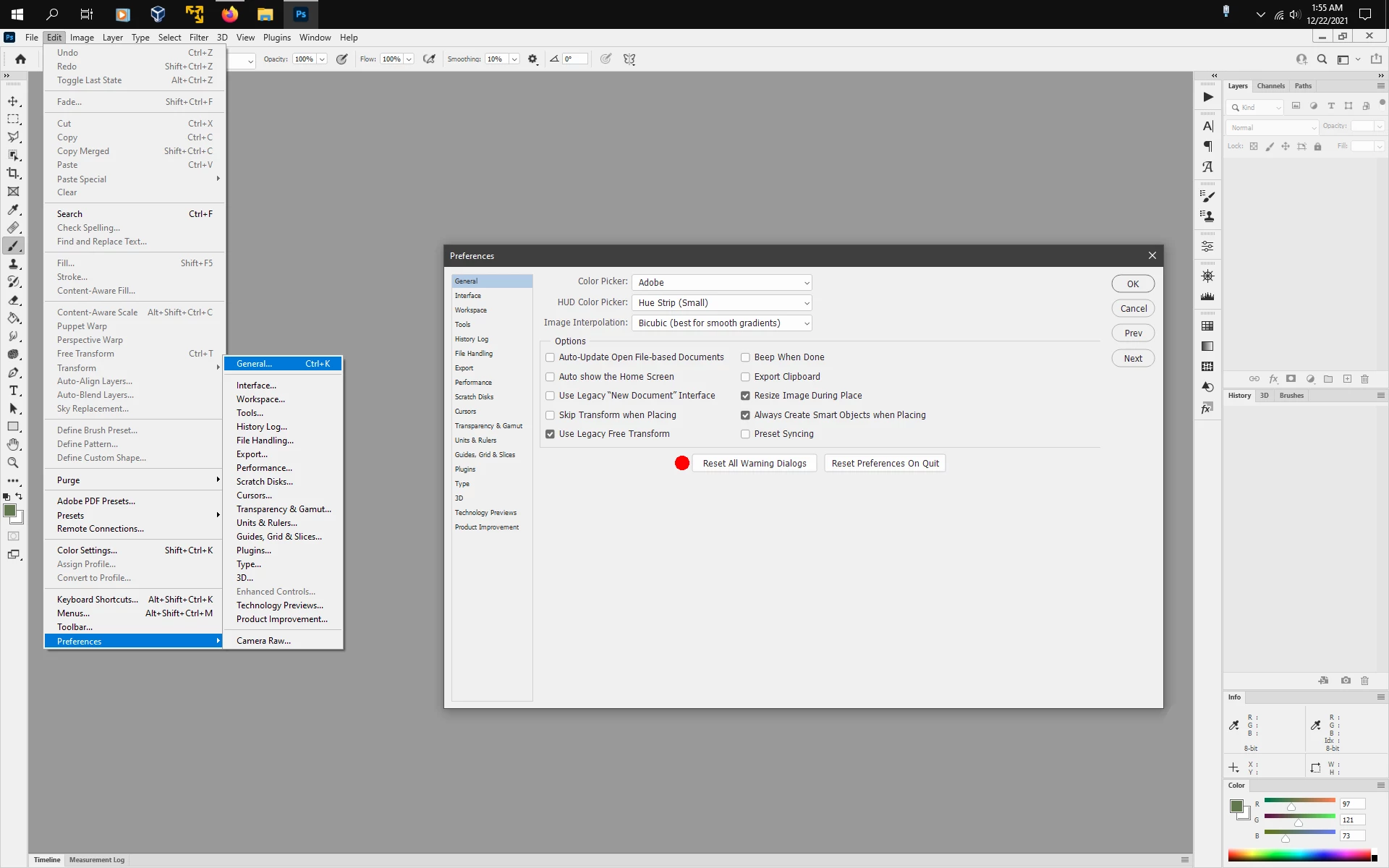
In photoshop go to Edit>Preferences>General and click Reset All warning Dialogs.


1 reply

Jeff Arola
Community Expert
Jeff ArolaCommunity ExpertCorrect answer
Community Expert
December 22, 2021

In photoshop go to Edit>Preferences>General and click Reset All warning Dialogs.


scotwllm
scotwllmAuthor
Inspiring
December 22, 2021

That works perfectly. Thanks!


I tried Adobe's chat tech support a little while before, and the first thing the tech said to do was close everything, appdata, save a copy of preferences, etc. I've fallen for that before. You get that "Yay! He fixed it" rush, but it's inevitably followed by the realization all the customization you did to the program is gone and you have to remember where you put everything so you can reinstall it. 


Scott