Known Participant
February 15, 2021
Question

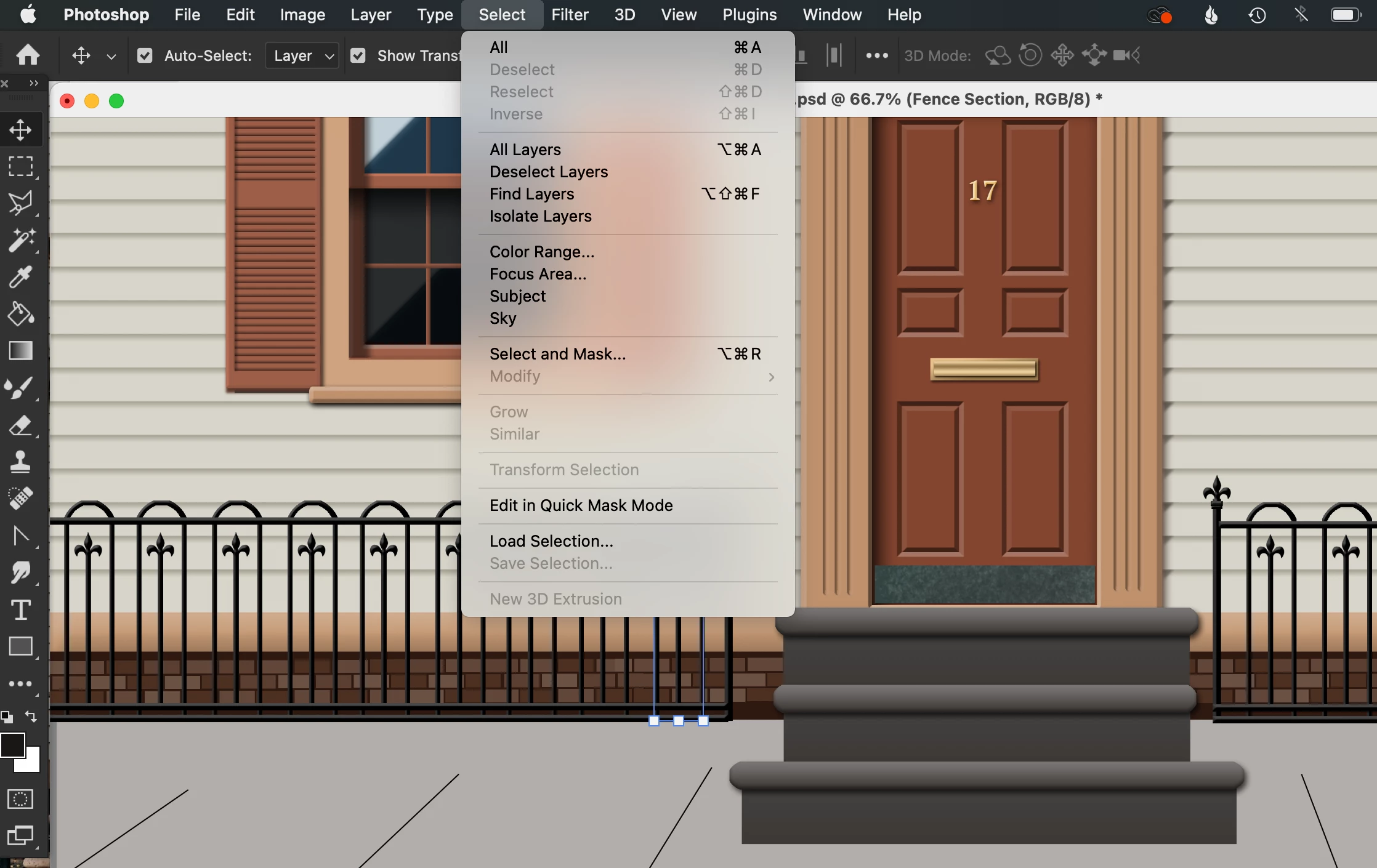
'Deselect' unavailable for move tool

  • February 15, 2021
  • 5 replies
  • 3096 views

For some reason the Deselect menu option (and shortcut) are both unavailable. I'm trying to move, transform and deselect various objects. Thanks!


...


This topic has been closed for replies.

5 replies

c.pfaffenbichler
Community Expert
Community Expert
February 16, 2021

One can record deselecting the current Layer into an Action and assign the Action a Shortcut, I guess. 

jane-e
Community Expert
Community Expert
February 15, 2021

Hi,

As others have said, you do not have an active selection (marching ants). It appears that you may have a Path selected. Open the Paths panel from the Window menu and click in a blank area to deselect. You can also use the Path Selection tool ("A") , the black arrow.


Show your Paths and Layers panels if you need more help.


EDIT: I don't see the Path Selection tool in your toolbar. Go to Edit > Toolbars and either Restore the toolbar OR drag the Path Selection and Direct Selection tools to your toolbar if you plan to work with Paths.


~ Jane


Known Participant
February 15, 2021

I'm not working with Paths. I want to select various layers by clicking on them, and then move them... then deselect when I'm done so that I can see my painting without the blue Transform controls. 


I have "Show Transform Controls" checked, otherwise I don't see what I've selected. I don't want to toggle this setting every time I want to glance at my drawing without transform controls showing since I want to switch often between moving items and seeing my screen without anything selected.


Known Participant
February 15, 2021

I also want to be able to deselect so that I can select another item close by, otherwise I can't click a nearby object and my cursor looks like this:

c.pfaffenbichler
Community Expert
Community Expert
February 15, 2021

Unchecking »Show Transform Controls« in the Options Bar for the Move Tool or unchecking View > Extras (cmd-H) might help evaluate a Layout without having to see the Transform Controls if that is what irritates you. 

Known Participant
February 15, 2021

That's not a great solution since I'd have to remember to turn Extras back on. Yes, that's my issue. I'm trying to select and move various layers then deselect (for lack of a better word) to view my progress without the Transform box distracting me. I'm surprised this option doesn't exist.

c.pfaffenbichler
Community Expert
Community Expert
February 16, 2021

You can unselect the active Layer by cmd-clicking its name in the Layers Panel. 

Chuck Uebele
Community Expert
Community Expert
February 15, 2021

As c.pfaffenbichler mentioned, that is only for selections. You can't and don't deselect a layer when you're moving it, with the move tool. You either stop using the move tool, or select a different layer.

c.pfaffenbichler
Community Expert
Community Expert
February 15, 2021

When no Selection is active Select > Deselect can naturally not be invoked. 

And this refers to Selections in the sense of »marching ants«. 

Known Participant
February 15, 2021

Perhaps Selection is the wrong term, I want to select various layers by clicking on them and then move them... then deselect when I'm done so that I can see my painting without the blue Transform controls. How do I deselect a layer when I'm done? I used to be able to hit Cmd-D (on Mac).


I have "Show Transform Controls" checked, otherwise I don't see what I've selected. I don't want to toggle this setting every time I want to glance at my drawing without transform controls showing since I want to switch often between moving items and seeing my screen without anything selected.


c.pfaffenbichler
Community Expert
Community Expert
February 15, 2021

»I used to be able to hit Cmd-D (on Mac).«

I already explained that that command, by default, refers to Selections, not selected Layers. 


»I have "Show Transform Controls" checked, otherwise I don't see what I've selected.«

Have you considered using the Layers Panel to track which Layer/s you have selected? 

The Transform Controls are, in my opinion, image degradation waiting to happen. 


And again: cmd-H can be used to hide extras.
