smithcgl9043167
Inspiring
May 26, 2017
Answered

Determine a numeric value between two tabs in the center of the document. Part II

  • May 26, 2017
  • 3 replies
  • 978 views

Part 1: https://forums.adobe.com/thread/2318841

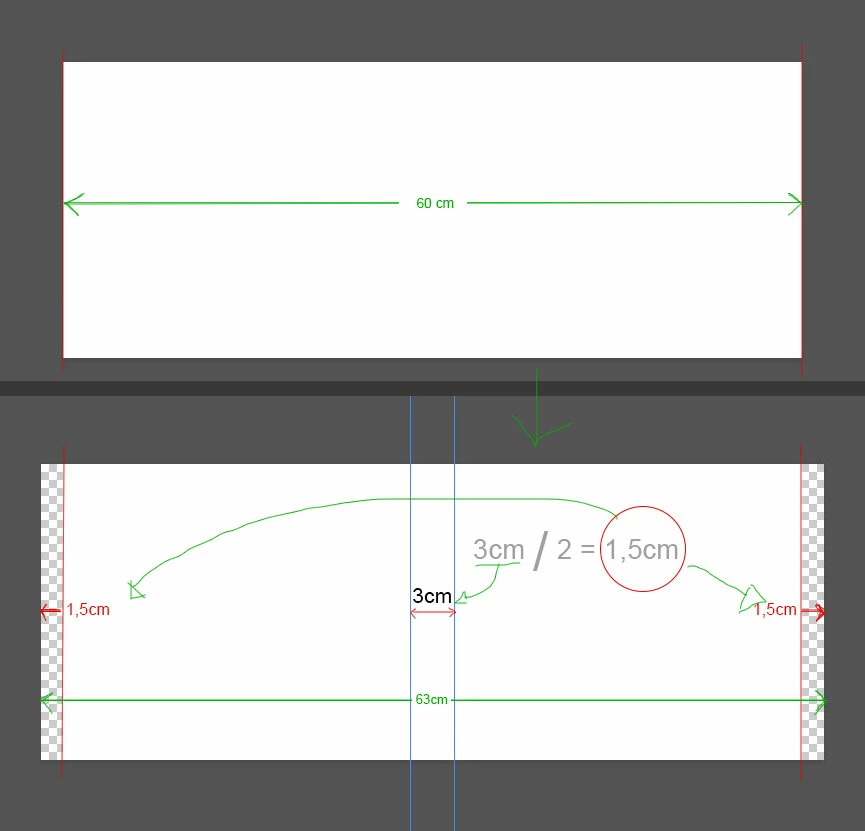
My idea now is to modify the function of the checkbox of this script that gained functionality thanks to our friend SuperMerlin: The purpose of it when enabled, will be to add a more precise final size, increasing only the width of the document, using the same numeric value "cm "Assigned to the two added central tabs.

Example: As shown in the illustration below:
Script:

  1. #target photoshop; 
  2. app.bringToFront(); 
  3.  
  4. var dial = new Window ("dialog", "My Dialog", undefined);   
  5. dial.orientation = "column";   
  6. dial.alignChildren = "fill";   
  7. dial.margins = 20;   
  8.  
  9. var dPanel = dial.add ("panel", undefined, "Document Finished Size");   
  10. dPanel.orientation = "column";   
  11. dPanel.alignChildren = "left";   
  12. dPanel.margins = 15;   
  13.  
  14. var aLevels = dPanel.add ("checkbox", undefined, "Add Finished Size");   
  15.  
  16. var dGroup = dial.add ("group", undefined);   
  17. dGroup.orientation = "row";   
  18. dGroup.alignChildren = "left";   
  19.  
  20. var st = dGroup.add ("statictext", undefined, "Add Center Guides:");   
  21.  
  22. var nField = dGroup.add ("edittext", undefined, "1");   
  23. nField.characters = 4;   
  24.  
  25.  
  26. var un = dGroup.add ("statictext", undefined, "Centimeters");   
  27.  
  28. var gButtons = dial.add ("group", undefined);   
  29. gButtons.orientation = "row";   
  30. gButtons.alignChildren = ["right", "right"];   
  31.  
  32. var canc = gButtons.add ("button", undefined, "Cancel", {name:"cancel"});   
  33. var exe = gButtons.add ("button", undefined, "To Apply", {name:"ok"});   
  34. exe.onClick = function(){ 
  35. dial.close(0); 
  36. var doc = app.activeDocument; 
  37. app.displayDialogs = DialogModes.NO; 
  38. var strtRulerUnits = app.preferences.rulerUnits; 
  39. var strtTypeUnits = app.preferences.typeUnits; 
  40. app.preferences.rulerUnits = Units.PIXELS; 
  41. app.preferences.typeUnits = TypeUnits.PIXELS; 
  42. var Res = doc.resolution; 
  43. if(aLevels.value){ 
  44.     //code goes here for "Add Finished Size"  
  45.     //No idea what you mean. 
  46.     } 
  47. var cm = Res/2.54
  48. var Width = doc.width; 
  49. var selectedCM = Number( nField.text.toString().replace(/,/g,'.')); 
  50. var leftGuide = (Width/2) - (cm * selectedCM/2); 
  51. var rightGuide = (Width/2) + (cm * selectedCM/2); 
  52. guideLine(leftGuide,'Vrtc','#Pxl'); 
  53. guideLine(rightGuide,'Vrtc','#Pxl'); 
  54. app.preferences.rulerUnits = strtRulerUnits; 
  55. app.preferences.typeUnits = strtTypeUnits; 
  56. if(documents.length) dial.show();  
  57. function guideLine(position, type,unit) {  
  58. //unit '#Pxl' pixel '#Rlt' =Relative to 72PPI '#Prc' = percent 
  59. // types: 'Vrtc' & 'Hrzn'  
  60. var desc = new ActionDescriptor(); 
  61. var desc2 = new ActionDescriptor(); 
  62. desc2.putUnitDouble( charIDToTypeID('Pstn'), charIDToTypeID(unit), position); 
  63. desc2.putEnumerated( charIDToTypeID('Ornt'), charIDToTypeID('Ornt'), charIDToTypeID(type) ); 
  64. desc.putObject( charIDToTypeID('Nw  '), charIDToTypeID('Gd  '), desc2 ); 
  65. executeAction( charIDToTypeID('Mk  '), desc, DialogModes.NO ); 
  66. }; 

Abierto to all.

This topic has been closed for replies.
Correct answer SuperMerlin

#target photoshop; 

app.bringToFront(); 


var dial = new Window ("dialog", "My Dialog", undefined);   

dial.orientation = "column";   

dial.alignChildren = "fill";   

dial.margins = 20;   


var dPanel = dial.add ("panel", undefined, "Document Finished Size");   

dPanel.orientation = "column";   

dPanel.alignChildren = "left";   

dPanel.margins = 15;   


var aLevels = dPanel.add ("checkbox", undefined, "Add Finished Size");   


var dGroup = dial.add ("group", undefined);   

dGroup.orientation = "row";   

dGroup.alignChildren = "left";   


var st = dGroup.add ("statictext", undefined, "Add Center Guides:");   


var nField = dGroup.add ("edittext", undefined, "1");   

nField.characters = 4;   


var un = dGroup.add ("statictext", undefined, "Centimeters");   


var gButtons = dial.add ("group", undefined);   

gButtons.orientation = "row";   

gButtons.alignChildren = ["right", "right"];   


var canc = gButtons.add ("button", undefined, "Cancel", {name:"cancel"});   

var exe = gButtons.add ("button", undefined, "To Apply", {name:"ok"});   

exe.onClick = function(){ 

dial.close(0); 

var doc = app.activeDocument; 

app.displayDialogs = DialogModes.NO; 

var strtRulerUnits = app.preferences.rulerUnits; 

var strtTypeUnits = app.preferences.typeUnits; 

app.preferences.rulerUnits = Units.PIXELS; 

app.preferences.typeUnits = TypeUnits.PIXELS; 

var Res = doc.resolution;   

var cm = Res/2.54; 

var Width = doc.width; 

var selectedCM = Number( nField.text.toString().replace(/,/g,'.')); 

var leftGuide = (Width/2) - (cm * selectedCM/2); 

var rightGuide = (Width/2) + (cm * selectedCM/2); 

guideLine(leftGuide,'Vrtc','#Pxl'); 

guideLine(rightGuide,'Vrtc','#Pxl'); 

if(aLevels.value){ 

var Colour = new SolidColor();

Colour = app.foregroundColor;

var White = new SolidColor();

White.rgb.hexValue = "ffffff";

app.foregroundColor = White;

var Height = doc.height;

guideLine(0,'Vrtc','#Pxl');

guideLine(Width,'Vrtc','#Pxl');

app.activeDocument.resizeCanvas((Width +(cm* selectedCM)), Height, AnchorPosition.MIDDLECENTER);

app.foregroundColor = Colour;

    }

app.preferences.rulerUnits = strtRulerUnits; 

app.preferences.typeUnits = strtTypeUnits; 

if(documents.length) dial.show();  

function guideLine(position, type,unit) {  

//unit '#Pxl' pixel '#Rlt' =Relative to 72PPI '#Prc' = percent 

// types: 'Vrtc' & 'Hrzn'  

var desc = new ActionDescriptor(); 

var desc2 = new ActionDescriptor(); 

desc2.putUnitDouble( charIDToTypeID('Pstn'), charIDToTypeID(unit), position); 

desc2.putEnumerated( charIDToTypeID('Ornt'), charIDToTypeID('Ornt'), charIDToTypeID(type) ); 

desc.putObject( charIDToTypeID('Nw  '), charIDToTypeID('Gd  '), desc2 ); 

executeAction( charIDToTypeID('Mk  '), desc, DialogModes.NO ); 

};

3 replies

JJMack
Community Expert
Community Expert
May 26, 2017

To me it seems like you are trying to tile a couple of images for your book cover.   IMO you would be better off using a template file.  It could be some much more than two tiled images.

If you want to tile images why limit the tiling to one row of two images.  IMO all you need do is specify is the tile size and the wall width and height.  The size of the grout ares between tiles and  frame size around the tile area where the grout and frame size can be 0. Simple to script.

Something like Paste Image Roll script

The Script

JJMack
SuperMerlin
SuperMerlinCorrect answer
Inspiring
May 26, 2017

#target photoshop; 

app.bringToFront(); 


var dial = new Window ("dialog", "My Dialog", undefined);   

dial.orientation = "column";   

dial.alignChildren = "fill";   

dial.margins = 20;   


var dPanel = dial.add ("panel", undefined, "Document Finished Size");   

dPanel.orientation = "column";   

dPanel.alignChildren = "left";   

dPanel.margins = 15;   


var aLevels = dPanel.add ("checkbox", undefined, "Add Finished Size");   


var dGroup = dial.add ("group", undefined);   

dGroup.orientation = "row";   

dGroup.alignChildren = "left";   


var st = dGroup.add ("statictext", undefined, "Add Center Guides:");   


var nField = dGroup.add ("edittext", undefined, "1");   

nField.characters = 4;   


var un = dGroup.add ("statictext", undefined, "Centimeters");   


var gButtons = dial.add ("group", undefined);   

gButtons.orientation = "row";   

gButtons.alignChildren = ["right", "right"];   


var canc = gButtons.add ("button", undefined, "Cancel", {name:"cancel"});   

var exe = gButtons.add ("button", undefined, "To Apply", {name:"ok"});   

exe.onClick = function(){ 

dial.close(0); 

var doc = app.activeDocument; 

app.displayDialogs = DialogModes.NO; 

var strtRulerUnits = app.preferences.rulerUnits; 

var strtTypeUnits = app.preferences.typeUnits; 

app.preferences.rulerUnits = Units.PIXELS; 

app.preferences.typeUnits = TypeUnits.PIXELS; 

var Res = doc.resolution;   

var cm = Res/2.54; 

var Width = doc.width; 

var selectedCM = Number( nField.text.toString().replace(/,/g,'.')); 

var leftGuide = (Width/2) - (cm * selectedCM/2); 

var rightGuide = (Width/2) + (cm * selectedCM/2); 

guideLine(leftGuide,'Vrtc','#Pxl'); 

guideLine(rightGuide,'Vrtc','#Pxl'); 

if(aLevels.value){ 

var Colour = new SolidColor();

Colour = app.foregroundColor;

var White = new SolidColor();

White.rgb.hexValue = "ffffff";

app.foregroundColor = White;

var Height = doc.height;

guideLine(0,'Vrtc','#Pxl');

guideLine(Width,'Vrtc','#Pxl');

app.activeDocument.resizeCanvas((Width +(cm* selectedCM)), Height, AnchorPosition.MIDDLECENTER);

app.foregroundColor = Colour;

    }

app.preferences.rulerUnits = strtRulerUnits; 

app.preferences.typeUnits = strtTypeUnits; 

if(documents.length) dial.show();  

function guideLine(position, type,unit) {  

//unit '#Pxl' pixel '#Rlt' =Relative to 72PPI '#Prc' = percent 

// types: 'Vrtc' & 'Hrzn'  

var desc = new ActionDescriptor(); 

var desc2 = new ActionDescriptor(); 

desc2.putUnitDouble( charIDToTypeID('Pstn'), charIDToTypeID(unit), position); 

desc2.putEnumerated( charIDToTypeID('Ornt'), charIDToTypeID('Ornt'), charIDToTypeID(type) ); 

desc.putObject( charIDToTypeID('Nw  '), charIDToTypeID('Gd  '), desc2 ); 

executeAction( charIDToTypeID('Mk  '), desc, DialogModes.NO ); 

};

smithcgl9043167
Inspiring
May 26, 2017

SuperMerlin  escreveu

#target photoshop;   app.bringToFront();      var dial = new Window ("dialog", "My Dialog", undefined);     dial.orientation = "column";     dial.alignChildren = "fill";     dial.margins = 20;        var dPanel = dial.add ("panel", undefined, "Document Finished Size");     dPanel.orientation = "column";     dPanel.alignChildren = "left";     dPanel.margins = 15;        var aLevels = dPanel.add ("checkbox", undefined, "Add Finished Size");        var dGroup = dial.add ("group", undefined);     dGroup.orientation = "row";     dGroup.alignChildren = "left";        var st = dGroup.add ("statictext", undefined, "Add Center Guides:");        var nField = dGroup.add ("edittext", undefined, "1");     nField.characters = 4;           var un = dGroup.add ("statictext", undefined, "Centimeters");        var gButtons = dial.add ("group", undefined);     gButtons.orientation = "row";     gButtons.alignChildren = ["right", "right"];        var canc = gButtons.add ("button", undefined, "Cancel", {name:"cancel"});     var exe = gButtons.add ("button", undefined, "To Apply", {name:"ok"});     exe.onClick = function(){   dial.close(0);   var doc = app.activeDocument;   app.displayDialogs = DialogModes.NO;   var strtRulerUnits = app.preferences.rulerUnits;   var strtTypeUnits = app.preferences.typeUnits;   app.preferences.rulerUnits = Units.PIXELS;   app.preferences.typeUnits = TypeUnits.PIXELS;   var Res = doc.resolution;     var cm = Res/2.54;   var Width = doc.width;   var selectedCM = Number( nField.text.toString().replace(/,/g,'.'));   var leftGuide = (Width/2) - (cm * selectedCM/2);   var rightGuide = (Width/2) + (cm * selectedCM/2);   guideLine(leftGuide,'Vrtc','#Pxl');   guideLine(rightGuide,'Vrtc','#Pxl');   if(aLevels.value){   var Colour = new SolidColor(); Colour = app.foregroundColor; var White = new SolidColor(); White.rgb.hexValue = "ffffff"; app.foregroundColor = White; var Height = doc.height; guideLine(0,'Vrtc','#Pxl');  guideLine(Width,'Vrtc','#Pxl');  app.activeDocument.resizeCanvas((Width +(cm* selectedCM)), Height, AnchorPosition.MIDDLECENTER); app.foregroundColor = Colour;     } app.preferences.rulerUnits = strtRulerUnits;   app.preferences.typeUnits = strtTypeUnits;   }   if(documents.length) dial.show();    function guideLine(position, type,unit) {    //unit '#Pxl' pixel '#Rlt' =Relative to 72PPI '#Prc' = percent   // types: 'Vrtc' & 'Hrzn'    var desc = new ActionDescriptor();   var desc2 = new ActionDescriptor();   desc2.putUnitDouble( charIDToTypeID('Pstn'), charIDToTypeID(unit), position);   desc2.putEnumerated( charIDToTypeID('Ornt'), charIDToTypeID('Ornt'), charIDToTypeID(type) );   desc.putObject( charIDToTypeID('Nw  '), charIDToTypeID('Gd  '), desc2 );   executeAction( charIDToTypeID('Mk  '), desc, DialogModes.NO );   };  

SuperMerlin It worked perfectly well! Once again, thank you . I wish you much health and peace to the UK ... An arm to all.

pixxxelschubser
Community Expert
Community Expert
May 26, 2017

Hahaha

I see you did not try my advice in the other thread. It makes exactly what you want.

smithcgl9043167
Inspiring
May 26, 2017

https://forums.adobe.com/people/pixxxel+schubser  escreveu

Hahaha

I see you did not try my advice in the other thread. It makes exactly what you want.

Hi pixxxel schubser Sorry, I confess I had imagined that those lines that you advised me would be a correction of an initial error in line 62, but already corrected.

I am very happy that you helped a lot, you too a great programmer, I see the iIustrator forum daily and I consider you one of the best. I'm very grateful.

I made tests here with the lines you advised me and realized that the final size added to the document does not match the values of the division added to the tabs.

Example:

Using your lines. For a document of dimensions: W 60cm x H 20cm + 3cm = 68.33cm x 20cm (added 8.3cm in W)

Correct would look like this: W 60cm x H 20cm + 3cm = 63cm x 20cm

The SuperMerlin script worked accurately.

pixxxelschubser
Community Expert
Community Expert
May 26, 2017

smithcgl9043167  schrieb

I made tests here with the lines you advised me and realized that the final size added to the document does not match the values of the division added to the tabs.

Example:

Using your lines. For a document of dimensions: W 60cm x H 20cm + 3cm = 68.33cm x 20cm (added 8.3cm in W)

Correct would look like this: W 60cm x H 20cm + 3cm = 63cm x 20cm

Upps.

Yes. you are totally right. I did not tested fullfully. And I wrote a "typo" in the line. (@SuperMerlin use this variable as converting factor for the resolution and I thought it was for pixel/cm converting)

desc3.putUnitDouble( charIDToTypeID('Wdth'), charIDToTypeID('#Rlt'), cm * selectedCM );

should be

desc3.putUnitDouble( charIDToTypeID('Wdth'), charIDToTypeID('#Rlt'), (72/2.54*selectedCM) );

Then this script-variant also works as expected

#target photoshop;   

app.bringToFront();   


var dial = new Window ("dialog", "My Dialog", undefined);     

dial.orientation = "column";     

dial.alignChildren = "fill";     

dial.margins = 20;     


var dPanel = dial.add ("panel", undefined, "Document Finished Size");     

dPanel.orientation = "column";     

dPanel.alignChildren = "left";     

dPanel.margins = 15;     


var aLevels = dPanel.add ("checkbox", undefined, "Add Finished Size");     


var dGroup = dial.add ("group", undefined);     

dGroup.orientation = "row";     

dGroup.alignChildren = "left";     


var st = dGroup.add ("statictext", undefined, "Add Center Guides:");     


var nField = dGroup.add ("edittext", undefined, "1");     

nField.characters = 4;     


var un = dGroup.add ("statictext", undefined, "Centimeters");     


var gButtons = dial.add ("group", undefined);     

gButtons.orientation = "row";     

gButtons.alignChildren = ["right", "right"];     


var canc = gButtons.add ("button", undefined, "Cancel", {name:"cancel"});     

var exe = gButtons.add ("button", undefined, "To Apply", {name:"ok"});     

exe.onClick = function(){   

dial.close(0);   

var doc = app.activeDocument;   

app.displayDialogs = DialogModes.NO;   

var strtRulerUnits = app.preferences.rulerUnits;   

var strtTypeUnits = app.preferences.typeUnits;   

app.preferences.rulerUnits = Units.PIXELS;   

app.preferences.typeUnits = TypeUnits.PIXELS;   

$.writeln ("width "+ doc.width.as('cm'))

/*

var Res = doc.resolution;  // ----------------------------------------         // first line to change

if(aLevels.value){   

    //code goes here for "Add Finished Size"    

    //No idea what you mean.   

    }   

var cm = Res/2.54;   

var Width = doc.width;   

var selectedCM = Number( nField.text.toString().replace(/,/g,'.'));   

var leftGuide = (Width/2) - (cm * selectedCM/2);   

var rightGuide = (Width/2) + (cm * selectedCM/2);   

guideLine(leftGuide,'Vrtc','#Pxl');   

guideLine(rightGuide,'Vrtc','#Pxl');   // -------------------------------    // last line to change

*/

var Res = doc.resolution; 

var cm = Res/2.54; 

var Width = doc.width; 

var selectedCM = Number( nField.text.toString().replace(/,/g,'.')); 

var leftGuide = (Width/2) - (cm * selectedCM/2); 

var rightGuide = (Width/2) + (cm * selectedCM/2);

/* ----------------------------------------------- add the left and right guides if required

guideLine(0,'Vrtc','#Pxl');  

guideLine(Width,'Vrtc','#Pxl');

-------------------------------------------------- */

guideLine(leftGuide,'Vrtc','#Pxl'); 

guideLine(rightGuide,'Vrtc','#Pxl'); 

if(aLevels.value){  // ---------------------------the following two lines are not required

    //code goes here for "Add Finished Size" 

    //No idea what you mean. 

    var desc3 = new ActionDescriptor(); 

    desc3.putBoolean( charIDToTypeID('Rltv'), true ); 

    desc3.putUnitDouble( charIDToTypeID('Wdth'), charIDToTypeID('#Rlt'), (72/2.54*selectedCM) );

    desc3.putEnumerated( charIDToTypeID('Hrzn'), charIDToTypeID('HrzL'), charIDToTypeID('Cntr') ); 

    desc3.putEnumerated( stringIDToTypeID('canvasExtensionColorType'), stringIDToTypeID('canvasExtensionColorType'), charIDToTypeID('Wht ') ); 

    executeAction( charIDToTypeID('CnvS'), desc3, DialogModes.NO ); 

    };

app.preferences.rulerUnits = strtRulerUnits;   

app.preferences.typeUnits = strtTypeUnits;   

}   

if(documents.length) dial.show();    

function guideLine(position, type,unit) {    

//unit '#Pxl' pixel '#Rlt' =Relative to 72PPI '#Prc' = percent   

// types: 'Vrtc' & 'Hrzn'    

var desc = new ActionDescriptor();   

var desc2 = new ActionDescriptor();   

desc2.putUnitDouble( charIDToTypeID('Pstn'), charIDToTypeID(unit), position);   

desc2.putEnumerated( charIDToTypeID('Ornt'), charIDToTypeID('Ornt'), charIDToTypeID(type) );   

desc.putObject( charIDToTypeID('Nw  '), charIDToTypeID('Gd  '), desc2 );   

executeAction( charIDToTypeID('Mk  '), desc, DialogModes.NO );   

};  

Have fun