
Known Participant
August 18, 2017
Answered

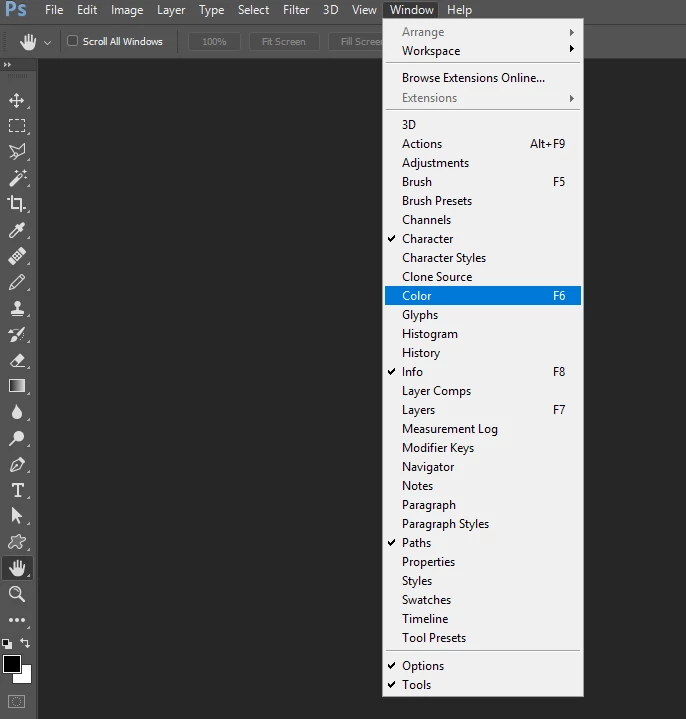
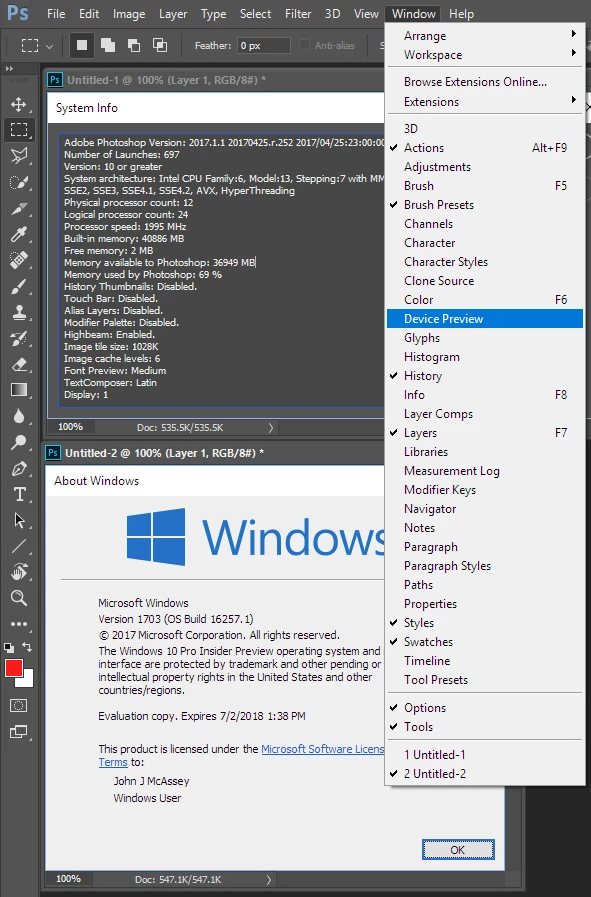
Device Preview missing from the Window panel

  • August 18, 2017
  • 2 replies
  • 3550 views

I cannot open the Device Preview on Photoshop CC, the option is completely missing from the Window panel. I think it is missing since my Windows 10 Pro updated last time, around 2 weeks ago, as before that it was just working fine. I tried reinstalling Photoshop CC and it didn't help. Reinstalling Windows is not an option. Any ideas?
This topic has been closed for replies.
Correct answer JJMack

try resetting your preferences.

2 replies

Known Participant
October 20, 2017

Just to report: That solution helped for some time, but then the Device Panel was missing again, and I had to restart Preferences again. Then it was missing completely and restarting preferences didn't help. Now I installed the newest version of Photoshop, and the Device Panel is no longer part of this application anymore. I had a chat with Adobe Support representative and he confirmed that, and as a reason, he mentioned that this feature was not used by many people and therefore got removed...

JJMack
Community Expert
Community Expert
October 20, 2017

I would think it also had to do with mobile devices.  There are two camps there mainly Apple IOS and Google Android.  These change too often and  devices get abandoned.  Apple old devices  can not run then newer IOS versions and the latest IOS 11  no longer support old 32bit apps.  Adobe would need to maintain IOS version dependant version for mobile IOS devices.  Android  is like the PC world many manufactures use Android OS and their mobile devices do not always get update to the latest version of Google Android OS.  Adobe realize that the development cost to support all mobile devices and versions would be very expensive and hurt their bottom line.  Seeing the feature was not widely used it would be better to drop the feature and not increase the price of the Creative Cloud Subscriptions.

JJMack
AASBB1
Participating Frequently
January 12, 2018

This is disheartening, I came here to find out where this functionality went myself. I believe I was just using it a month or two ago before the last upgrade.  While I didn't bother checking what my designs looked like on Android, I did check them on an iPhone to see how they would look on a mobile device. I only do 3-4 web applications a year but I used it every time I did design work. Even only supporting iPhone, is better than nothing, you can still get a sense of what something will look like on an actual mobile device in terms of scale and proportions. Thankfully I use a mac so there are other options for me, like Sketch. I will be very honest with you, the only reason I had gone back to Photoshop from Sketch was because they added that feature. I'm not here to bash Adobe or it's products but that was a very important feature to my workflow and my validation process. Maybe not many people used it because not many people knew it existed, there is an awful lot of functionality in photoshop that not everyone uses. Plus Adobe's plan was to make Photoshop more of a web / app based design tool and they had added a lot of features that Sketch had, like art boards. Before you only had Art Boards in illustrator. So by trying to turn Photoshop into a Swiss Army Knife like design tool, of course you're going to wind up with some features that aren't widely used however I bet more people used it than the fish eye lens filter that has existed in Photoshop for like 30 years.

JJMack
Community Expert
Community Expert
August 18, 2017

What CC version? Try creating a new mobile document so Photoshop can see the device you are editing for.. I have the latest Windows 10 preview installed.....

JJMack
Known Participant
August 18, 2017

Didn't help. I tried to create a new Artboard for iPhone 6, and still, no Device Preview under the Window menu...

Newest version (2017.1.1 20170425.r.252 2017/04/25:23:00:00 CL 1113967  x64)

JJMack
Community Expert
JJMackCommunity ExpertCorrect answer
Community Expert
August 18, 2017

try resetting your preferences.

JJMack