
Participating Frequently
June 25, 2021
Answered

dialog box when closing PS

  • June 25, 2021
  • 2 replies
  • 713 views

Hi,


I'm running PS 2021 and Lightroom Classic, latest updates, on a Mac with OS 10.14.6. My normal workflow from within LR involves using Edit In > Photoshop for some images. I do my PS work and save the file back to LR. Everything works as expected except I get the dialog box (shown in attachment) saying PS could not export the clipboard because it is too big. AFAIK, I'm not trying to export the clipboard nor do I want to. What is the message for and how can I get it to stop appearing?


Thank you,

Dan
This topic has been closed for replies.
Correct answer JJMack

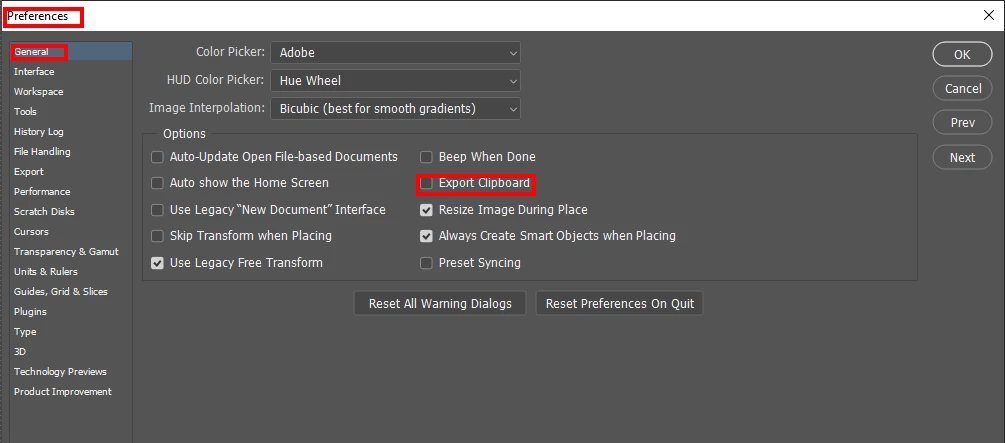
You can set your Photoshop Preferences not to export to the clipboard.

2 replies

JJMack
Community Expert
JJMackCommunity ExpertCorrect answer
Community Expert
June 25, 2021

You can set your Photoshop Preferences not to export to the clipboard.

JJMack
DMP000Author
Participating Frequently
June 25, 2021

Thanks, JJMack!


Of course, I'm looking for a more complex reason + solution. Never would have thought about preferences.

Have a great weekend.

Dan

AxelMatt
Community Expert
Community Expert
June 25, 2021

I've never seen such a error message.

Please reset the Photoshop preferences to the default settings and try again.

https://helpx.adobe.com/photoshop/using/preferences.html#reset_preferences


My System: Intel i7-8700K - 64GB RAM - NVidia Geforce RTX 3060 - Windows 11 Pro 25H2 -- LR-Classic 15 - Photoshop 27 - Nik Collection 8 - PureRAW 5 - Topaz Photo