TomekP
Participant
September 30, 2018
Answered

Different scene setups for different merged objects

  • September 30, 2018
  • 1 reply
  • 326 views

Hello there,

I'm looking for some information about possibilities for setup different scene setup for merged objects.

I've made an scene with three different objects, merged because they are parts of something bigger (Bottle, rubber cap and plastic cap).

Now i need to render this with bottle and plastic cap rendered as lines with points and rubber cap rendered with surface.

Is it possible with merged 3d objects or they can't be merged?
    This topic has been closed for replies.
    Correct answer davescm

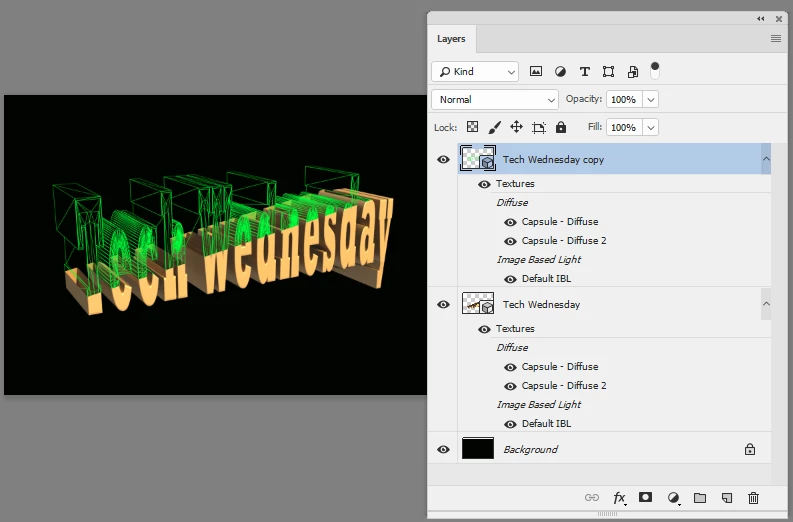
    The quickest way is to duplicate your 3D layer (Ctrl+J) then render it with different scene settings and blend or mask the resulting rendered layers as required

    Similar to this :

    Dave

    1 reply

    davescm
    Community Expert
    davescmCommunity ExpertCorrect answer
    Community Expert
    September 30, 2018

    The quickest way is to duplicate your 3D layer (Ctrl+J) then render it with different scene settings and blend or mask the resulting rendered layers as required

    Similar to this :

    Dave

    davescm
    Community Expert
    Community Expert
    September 30, 2018

    I should also have said in the example above I used the cross section function in Scene Properties to cut teh scene in half and then rendered each half differently. So you are not restricted to just rendering the individual models separately.

    Dave