
Difficulty getting ExtendScript to target Photoshop CC 2018
Hi, I'm hoping someone here can help me please.
I consider myself to be new to JavaScript and ExtendScript, but I have had a success or two creating 2 or 3 scripts to automate tasks in PhotoShop. But now I've run into a problem, came here at the suggestion of Adobe Support after a frustrating and fruitless call with them.
In the past few days I have been unable to get ExtendScript to target Photoshop for the purpose of debugging my next script. I'm uncertain of specific dates, but I have had this work in the recent past - last script is dated August 2, 2018.
My problem: I start with a document open in PhotoShop CC 2018 (19.1.6, not sure why the terminology works this way) and a script open in ExtendScript. I check that the target bar in ExtendScript says "Adobe Photoshop CC 2018 (120.032)", and the connection link is green. When I try to start steppin through the script, I immediately get this error message
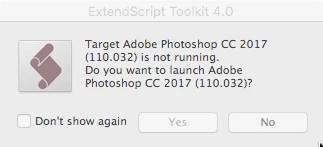
I have Photoshop 2017 installed, but I have the same problem trying to use it for this script work. I I target Photoshop 2017 in the ExtendScript target bar, I get the same error message, but for Photoshop CC 2018. I do not believe the problem is in the script because I get exactly the same results when the only script open in ExtendScript is "Layer Comps to Files", one of the standard Adobe scripts in the Photoshop Presets folders.
The first support person I spoke to today claimed that the only reason I have ExtendScript is a legacy license for PhotoShop Extended CS4. Hard to believe that, as this ExtendScript was installed this morning and acknowledges the existence of both Photoshop 2017 and 2018. A second support person told me there is no official support for ExtendScript, the only place I'm going to get any help is in the forums. Perhaps he's right, but neither response helps me.
Any help or suggestions would be appreciated.
Should I be using a different scripting editor/debugger? I'm a novice, and would need one that already understands the Adobe DOM's. What are other users doing to autmoate tasks that exceed what's possible with a PhotoShop Action?
I am running ExtendScript 4.0 (re-installed this morning using the Creative Cloud App), PhotoShop CC 19.1.6 (update via CC in the past day or two) on Mac OS 10.13.6. Both the ExtendScript re-install and Photoshop update took place after my last debugging effort.
Thanks in advance.
==> corrected typo
 AdChoices